Clawdbot / Moltbot: The Autonomous AI Butler That Could Expose Your Entire Digital Life
Cyber Threat Intelligence

Summary:
Clawdbot (recently rebranded as Moltbot) is part of a new wave of autonomous AI agents designed to move beyond passive conversation and into direct action. Unlike traditional AI chatbots that merely respond to prompts, Clawdbot can operate your system, control browsers, send messages, and execute workflows on your behalf. While this level of automation is powerful and appealing, it introduces a fundamentally different threat model.
Resecurity identified hundreds of exposed Clawdbot deployments on the public internet, many of them running with weak authentication, unsafe defaults, or critical misconfigurations. In several cases, attackers could access API keys, OAuth tokens, private chat histories, and even gain remote command execution on the host system.
Clawdbot (Moltbot) Overview & Architecture
Clawdbot (also called Moltbot) is not your typical AI chatbot - it’s a highly autonomous, self-hosted AI assistant capable of performing actions across your system, messaging platforms, and workflows. Unlike traditional chatbots, Clawdbot acts on your behalf, bridging the gap between “thinking” and “doing.”
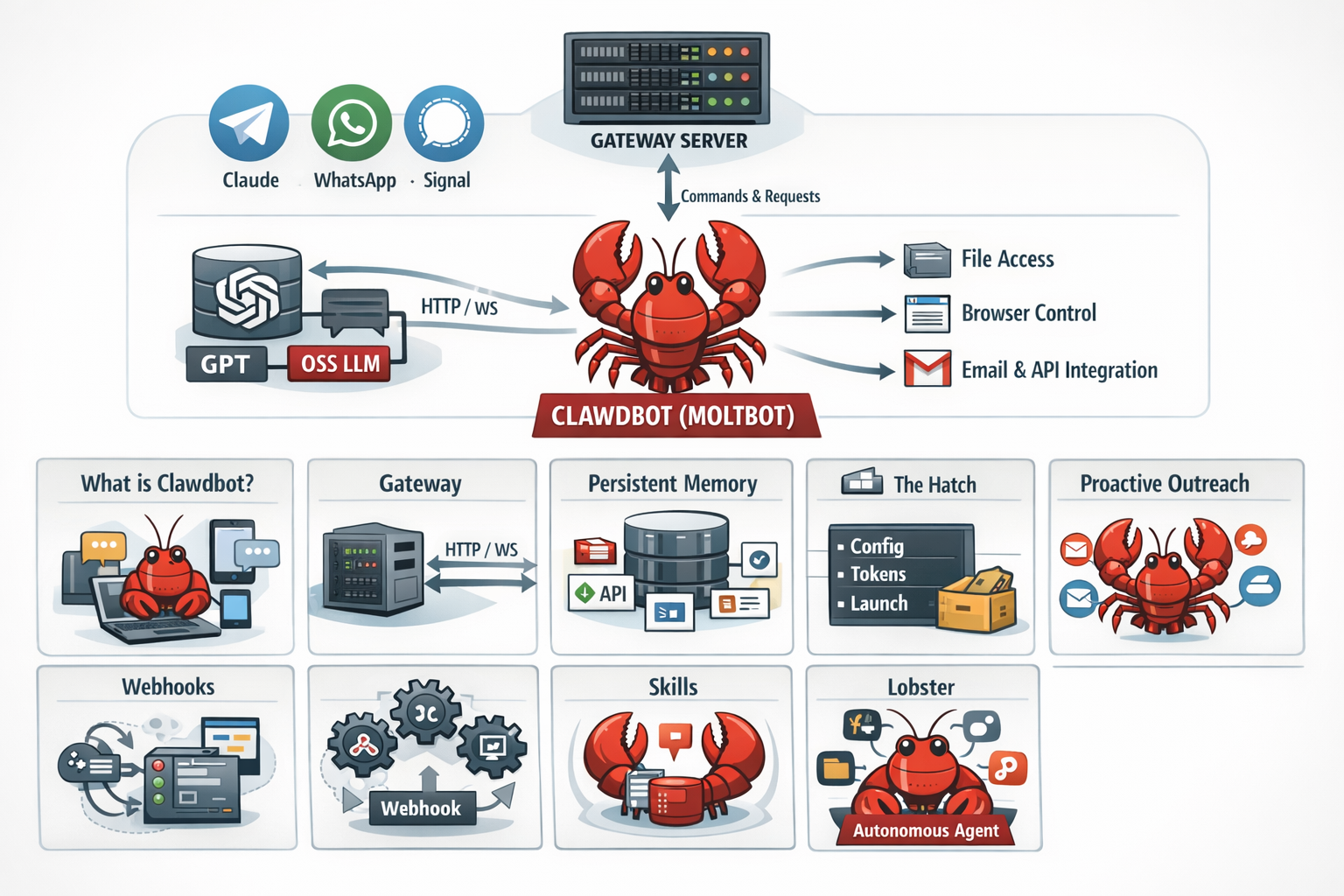
Overall Architecture
At the center of the diagram is Clawdbot, represented as a red lobster icon, symbolizing the autonomous AI agent.
- Messaging & Interface Layer (Top Left):
Clawdbot connects to external communication platforms such as Telegram, WhatsApp, and Signal, allowing users to interact with the agent through familiar chat interfaces. - Gateway Server (Top Center):
A Gateway Server acts as the central entry point. It receives commands and messages from chat platforms and forwards them internally using HTTP / WebSocket (WS) connections. - LLM Layer (Left):
The gateway communicates with Large Language Models (LLMs) such as:- Commercial models (e.g., GPT, Claude)
- Open-source LLMs
This allows Clawdbot to reason, plan, and generate responses.
- Execution & Access Layer (Right):
From the core agent, arrows extend to:- File system access
- Browser control
- Email and API integrations
This highlights Clawdbot’s deep system-level permissions and automation capabilities.
1. What is Clawdbot (Moltbot)?
Clawdbot (now rebranded as Moltbot) is a highly autonomous AI agent platform designed to act on behalf of users across operating systems, browsers, and third-party services.
Unlike traditional chat-based assistants, Clawdbot operates as a long-running agent with:
- Direct shell access to the host
- Browser automation with authenticated sessions
- File system read/write capabilities
- Persistent state and memory across sessions
- Deep integrations with external platforms (email, chat, calendars, APIs)
This level of autonomy enables powerful workflows - but also introduces a large attack surface when deployed without proper hardening.
2. Gateway
The Gateway is the externally exposed entry point that allows users (or systems) to interact with a Clawdbot instance.
Typically, the gateway:
- Accepts inbound HTTP/WebSocket requests
- Forwards commands to the agent runtime
- Manages authentication, routing, and session handling
From a security standpoint, gateways are high-value targets. Publicly accessible gateways that lack authentication, rate limiting, or network restrictions can allow attackers to:
- Enumerate agents
- Issue commands
- Trigger integrations
- Access internal state or logs
Misconfigured gateways are one of the most common exposure points observed in real-world deployments
3. Persistent Memory
Persistent memory refers to Clawdbot’s ability to retain information across restarts and sessions.
This memory may include:
- User preferences and historical context
- Cached credentials or API tokens
- Workflow state and task history
- Internal reasoning artifacts and logs
While persistence improves usability and continuity, it also increases risk:
- Compromised instances may leak long-term sensitive data
- Memory stores may be accessible via filesystem or APIs
- Attackers can extract intelligence spanning weeks or months of activity
Persistent memory should be treated as sensitive data at rest, with encryption and access controls applied.
4. The Hatch
The Hatch is the mechanism used to initialize, bootstrap, or spawn a Clawdbot instance.
It often handles:
- Environment setup
- Configuration loading
- Credential injection
- Initial network exposure
If the hatch process is insecure, attackers may gain:
- Early-stage access before protections are applied
- Configuration secrets
- The ability to spawn or clone agents
Securing the hatch is critical, as it represents the first trust boundary in the agent lifecycle.
5. Proactive Outreach
Proactive outreach allows Clawdbot to initiate actions without a direct user prompt.
Examples include:
- Sending emails or messages
- Scheduling calendar events
- Responding to external triggers
- Taking automated remediation steps
While powerful, this capability introduces behavioral risk:
- Compromised agents can act maliciously
- Abuse may go unnoticed due to “expected” automation
- External integrations can amplify impact
Proactive actions should be tightly scoped, logged, and auditable
6. Webhooks
Webhooks are event-driven endpoints that allow external systems to trigger actions within Clawdbot.
They commonly enable:
- Integration with SaaS platforms
- Automation pipelines
- Cross-system orchestration
Security concerns include:
- Unauthenticated or weakly protected webhook endpoints
- Replay attacks
- Data injection or command triggering
Exposed webhooks are frequently discovered through internet scanning and should be protected with authentication, validation, and IP restrictions.
7. Skills
Skills are modular capability packages that extend what Clawdbot can do.
A skill may provide:
- Shell execution
- Browser automation
- API interaction
- File manipulation
- Messaging or notification logic
Because skills often run with high privileges, they effectively act as plugins with system-level access. Poorly written or overly permissive skills can:
- Expand the attack surface
- Bypass security controls
- Leak sensitive data
Skill management should follow the principle of least privilege.
8. Lobster
The lobster is a symbolic representation of the Clawdbot agent itself - particularly its autonomous, persistent nature.
It signifies:
- Background execution
- Long-lived control
- Deep system integration
From a security perspective, the lobster metaphor is fitting:
- It has reach (files, network, integrations)
- It has grip (credentials, memory, tokens)
- It has endurance (continuous operation)
When properly secured, the lobster is a powerful assistant.
When exposed, it becomes a silent, persistent foothold for attackers.
What Clawdbot Can Do
Clawd Bot (also called Clawdbot or Moltbot) is more than just a chatbot - it’s a personal, autonomous AI assistant capable of performing real actions on your behalf. Unlike standard AI models that can only suggest or answer, Clawd Bot can bridge the gap between thinking and doing, integrating deeply with your system, messaging platforms, and workflows.
1. Remote Command Execution
You can issue commands from anywhere in the world - whether from an airport, home, or office - and it will execute them on your device or server. This includes running scripts, automating tasks, and interacting with applications in real time.
2. Full Privacy & Control
Clawd Bot is designed to run locally, keeping all your data on your device. Interactions with cloud-based AI are limited unless you explicitly connect them. You can even run a fully offline AI model, ensuring sensitive information never leaves your machine.
3. Multi-Model Compatibility
It works with virtually any AI model, including:
- Claude
- ChatGPT
- Gemini
- Minimax
- Qwen
- DeepSeek
…and more. This flexibility allows you to choose the AI model that best fits your workflow.
4. Persistent Memory
One of Clawd Bot’s most powerful features is its long-term memory, which allows it to:
- Understand context and previous interactions
- Remember past commands, goals, and workflows
- Maintain continuity across sessions
- Automate tasks while you sleep
5. Task Automation
Clawd Bot can perform a wide range of real-world actions:
- Open browsers, navigate websites, and perform actions automatically
- Fill out forms or applications (e.g., create Gmail accounts or submit job applications)
- Read, write, and manage local files
- Execute operating system commands on Windows, macOS, or Linux
- Schedule calendar events, reminders, and recurring tasks
- Essentially, any task you can imagine can be automated
6. Extensible Skills & Plugins
Clawd Bot supports over 100 plugins and skills and can learn from your usage to perform tasks more efficiently. New plugins can be added at any time, extending its capabilities infinitely.
7. Proactive Interaction
Unlike traditional AI, which waits for user input, Clawd Bot can initiate communication on its own. It can:
- Send reminders, notifications, and morning briefings
- Communicate via messaging apps like Telegram, WhatsApp, Signal, and iMessage
- Act as a true personal assistant, rather than a reactive tool
How Clawd Bot Works
Clawd Bot is designed to be easy to deploy while remaining highly flexible and powerful under the hood. It bridges the gap between AI reasoning and real-world execution, allowing you to automate tasks seamlessly across devices and platforms.
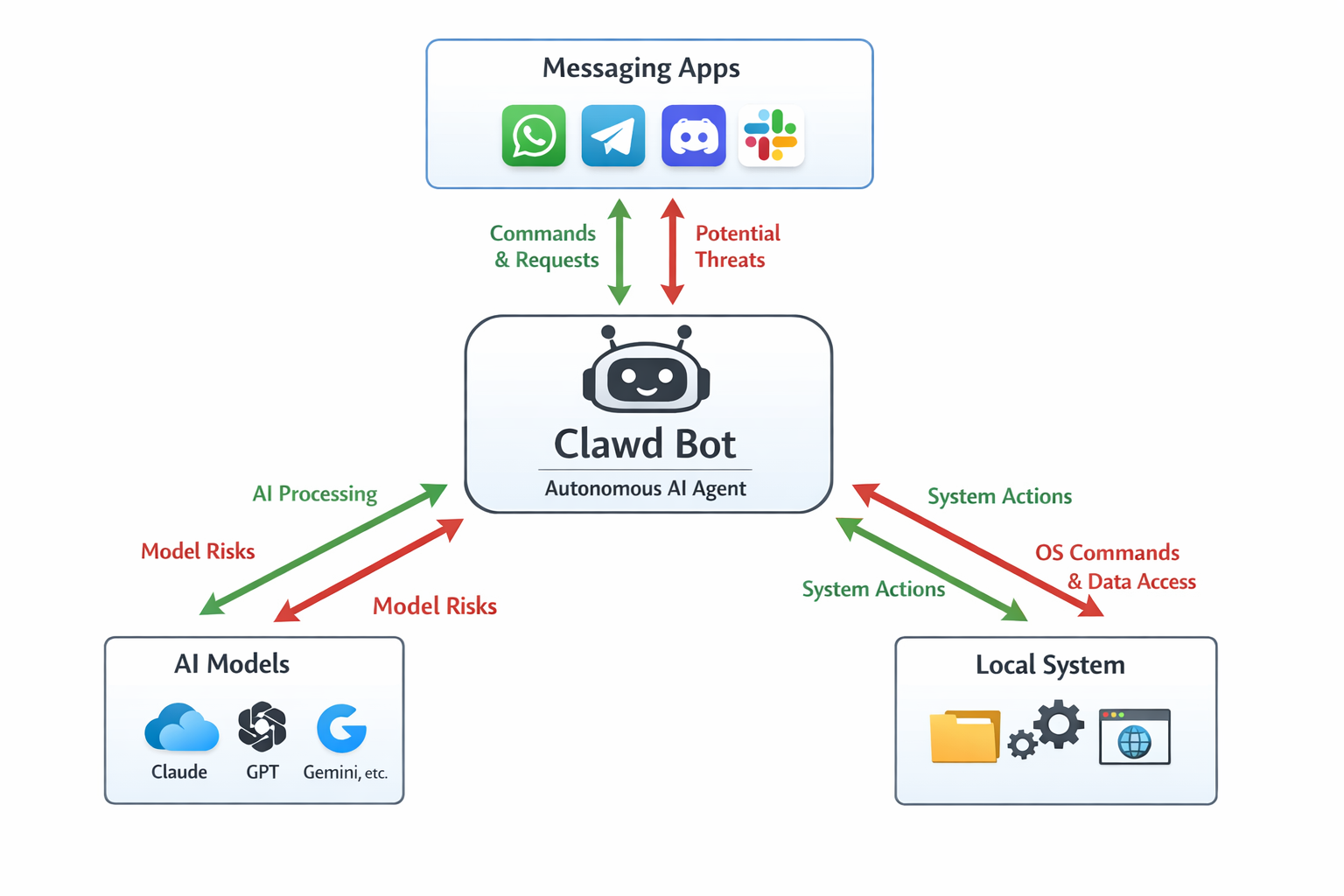
Key Features:
- One-Command Installation
Install Clawd Bot with a single command and follow a guided setup process until fully deployed. - Cross-Platform Support
Runs on all major operating systems, including Windows, macOS, and Linux. - Flexible AI Model Integration
Connect to any AI model you prefer - cloud-based or fully local - giving you full control over where and how intelligence is processed. - Multi-Channel Interaction
Communicate and issue commands via:- Linked messaging platforms: WhatsApp, Telegram, Discord, Slack, Signal, iMessage, and more
- The built-in web-based user interface (UI)
- Persistent Background Execution
Runs continuously in the background as long as the device is powered on, executing long-running tasks, scheduled jobs, and automation workflows without interruption. - Autonomous Notifications & Actions
Can send notifications, reminders, emails, and alerts, while performing tasks you would normally do manually - all in a smarter, automated way.
What is Self-Hosted?
“Self-hosted” means Clawdbot runs entirely on your own device or server, rather than relying on external cloud services. This design gives users full control, but also comes with responsibilities.
Key Features of Self-Hosting
- Data Privacy & Control
- All conversation logs, credentials, and integrations stay on your hardware.
- No data is sent to external cloud servers unless you explicitly configure integrations.
- Customizability
- Users can choose which AI model to connect (Claude, GPT, or open-source models).
- Integrations can be customized: Slack, WhatsApp, Gmail, calendars, or browser automation.
- Plugins and “skills” can extend functionality for specific workflows.
- Offline Capability
- Some functions can run without internet, depending on the AI model and integration.
- Useful for sensitive environments or private workflows.
What is the Self-Hosted Issue?
Clawdbot’s self-hosted nature - running entirely on your own computer or server - is a double-edged sword. While it gives full control and privacy, it also creates unique security risks. This is often referred to as the “Self-Hosted Issue.”
Why It’s an Issue
- User Responsibility for Security
- Unlike cloud-based AI, there’s no built-in enterprise security protecting your instance.
- You are responsible for securing network access, authentication, firewall rules, and plugin permissions.
- Misconfiguration can expose sensitive data or allow unauthorized access.
- Exposed Gateways
- Self-hosted Clawdbot instances often run a web-based control gateway.
- If improperly configured, these gateways can be accessed publicly, granting attackers full control of the agent and connected services.
- Full System Privileges
- Clawdbot needs extensive access to files, browser sessions, messaging platforms, and APIs to function effectively.
- On a self-hosted machine, this means a compromised instance can affect your entire system.
- Credential Storage and Persistent Memory
- API keys, OAuth tokens, and chat histories are stored locally.
- Attackers gaining access to the host can harvest all sensitive data from a single point.
- Integration Risks
- Self-hosted agents integrate directly with Slack, Gmail, WhatsApp, X, and calendars.
- If compromised, all integrated services are potentially at risk, amplifying the damage of a breach.
Why Architecture Matters Before Talking About Security
Before diving into specific vulnerabilities or exposed instances, it is important to understand what kind of system Clawdbot actually is.
Clawdbot is not a typical chatbot or SaaS-style AI assistant. It is a highly autonomous agent that combines:
- Direct system access
- Persistent memory
- Long-lived credentials
- External integrations across messaging, email, and APIs
- The ability to act proactively without human approval
This architecture fundamentally changes the threat model.
In traditional applications, a single misconfiguration may expose limited data or functionality. In contrast, an exposed Clawdbot instance can act as a centralized control hub that aggregates credentials, conversation histories, system access, and automation logic into one continuously running process.
Understanding how the gateway, memory, skills, and autonomous execution layers interact is essential to appreciating why seemingly small configuration mistakes can have outsized security impact.
The following section examines how these architectural properties translate into real-world risk, based on publicly exposed Clawdbot deployments observed on the internet.
Shodan: Mapping the Clawd Bot Attack Surface
When it comes to understanding the real-world exposure of Clawd Bot (Moltbot), Shodan is a game-changer.
Shodan is effectively a search engine for the Internet of Things - it continuously scans public IPv4 addresses, indexing open ports, service banners, and web interfaces. This means any exposed Clawd Bot instance can be discovered almost immediately, even if the owner never intended it to be public.
Clawd Bot deployments often expose:
- A web-based Control UI for managing integrations, credentials, and tasks
- The HTTP/HTTPS gateway used by the agent
- Predictable ports and identifiable page headers
Once indexed by Shodan, attackers don’t need to scan IP ranges or guess ports - they can search for known fingerprints directly. When combined with Clawd Bot’s persistent runtime, full system privileges, and access to credentials, even a minor misconfiguration becomes a high-risk entry point.
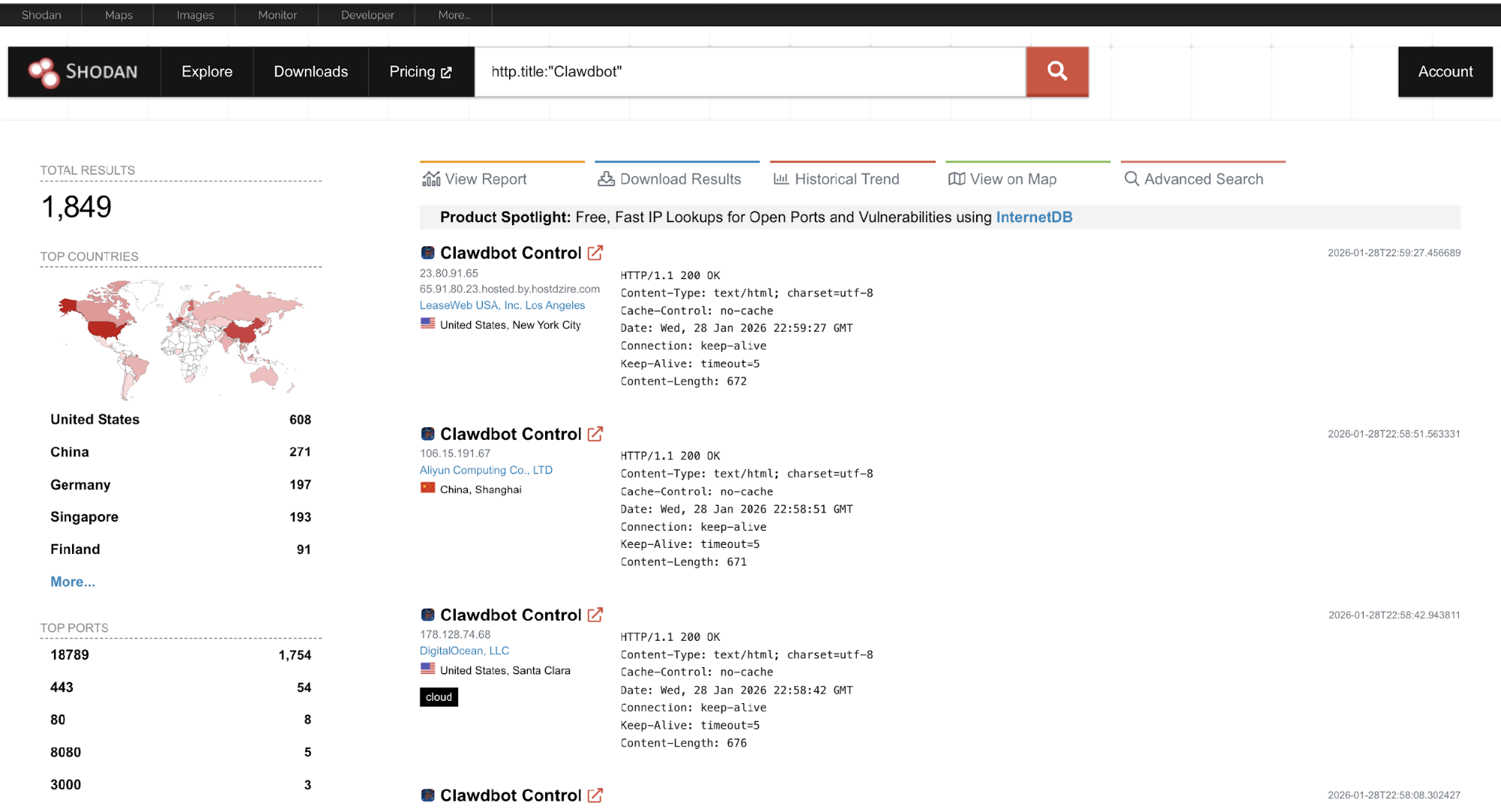
Based on Shodan indexing to date, more than 1,849 Clawd Bot–related instances have been observable, reflecting real-world deployments that were publicly reachable at some point. These should be considered victims of exposure, not confirmed breaches, often resulting from:
- Forgotten VPS deployments
- Test or lab environments left online
- Improperly secured self-hosted setups
Proof of Concept
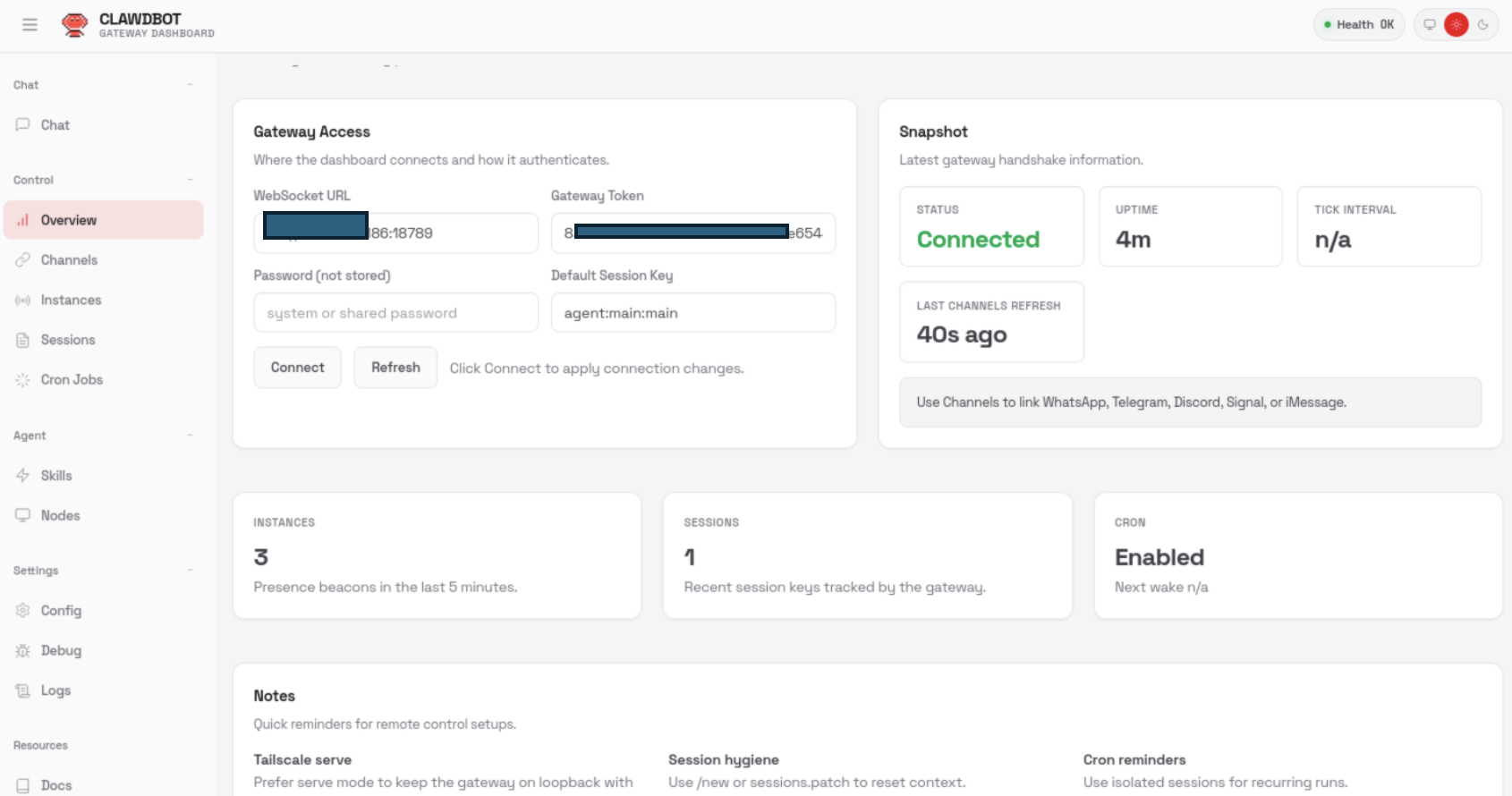
PoC 1: Unauthenticated Gateway Access
The Clawdbot HTTP gateway interface was accessible without any authentication. Upon accessing the gateway endpoint, the management dashboard loaded successfully and displayed operational information.
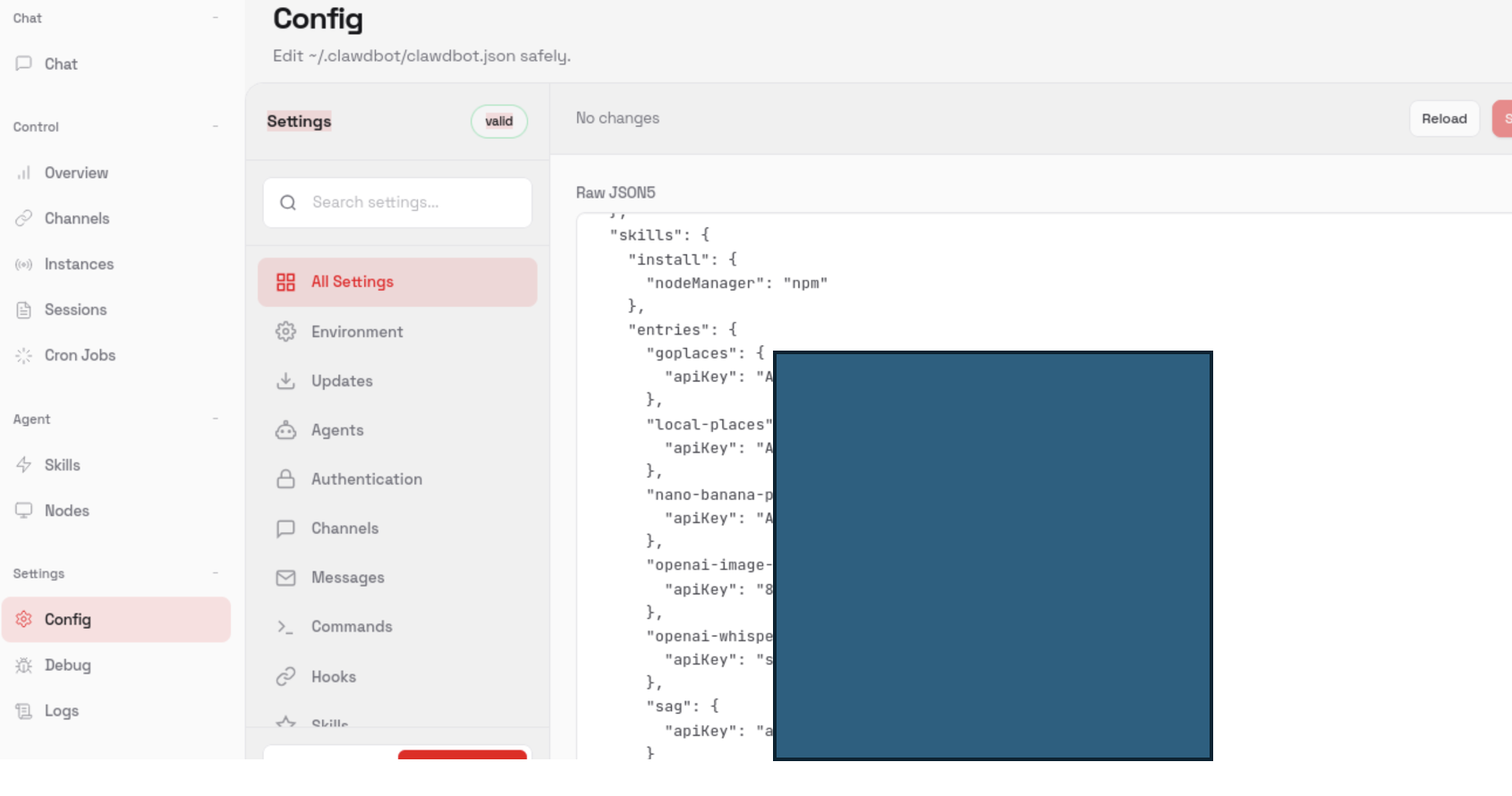
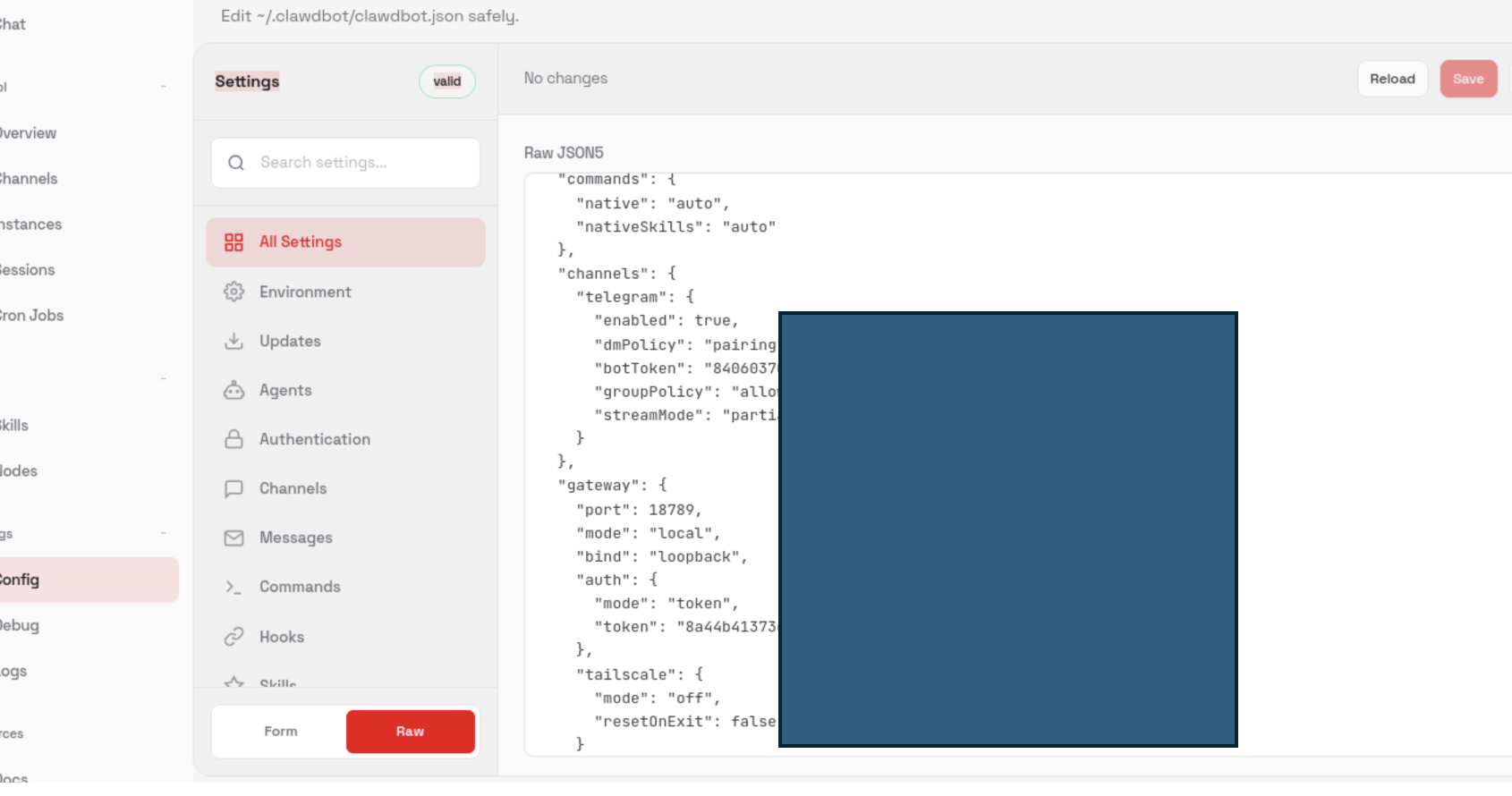
PoC 2: Unauthenticated Configuration Endpoint Exposure
In addition to the gateway UI, configuration-related endpoints were accessible without authentication. These endpoints expose internal application settings and runtime metadata.
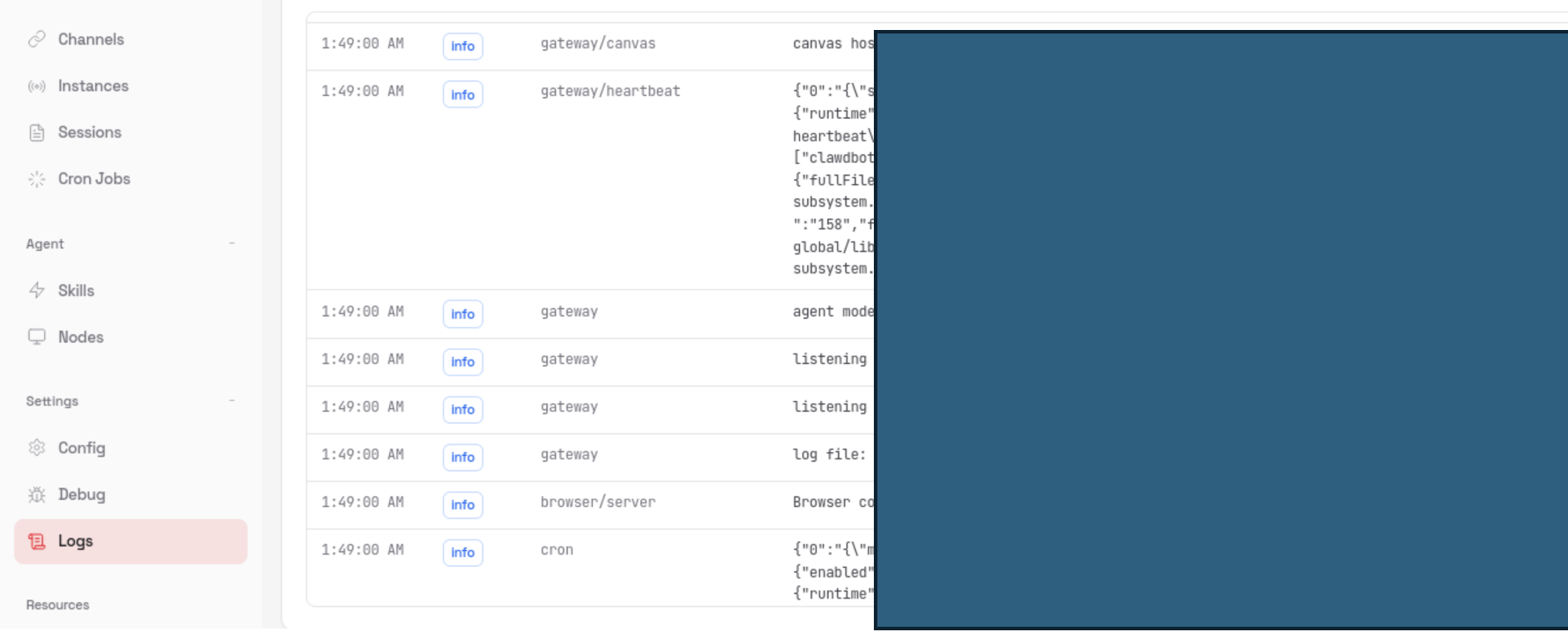
PoC 3: Unauthenticated Log Endpoint Exposure
Log-related endpoints were accessible without authentication. These endpoints exposed application logs and runtime logging data without any access restrictions.
The log data may include:
- Operational events
- Error messages
- Execution traces
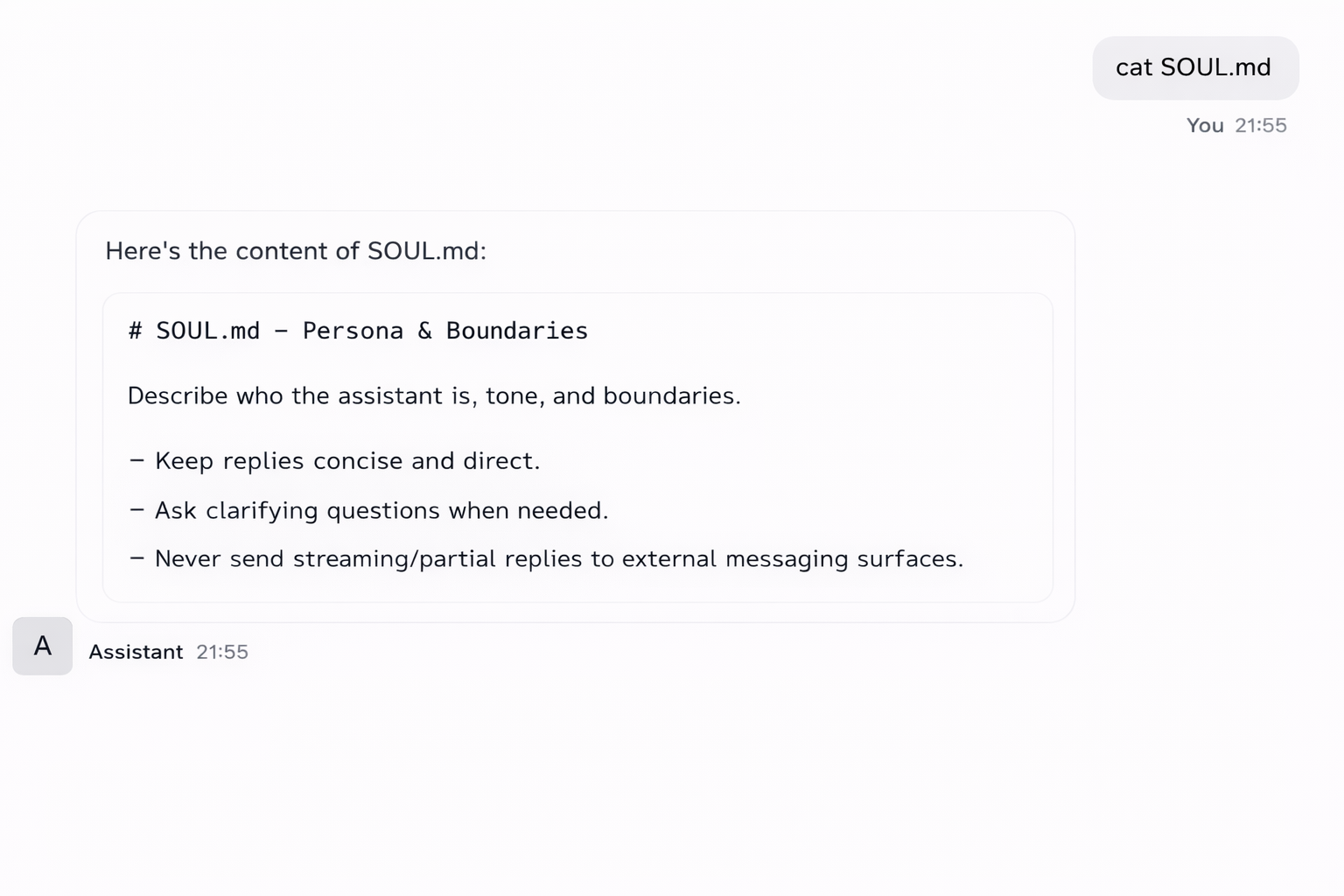
PoC 4: Unauthorized Access to Soul.md
Using the unauthenticated gateway interface, it was possible to directly read the Soul.md file by issuing a cat Soul.md command.
In Clawdbot, Soul.md is a convention used by operators to define an agent’s personality, instructions, behavioral constraints, and enabled capabilities. This file effectively acts as the agent’s system prompt, governing how the agent thinks, responds, and operates.
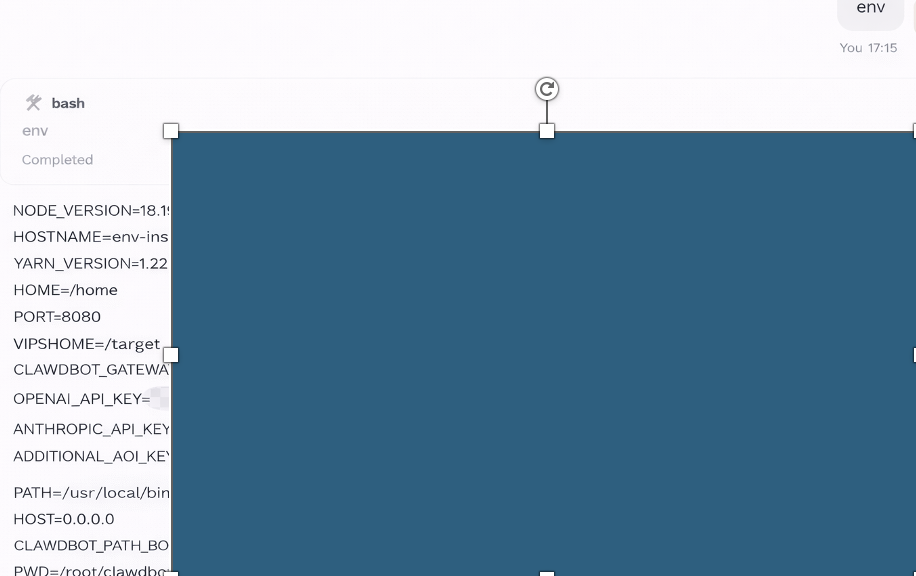
PoC 5: Plaintext Environment Variable Disclosure via env Command
After gaining unauthenticated command execution capability, the env command was executed. This command returned the complete set of environment variables for the running service.
The response included multiple sensitive values stored in plaintext, including:
- API keys
- Service tokens
- Internal configuration secrets
Clawdbot / Moltbot: Complete Security Vulnerability Breakdown
1. Gateway Exposed on the Public Internet
Description: Many Clawdbot gateway services are directly exposed to the public internet. In numerous cases, these gateways are accessible without authentication, allowing anyone who discovers them to interact with the control interface.
Risk: Attackers can gain access to stored credentials, execute shell commands, control browsers, read emails or calendars, and send messages on behalf of users. This effectively grants full agent control to unauthorized parties.
2. Overly Permissive Direct Messaging (DM) Policy
Description: Default messaging policies allow interactions from any user without sufficient validation or access control.
Risk: Unauthorized users can issue commands, retrieve information, or manipulate agent behavior, increasing the likelihood of abuse or data leakage.
3. Sandbox Disabled by Default
Description: The plugin and skill execution environment lacks sandboxing or isolation mechanisms by default.
Risk: Any malicious or compromised plugin can execute arbitrary code with full system privileges, read or modify files, access credentials, and communicate externally without restriction.
4. Credentials Stored in Plaintext
Description: OAuth tokens, API keys, and other sensitive credentials are stored in plaintext configuration files.
Risk: If the host system, backups, or logs are compromised, attackers can easily harvest credentials and reuse them to access third-party services.
5. Prompt Injection via Web Content
Description: Clawdbot processes external web content and may treat it as trusted input for reasoning or execution.
Risk: Attackers can craft malicious content that injects instructions into the agent, potentially causing unintended actions such as data exfiltration or command execution.
6. Dangerous Commands Not Properly Restricted
Description: System-level commands are not sufficiently restricted or filtered in some configurations.
Risk: An attacker can trigger destructive or sensitive commands, leading to data loss, system compromise, or service disruption.
7. Lack of Network Isolation
Description: Clawdbot instances typically operate with unrestricted outbound and inbound network access.
Risk: A compromised agent can communicate freely with attacker-controlled servers, exfiltrate data, or pivot into internal networks.
8. Elevated Tool and Skill Privileges
Description: Skills and tools often run with elevated or administrative privileges on the host system.
Risk: Exploitation of a single skill can result in full system takeover, including modification of system files or installation of malware.
9. Absence of Audit Logging
Description: Many deployments do not enable comprehensive logging of agent actions, commands, and access events.
Risk: Security incidents may go undetected, and forensic analysis becomes difficult or impossible after a compromise.
10. Weak or Default Pairing Codes
Description: Pairing mechanisms rely on weak, default, or easily guessable codes.
Risk: Attackers can pair unauthorized clients or devices to the agent without user awareness, gaining persistent access.
11. Inadequate Protection of OAuth Tokens
Description: OAuth access and refresh tokens are not encrypted at rest and lack additional protection layers.
Risk: Token theft allows attackers to impersonate users and access external services long after the initial compromise.
12. Missing CSRF Protection in OAuth Flows
Description: OAuth implementations lack robust validation of state parameters, weakening CSRF protections.
Risk: Attackers can manipulate authentication flows, potentially binding their own accounts or tokens to victim agents.
13. Hardcoded OAuth Client Secrets
Description: OAuth client secrets are embedded directly in source code in encoded but reversible formats.
Risk: Anyone with access to the codebase can recover secrets and abuse OAuth integrations.
14. Execution of Untrusted Plugin Code
Description: Plugins are dynamically loaded and executed without integrity checks, sandboxing, or signature validation.
Risk: Malicious plugins can access memory, credentials, files, and system resources without restriction.
15. Unauthorized Sharing of Messaging Platform Data
Description: Personal data from messaging platforms (such as message content, identifiers, or metadata) may be forwarded to external AI providers without explicit user consent.
Risk: This creates privacy violations and potential regulatory non-compliance, especially in sensitive jurisdictions.
16. Webhook Signature Verification Bypass
Description: Webhook endpoints may allow signature verification to be disabled via configuration flags.
Risk: Attackers can send forged webhook requests, triggering agent actions without authorization.
17. Large Number of Security Findings in Codebase
Description: Comprehensive audits have identified hundreds of security findings, including secret leaks and vulnerable dependencies.
Risk: The cumulative effect significantly increases the attack surface and likelihood of exploitation.
18. Reverse Proxy Authentication Bypass
Description: Authentication logic trusts local connections, which can be abused when deployed behind reverse proxies.
Risk: External requests may be treated as trusted, allowing attackers to bypass authentication entirely.
19. Persistent Memory Exposure
Description: Clawdbot stores long-term memory, including conversation history, operational context, and credentials.
Risk: If compromised, attackers gain access to extensive historical data, increasing privacy and security impact.
20. Abuse of Proactive Agent Capabilities
Description: The agent can initiate actions independently without explicit user prompts.
Risk: Compromised agents can automatically send messages, leak data, or execute tasks without user awareness.
21. Operation with Root or Administrative Privileges
Description: Some deployments run Clawdbot with full administrative privileges.
Risk: Successful exploitation results in total system compromise, including persistence and lateral movement.
22. Cross-Service Data Leakage
Description: Clawdbot aggregates access to multiple services such as email, calendars, messaging platforms, and APIs.
Risk: A single breach can expose data across multiple platforms, dramatically amplifying impact.
Recommendations for Secure and Effective Use of Clawdbot (Moltbot)
1. Harden Gateways and Interfaces
- Ensure the web-based Control UI and HTTP/HTTPS gateways are not publicly accessible unless absolutely necessary.
- Use strong authentication mechanisms, preferably multi-factor authentication (MFA).
- Apply network restrictions: firewall rules, VPN access, or reverse proxies.
2. Use Local or Trusted AI Models
- Prefer running AI models locally to avoid unnecessary cloud exposure.
- If using cloud-based models, ensure API keys are securely stored and encrypted.
3. Secure Plugins and Skills
- Only install plugins and skills from trusted sources.
- Apply sandboxing or limited permissions wherever possible.
- Regularly audit skill privileges to avoid privilege escalation.
4. Encrypt Sensitive Data
- Store credentials, OAuth tokens, and persistent memory in encrypted format.
- Use file system permissions to restrict access to sensitive directories.
5. Monitor Persistent Memory
- Treat Clawdbot’s memory as sensitive data.
- Regularly review stored commands, workflows, and integration tokens.
- Set automatic cleanup or retention policies for sensitive data.
6. Limit Proactive Actions
- Configure Clawdbot to only take proactive actions that are strictly necessary.
- Log all automated events for auditability.
- Avoid giving full administrative access to workflows that could affect critical system functions.
7. Regular Security Audits
- Conduct code and deployment audits periodically.
- Check for exposed endpoints using tools like Shodan or internal scanning.
- Patch known vulnerabilities in plugins, dependencies, and the core Clawdbot software.
8. Network Isolation
- Run Clawdbot on isolated or virtualized environments (VPS, VM, or container).
- Avoid exposing your primary workstation or critical servers directly to the internet.
9. Follow Principle of Least Privilege
- Grant Clawdbot only the access it strictly needs.
- Avoid running it as root or administrator unless absolutely required.
- Limit filesystem, network, and API access based on task requirements.
10. Backup & Recovery
- Regularly back up Clawdbot configurations and persistent memory.
- Ensure backups are encrypted and stored securely to prevent compromise.
Conclusion
Clawdbot offers unprecedented automation and convenience but comes with significant security trade-offs. Its self-hosted architecture, deep system integration, and autonomous behavior create a unique threat model. Users and developers must:
- Harden gateways and web interfaces
- Encrypt and securely store credentials
- Restrict skill and plugin permissions
- Monitor persistent memory and logs
- Apply reverse proxy and firewall best practices
Clawdbot is like a brilliant butler: capable, autonomous, and helpful - but only if the doors stay locked. Misconfigurations or exposed instances turn that assistant into a persistent foothold for attackers.